
A clearer view of your assumptions
SEO Planning Calculators
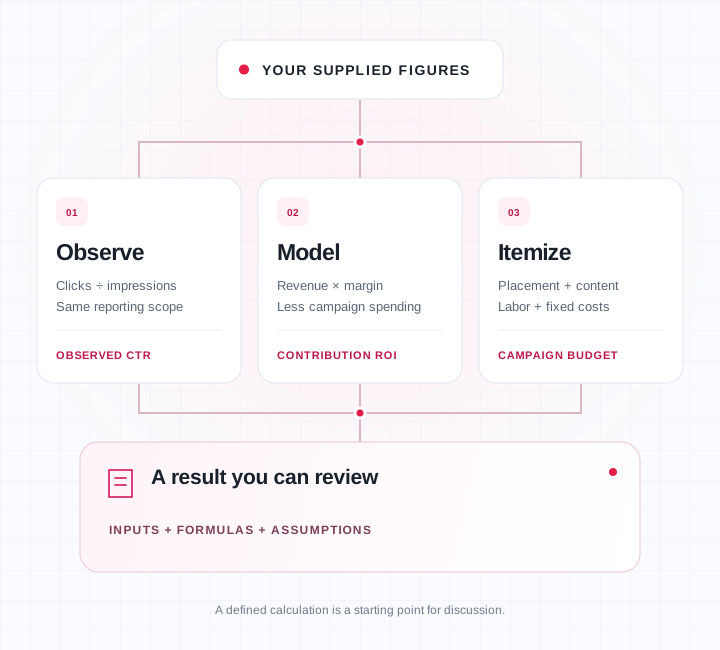
Understand the arithmetic behind an SEO plan before using it in a budget or campaign discussion. Calculate an observed click-through rate, model campaign contribution ROI or itemize supplied campaign costs. Review the inputs, formulas and assumptions that lead to each result.
Your figures. Visible formulas. Defined scenarios.
01 / THE WORKSPACE
Put the arithmetic
to work.
Choose CTR, campaign contribution ROI or a supplied-cost budget. Set the measurement scope, enter your figures and inspect the formulas behind the result.
Start with supplied figures from a consistent source. The examples below explain the relationships; they are independently authored arithmetic.
02 / BEFORE THE NUMBERS
Start with a consistent measurement scope
Before entering clicks and impressions, check that the two figures come from the same source, period and filters. Record whether they describe a property, page, query group, country or device. A value copied from one report should not be casually paired with a different report’s denominator.
Search clicks and analytics sessions describe different measurements. A click-based conversion rate also differs from a session-based rate. Keep the denominator used to calculate your rate consistent with the traffic input you intend to model. The workspace cannot reconcile those definitions for you.
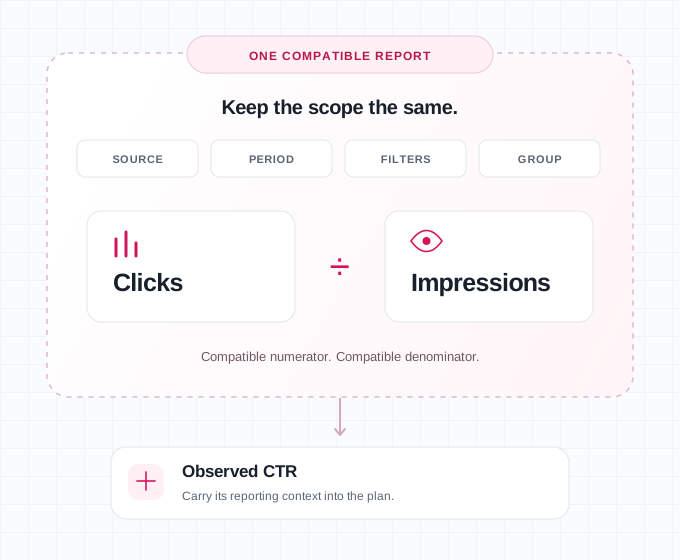
If you need to compare supplied page-performance periods before planning, use the Content Refresh Checker. Carry the useful measurement context into your plan. These calculators do not import or verify the underlying report, so keep its source and reporting period with your working notes.
03 / OBSERVE
Calculate an observed CTR
Observed CTR equals clicks divided by impressions, multiplied by 100. Enter whole-number counts from the same measurement scope. For example, the tool’s synthetic demo uses 250 clicks and 10,000 impressions to produce 2.5%. That demonstration checks the arithmetic without presenting an industry benchmark.
An optional target uses the same impression count. The calculator shows clicks at that target, the difference from observed clicks and the percentage-point difference between target and observed CTR. The target is an assumption supplied by you, not a recommendation based on rank or search-result layout.
A target below the observed rate produces a negative difference. That sign matters: it tells you the direction of the comparison. Do not remove it to make a planning presentation look better. If no target is entered, the comparison is unavailable for that reason rather than silently using zero.
With zero impressions, observed CTR is undefined. The calculator shows an unavailable value with an explanation. A real zero CTR is different: positive impressions and zero clicks produce a measured zero. Keeping those cases distinct prevents a missing denominator from becoming a misleading performance result.
When reviewing several groups outside this workspace, add compatible clicks and impressions before dividing. A simple average of row percentages can distort the total because a small group and a large group receive equal weight. Keep overlapping scopes separate so the same underlying observations are not counted twice.
DEFINE THE JOB
Give each scenario a defined job
A useful scenario begins with the work being considered and the evidence behind it. Identify the target page, audience and intended action before assigning a traffic or conversion assumption. The calculator does not determine whether a keyword belongs to the page or whether the article answers the reader’s question.
Use the Keyword Mapping Tool when you need to organize supplied keywords into page assignments. A clear page plan makes a campaign discussion easier to inspect. It still does not prove that an assigned page will achieve a particular position or receive a particular number of clicks.
04 / MODEL
Model campaign contribution ROI
Clicks → conversions → revenue
Revenue × contribution margin
Contribution − campaign spending
Net contribution ÷ spending × 100
Choose a scenario length and supply assumed monthly campaign-attributed clicks, conversion rate, revenue per conversion, contribution margin, setup cost and monthly campaign cost. Use one currency throughout. The model holds the monthly assumptions constant across the selected number of months.
The calculation first multiplies monthly clicks by months. It applies your click-based conversion rate to those clicks, then multiplies modeled conversions by revenue per conversion. Applying your contribution margin gives the contribution available before the separately entered campaign spending.
Campaign spending equals the one-time setup cost plus monthly campaign cost multiplied by months. Subtract that spending from contribution. Divide the remaining contribution by campaign spending and multiply by 100 to obtain net-contribution campaign ROI. The displayed formulas make these relationships available for review.
This is a specific contribution model. It is different from revenue divided by advertising spending, and it does not include every cost of operating a business. Supply a margin that excludes the setup and monthly campaign costs entered separately, or the same expense may be counted twice.
Fractional conversions are allowed because the output is a mathematical scenario. A modeled 0.5 conversion does not describe half of an actual transaction. Negative contribution and negative ROI are retained. With zero campaign spending, the ROI denominator is undefined even when modeled revenue is positive.
KEEP THE EVIDENCE VISIBLE
Make attribution an explicit assumption
The monthly traffic input represents incremental or campaign-attributed clicks supplied by you. Entering all existing site traffic can assign value to a campaign that it did not generate. The calculator cannot establish the counterfactual or determine which marketing activity caused a conversion.
Revenue per conversion should match the event being modeled. A lead, sale, subscription payment and assumed lifetime value are different inputs with different supporting evidence. Do not substitute one for another without explaining the decision. The model does not add later customer value automatically.
Growth ramps, seasonality, delays, discounting, refunds and changing conversion behavior are not separately modeled. If they materially affect the decision, preserve them in a fuller planning process. The constant-assumption result remains useful for examining a defined case without pretending to answer those additional questions.
Use the Content Brief Generator to turn an agreed audience and outcome into a writing assignment. Carry the approved assumptions into the campaign handoff separately. Neither a finished brief nor a positive scenario establishes a confirmed commercial order or an achieved return.
05 / ITEMIZE
Build a supplied-cost budget
The cost worksheet separates planned placements, fee per placement, content cost per placement, total outreach hours, hourly rate and other fixed costs. Placement and content inputs scale with the planned count. Outreach labor and other fixed costs are added once for the whole scenario.
Check what each supplier amount already includes. If a placement fee includes writing, do not enter the same writing cost again as a separate content charge. If a retainer already includes outreach labor, decide how that cost belongs in your budget before adding another hourly amount.
Blended cost per planned placement divides the whole campaign total by the planned count. It includes the allocated effect of outreach and fixed costs, so it can differ from the placement fee. With zero placements, the total can still contain labor or fixed spending while unit cost remains unavailable.
The Guest Post Pricing Calculator serves a separate pricing question. This supplied-cost worksheet does not fetch marketplace records, confirm current availability or issue a quote. Use reconfirmed commercial terms when you need a budget tied to an actual proposed order.
If timing and acquisition pace also need discussion, use the Link Velocity Calculator for its separate planning task. A quantity in this worksheet is not a safe-link threshold, a publisher-quality assessment or an instruction from Google to acquire a particular number of links.
06 / READ THE RELATIONSHIPS
Worked examples with visible assumptions
The following examples are independently authored and calculated. They are not captured production output, market prices or suggested targets. They show how to read the three relationships while keeping observations, assumptions and commercial decisions separate.
For CTR, suppose a compatible report contains 50 clicks and 2,000 impressions. Observed CTR is 2.5%. A supplied 3% target corresponds to 60 clicks at the same impressions, or ten more clicks. The difference is 0.5 percentage points; expressed relative to 2.5%, it is a 20% increase. Those two descriptions use different denominators.
For ROI, assume four months, 500 campaign clicks each month, a 2.5% conversion rate, revenue per conversion of 75.50 and a 40% contribution margin. Assume a setup cost of 210 and monthly campaign spending of 300. Use one currency label for every money value.
That gives 2,000 modeled clicks, 50 modeled conversions and 3,775 in revenue. Contribution before campaign spending is 1,510. Campaign spending is 1,410, leaving 100 in net contribution. Net-contribution campaign ROI is approximately 7.0922%. Reporting that arithmetic does not establish that the clicks or conversions will occur.
For a separate cost example, assume six placements at 72.50 each, content at 27.50 per placement, 9.25 outreach hours at 24 per hour and 78 in fixed costs. Placement fees total 435, content totals 165 and labor totals 222. Total cost is 900 and blended cost is 150 per planned placement.
Sensitivity explains why the assumptions matter. In the ROI example, lowering conversion rate to 2% while holding everything else constant gives contribution of 1,208 and net contribution of minus 202, approximately minus 14.3262% ROI. These are two chosen cases, not a probability interval, forecast range or recommendation.
07 / INPUTS & PRECISION
Enter numbers the workspace can interpret
2500.50Keep currency labels and grouping commas outside the numeric field.Use unsigned plain decimal digits. Input guidance excludes commas, scientific notation, signs and negative inputs. Whole-number counts, percentages, money and hours have different limits. The interface permits percentages from zero to 100 with up to six decimal places, and money inputs with up to two.
Output commas are grouping marks for reading; they are not accepted as input separators. A rejected input produces an explanation and no report. Correct the value, confirm the measurement scope and calculate again. A large input ceiling describes a permitted quantity, not confidence that the value is realistic.
The workspace declares decimal arithmetic with division rounded to at most twenty decimal places using half-up rounding. It identifies its arithmetic library in the result notes. Long decimals describe computation, not the accuracy of a marketing assumption. Read the formula and unit before copying a number into a presentation.
08 / A CAREFUL HANDOFF
Review a fresh result and keep a careful handoff
Recalculate after a change
Changing an input removes the previous report and asks you to calculate again. That helps keep an earlier result from appearing current after an assumption changes. The synthetic demo is explicitly loaded without calculating; run it before treating the visible inputs as a completed scenario.
Know what Clear removes
Clear removes inputs and results from the workspace. In the observed ROI case, it retained the selected ROI mode while clearing its seven input fields. Clearing is not a promise to delete files already downloaded, hosting records or unrelated browser information.
Check the exported report
The interface offers JSON and CSV exports described as containing normalized inputs, results, formulas and assumptions. Treat a preparation notice separately from a completed saved file. Review any downloaded report before sharing it because commercially sensitive figures are not automatically anonymized.
09 / COMMON QUESTIONS
Common questions
Keep the meaning of each result clear before using it in a campaign discussion.
Does a target CTR predict my ranking or traffic?
No. It applies a supplied rate to a fixed impression count. The tool does not know the future search-result layout, ranking position or audience behavior. Use the result to discuss an assumption and keep the source of that assumption visible.
Is campaign contribution ROI the same as ROAS?
No. This model adjusts revenue by the supplied contribution margin before subtracting campaign spending. ROAS uses revenue or conversion value relative to advertising spend under its own definition. State the numerator and denominator whenever comparing reports.
Does selecting PKR convert a USD budget?
No. The currency selector changes the label used for monetary amounts. It does not retrieve exchange rates or convert existing inputs. Supply all amounts in one chosen currency before calculating and retain any separate conversion evidence outside this worksheet.
Does a zero denominator mean a zero result?
No. Zero impressions, zero campaign spending and zero placements make their respective ratios undefined. An unavailable value includes a reason. That distinction remains important even when other results in the same scenario are valid numbers.
Explore SEO and campaign services when you have a defined target page, audience, budget and desired deliverables. Searches such as “buy seo services,” “buy ranking services” and “buy seo ranking” express commercial intent; the calculator does not turn those phrases into a promise of search positions or returns.
When preparing to buy guest posts, discuss publisher fit, article scope and confirmed link terms. A “buy guest post” or “buy backlinks” enquiry begins that discussion. Submitting a brief does not itself confirm an order, price, placement or delivery date.
Confirmed guest post orders retain the agreed dofollow-link and Google indexing guarantee, with the review period and remedy written into the approved order. Rankings, traffic, leads, sales and authority-score increases are not guaranteed. Google’s paid-link guidance prefers sponsored and accepts nofollow. Reconcile that guidance and the actual dofollow commitment explicitly before approval, without treating a calculated budget as acceptance of commercial or search-engine terms.