
Keyword Cluster Generator
Group your keyword research by shared words or imported search-result URLs. Inspect the matches, keep uncertain terms separate, and export a review list before deciding which queries belong on the same page.
From list to pages
A long keyword list is not a publishing plan. Several searches may need the same answer, while two almost identical phrases may require different pages. Clustering gives you a shortlist of relationships to check. It does not make that editorial decision for you.
Start with terms that matter to your audience and business. Keep one language and market together. Remove irrelevant research before grouping it: a neat cluster around something you do not offer is still a poor reason to publish a page.
This generator works with your data. Word mode needs a keyword list. Imported-results mode needs the organic result URLs you have collected, plus their search context. Neither mode invents search volumes, fetches current Google rankings or assigns a search-intent label.
Pick your evidence
Word overlap is useful for a first pass through a list. The tool compares distinct tokens, ignoring case and word order. The overlap is the number of shared tokens divided by the number of distinct tokens across both phrases. Repeating a word does not increase the match.
For example, content planning and content planning workflow share two of three distinct words: about 66.67% overlap. That clears a 50% threshold. It says nothing about whether their search results or reader needs match.
No stemming, synonym model or automatic stop-word list is used. Negations and modifiers remain in the comparison unless you explicitly ignore them. Terms such as free, without and a place name can change the required answer. Do not remove them just to make larger groups.
Imported results gives you a different kind of evidence: the same page appearing in the organic results for more than one query. Supply complete top-five or top-ten lists, then choose how many URLs must be shared. Three shared URLs means three matching page addresses, not three matching domains or a 30% chance of ranking.
The tool gives matching URLs equal weight within the selected depth. It does not score their ranking positions, inspect the pages or determine why they rank. A search-result match still needs a human check.
Prepare the import
Use a CSV or TSV with exactly three headers. Put one organic result on each row:
| keyword | url | position |
|---|---|---|
| editorial calendar | https://example.com/calendar | 1 |
| editorial calendar | https://example.com/template | 2 |
These two rows illustrate the format; they are not a complete result set. The downloadable template contains a fuller example using example.com addresses. Replace them with your research rather than treating the sample as observed rankings.
Declare one search engine, country or market, language, device and capture date for the batch. Do not mix desktop and mobile exports, locations or dates under one context label. Keep ads, map results and other search features out of the organic URL list.
Importing replaces the result rows and adds their keywords to your current list. Existing keywords remain, so terms without enough results stay visible as not compared. Every position in the selected depth must be present with a distinct URL before a term enters result-based clustering. Missing data is not a failed keyword or evidence that it deserves its own page.
Repeated records at the same position are collapsed when the matching URL is identical. Conflicting URLs at one position, or the same URL at multiple positions, need correcting. The importer rejects unexpected columns so a country or date field cannot disappear unnoticed.
Read the groups
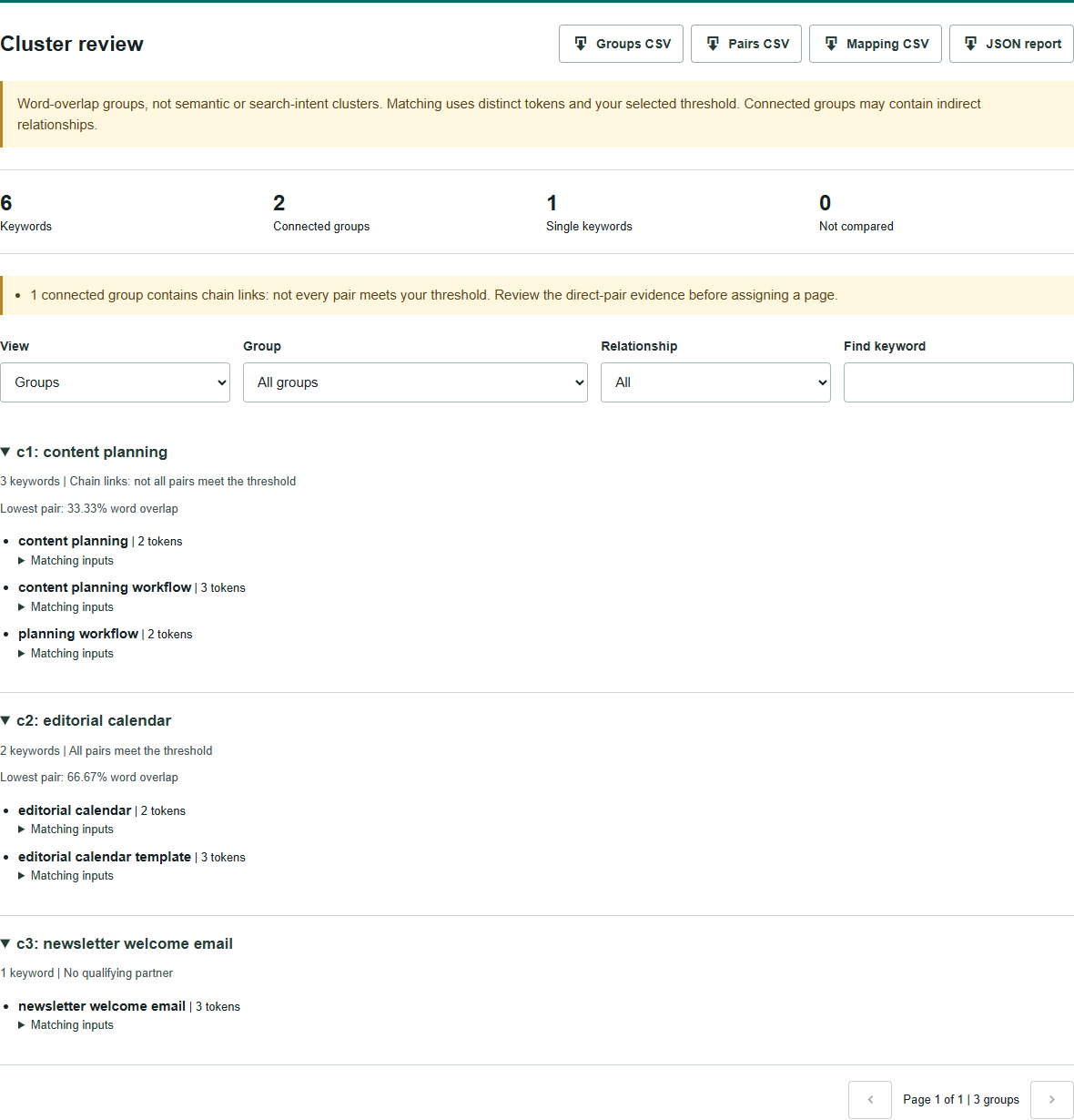
Open a group to see its members and matching inputs. The direct-pair view shows exactly which words or result URLs cleared your threshold. Search and filter the report when reviewing a larger list; the downloads retain the full report rather than just the current screen.
Pay particular attention to chain links. At a 50% word threshold, content planning matches content planning workflow, which matches planning workflow. The two shorter phrases share only one of three words, so they do not directly qualify. They can nevertheless appear in one connected group through the middle phrase.
The generator flags that situation and shows the group’s lowest pair value. Raising the threshold can separate a broad group, but no threshold converts word overlap into verified intent. Even when all pairs qualify, read the queries and inspect the actual results before assigning a destination.
Group labels are representative supplied keywords, not automatically chosen primary targets. Single keywords are retained too. A term without a qualifying partner may still be worth covering; there simply is no qualifying match in this input.
Check the URLs
Imported-result matching ignores hostname case and URL fragments. It keeps protocol, path case, query strings and trailing slashes distinct. Two pages on the same domain are not treated as the same result.
The tool does not follow redirects or check canonical tags. When two addresses genuinely resolve to the same page, confirm that separately and prepare a consistent export. Do not strip every query parameter or trailing slash merely to increase overlap.
Make the assignment
Export the Mapping CSV and open it in the Keyword Mapping Tool. Each keyword starts with a blank target URL, unknown intent and a review action. Choose a primary phrase and destination only after reviewing the group. The export makes no automatic changes to your website.
Once destinations are agreed, use the Topical Map Generator to arrange the pages, or the Content Brief Generator to define an individual page’s audience, evidence and scope.
Save a project JSON to keep your inputs and settings, or restore the inputs from a report JSON. Projects are not automatically saved in your browser or stored as WordPress content. Download before leaving. CSV exports protect spreadsheet formula-like values with an apostrophe; JSON retains the original text.
For more context, see Ahrefs on keyword clustering and Semrush’s clustering guide. Both are useful starting points for reviewing groups alongside actual search results.
Questions
Does this tool use live Google results?
No. Word mode compares the text you supply. Imported-results mode compares your own organic result URLs from one declared search context. It does not fetch Google results or measure search volume.
Should every keyword in a group target one page?
Not automatically. Read the queries and inspect their results first. Connected groups can contain indirect relationships, and even a direct match can conceal a different reader need.
What happens to incomplete result sets?
The keyword remains visible but is excluded from comparison. Imported-results mode needs every position in the selected top five or top ten, with distinct URLs, for that keyword.