
Canonical Tag Checker
Find the preferred URL a page declares and review the evidence behind it. Check HTML canonical tags and HTTP response headers, investigate conflicting destinations, and decide what needs attention before editing your site.
A canonical declaration expresses a preference. Google can select a different URL, so a clean result is a starting point for investigation.
CANONICAL EVIDENCE WORKSPACE
Inspect the declared preference.
Live checks fetch public responses. Supplied evidence is analyzed without fetching its URLs.
How to check a canonical URL
- Enter the address you want to investigate. Include a query string when you are checking a tracking or filter variant.
- Complete the verification and run the check. The tool makes a public server request; it does not use your signed-in browser session.
- Compare the declarations. Review the HTML and HTTP-header evidence together. Where target verification is enabled and a single usable destination exists, review that destination’s available response evidence too.
- Confirm the intended page. Decide whether the declaration matches the page’s purpose, then check important Google-specific questions in Search Console.
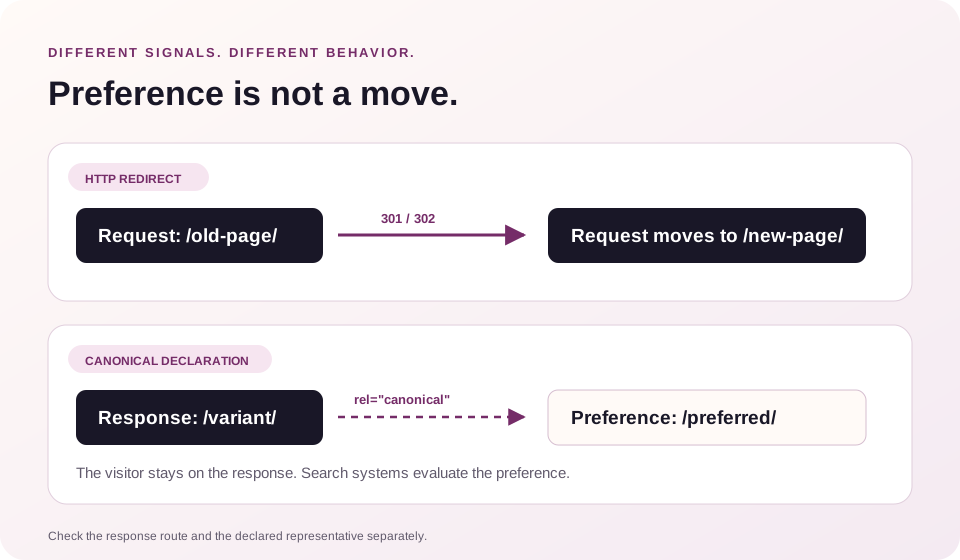
For the route a visitor follows between addresses, use the Redirect Checker. A canonical declaration and an HTTP redirect answer different questions.
Understand the evidence before choosing a fix
| Finding | What to investigate |
|---|---|
| One intended destination | Confirm that it represents this content and is the address your team wants to maintain. |
| No usable declaration found | Review the fetched response and template. Google can still choose a canonical without an explicit declaration. |
| The same destination appears more than once | Check for overlapping theme, plugin or server output. Redundancy deserves review even when the values agree. |
| Different destinations appear | Identify which system owns each declaration and establish the intended URL before changing either one. |
| A relative destination appears | Check its resolved address. Use a full absolute URL when implementing the preferred destination. |
| Target evidence is incomplete | Investigate the failed or limited request. An unchecked destination has not passed validation. |
HTML and HTTP declarations can come from different parts of a website. An SEO plugin may generate one while a CDN or web-server rule supplies another. Fix the configuration responsible for a disagreement, then request the page again.
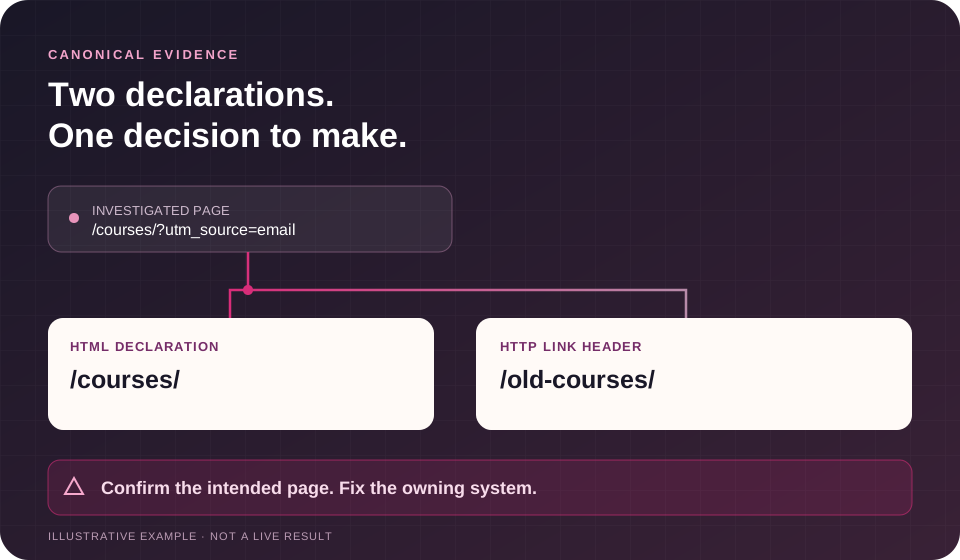
Example: two systems name different destinations
Illustrative teaching example using example.com. This is not a live scan or a promise about the report’s visual layout.
| Evidence | Example value |
|---|---|
| Investigated page | https://example.com/courses/?utm_source=email |
| HTML canonical | https://example.com/courses/ |
| HTTP Link canonical | https://example.com/old-courses/ |
| Decision needed | The declarations disagree. Confirm which address represents the course page. |
| First repair task | Review the page template and response-header configuration. |
| Follow-up | Fetch the page again, inspect the intended destination and review Search Console when relevant. |
The presence of a tag does not settle this example. Removing the tracking parameter may be intentional, while naming an outdated page may be an error. The right answer depends on the content and the site’s URL policy.
When should a page point to another URL?
An alternate address may exist for a useful reason: campaign tracking, an equivalent product route, a printable version or another presentation of substantially the same content. Review those relationships before deciding which URL should represent the content in search.
Different pages can also deserve independent visibility. A category, a detailed product page and a guide may discuss related topics while serving different needs. Pointing them all to a high-priority service page does not create a sound canonical strategy.
For language and regional versions, review the canonical alongside the language-alternate mapping. Use the Hreflang Generator to prepare the relationships you intend to publish, then validate the implementation. Avoid consolidating every translation into one language simply because the pages share a subject.
A destination needs more than a successful response
Where destination checks are available, investigate errors, redirects, indexing restrictions and a destination that declares a further preferred URL. Keep the page you requested, the address that returned content and the declared canonical distinct during review.
You still need to compare the actual content. A successful HTTP response does not establish that two pages are equivalent, that the destination is useful, or that Google will consolidate them.
For a separate review of crawling and indexing directives, use the Indexability Checker. For titles, headings, links and other page-level signals, continue with the SEO Checker.
One URL, a small batch, or evidence you supply
Keep the source, limits and next action visible—not just a green or red verdict.
Inspect a URL or a small batch
Review up to five supplied URLs by default. The current form shows the configured limit; administrators can allow up to ten. Each row keeps its requested URL, final response and unresolved checks separate.
Read HTML and response headers
Paste page HTML, headers and the address used to resolve relative values. Optionally add a DOM snapshot to compare declarations. Supplied evidence is not a fresh browser render or a new network request.
Compare against your URL policy
Add the canonical you expect, then investigate disagreements. Bounded target checks distinguish canonical relationships from HTTP redirects and make stopped, repeated or incomplete chains visible.
Export evidence and a repair task
Download CSV, JSON or a text report, copy the findings, and prepare a CMS repair task. The report includes incomplete checks and request context. It never changes your site automatically.
Fix the system that produces the declaration
Start with a written decision: which URL should represent this content, and why? Then locate the setting, template or response rule that generates the current value.
On a WordPress site, check the SEO plugin’s canonical field and any theme output before adding custom markup. In a hosted platform or a framework, review the documented page setting and shared templates. A global configuration change can affect many URLs, so validate representative pages before extending the change.
After the update:
- Request both the preferred page and a relevant alternate again.
- Confirm that declarations agree with the intended URL policy.
- Review internal links, redirects and sitemap entries for consistency.
- Inspect the page’s content and rendered experience.
- Use Search Console’s indexed inspection data when you need Google’s selected canonical.
If the problem spans important templates, markets or commercial pages, request SEO audit services for an agreed investigation and action plan. Share affected URLs, the intended destinations and examples of the conflicting evidence.
What this check covers
The documented checker reads canonical declarations from returned HTML and HTTP headers, preserves declaration evidence, resolves relative destinations and surfaces disagreements. It can report available destination evidence where verification is enabled. Header-based declarations also matter for supported non-HTML resources such as PDFs; reading a header does not mean reading the PDF’s content.
It does not render JavaScript, determine content similarity, inspect your Search Console account, or establish robots.txt access and sitemap membership. A restricted or incomplete response may differ from the page you see in your browser.
Treat the report as evidence from a particular request. Use the Privacy Policy for the site’s data-handling terms, and avoid submitting private or authenticated addresses.
Expanded evidence options: the public-fetch boundary above still applies. The supplied-evidence mode adds HTML/header analysis and optional supplied-DOM comparison; it does not make the checker a browser-rendering service. Exports and repair tasks document a proposed change rather than applying one.
Canonical tag checker FAQs
What is a canonical tag?
It is a declaration identifying a preferred URL for duplicate or very similar content. For HTML pages it commonly appears as a link element in the document head. A supported HTTP Link header can also express the relationship.
Does this show Google’s selected canonical?
It shows declarations and response evidence from the fetched page. Google’s selected canonical is a separate decision. Review that field in Search Console’s indexed URL Inspection data; its live test cannot predict the selection.
Is a missing canonical automatically an SEO error?
No. Search engines can choose a representative URL without a declared preference. Investigate whether duplicate routes, parameters or inconsistent signals create a practical problem before deciding what to change.
Should every canonical point to the page itself?
A self-reference is often appropriate for the preferred page. A duplicate variant may deliberately nominate another URL. Judge the relationship against the purpose of both pages.
Can I use a relative canonical URL?
Relative references can resolve successfully, but they depend on the response URL and applicable base context. Absolute URLs make the intended destination clearer and follow Google’s recommendation.
Can a PDF have a canonical URL?
Yes. The server can provide the relationship in an HTTP Link header. This checker reviews that declaration rather than extracting or comparing the PDF’s contents.
Is a cross-domain canonical always wrong?
No. It can be intentional, but the content relationship and ownership decision need careful review. An unexpected external hostname should be investigated before publication or promotion.
Will this find a canonical inserted by JavaScript?
This check uses the server response. Compare it with rendered HTML when scripts add or change the declaration. A difference between the two versions needs its own investigation. The supplied-evidence mode can compare original HTML with a rendered DOM snapshot you provide; it does not launch a browser or independently authenticate the capture.
Does canonicalization replace a redirect or noindex?
No. A redirect moves a request, a canonical expresses a preferred representative, and noindex concerns exclusion from search. Choose the mechanism that matches the intended behavior.
Can this automatically repair the page?
The current checker is read-only. Apply an agreed change in the system responsible for the declaration, then validate it again.
Turn the findings into an agreed plan
When canonical issues affect pages you plan to promote, resolve the destination and technical questions before expanding the campaign. SEO campaign management can connect agreed technical priorities with content work, internal links and subsequent promotion.
Bring the affected URL, intended canonical, relevant templates and business goal to the review. Scope, timing and work should be confirmed around the evidence.
Share the URLs that need attention
Include the affected URL, your intended canonical and a short description of the disagreement. Do not include passwords or private account information.
Method references
These resources explain Google’s behavior; they do not endorse this checker or guarantee a search outcome.