
Supplied evidence → practical campaign scope
Free Link Velocity Calculator
Plan your backlink campaign around your actual starting point.
Use the EduGuestPost Link Velocity Calculator to build a practical referring-domain growth plan from your current profile, recent gains and losses, competitor counts, campaign goals and delivery capacity. Review the assumptions behind the plan, identify the pages that need attention and set a checkpoint before increasing your activity.
You can use your own numbers without connecting a backlink provider. Competitor figures, budget and several profile details are optional.
Planning focus: new referring domains, losses, team capacity and periodic review. The result is an operational estimate; it does not certify a safe link quota or predict a Google ranking date.
Start with the information you know
Build your campaign brief
Use comparable referring-domain counts and a capacity your team can explain. The planner uses your supplied inputs; entering a website URL does not fetch its full backlink profile.
Your campaign inputs
Build a plan from evidence you already have
The planner uses supplied numbers without a paid backlink API. Inputs are sent to this site for calculation; no automatic backlink lookup is performed.
Step 1 of 8Website maturity
Complete free result
Your Link Velocity Planning Range
Turn the plan into qualified prospects
Find publishers that match this campaign
Use the planning range as capacity guidance, then evaluate relevance, audience, page context and current terms.
The campaign planner sends the supplied form inputs to this site’s server. The worked example below is a separate fictional calculation.
You can cancel a pending request. Requests time out after 20 seconds. Changing the inputs invalidates the current result; calculate again before printing or exporting an updated plan.
Plan the work behind the count
Calculate a campaign range you can explain
A single backlink target leaves useful questions unanswered. Does your team have enough reviewed prospects? Are you replacing lost domains or growing your profile? Are the competitor figures comparable? Can your writers and editors support the proposed campaign?
This calculator brings those planning inputs together. Supply the information you know, leave unavailable history unselected and use the report to decide what needs further research.
| Planning question | What to review |
|---|---|
| How fast is my profile changing? | Referring domains gained and lost across the same reporting period. |
| What can we realistically deliver? | Monthly capacity for qualified opportunities, with repeat publishers considered separately. |
| How large is the competitor count gap? | Your current referring-domain count against the median of the competitors you supply. |
| Which pages should the campaign support? | Your priorities for the homepage, commercial pages, products, informational content and local pages. |
| Does the budget fit the scope? | The budget available per planned opportunity, followed by a separate pricing review. |
| When should we revise the plan? | A checkpoint based on actual delivery, retention and campaign evidence. |
Eight steps, with your assumptions visible
How to use the Link Velocity Calculator
The planning model uses configurable profile weights and website-age context alongside supplied history, capacity and campaign inputs. These are operational assumptions, not Google thresholds. The worked example illustrates independent arithmetic rather than reproducing the model’s recommendation.
Enter capacity as distinct new referring domains your team can support per month. Repeat placements from an existing source do not automatically add new domains.
1. Set your website context
Choose the age range that describes your website. You can also add your website URL for campaign context.
Age can help you describe your starting position, but it does not establish a Google-approved number of links. A new website with useful research may attract substantial editorial interest; an older website can still have weak content or an unsuitable campaign.
2. Enter your current referring domains
Add the current number of unique domains linking to your website. If available, add your total backlink count, estimated organic traffic range, Domain Authority or Domain Rating.
Keep these measures separate. One publisher can produce multiple backlinks while adding only one referring domain. DA and DR are different third-party metrics, and neither is a Google score. The optional DA and DR fields provide context rather than directly setting the planning range.
3. Add recent gains and losses
If you have historical data, select a 30-, 60-, 90- or 180-day period and enter the referring domains gained and lost during that period.
Use the same provider, scope and dates for both figures. A domain-wide report including subdomains should not be mixed with an exact-page report or a report that excludes them. A longer period can make a short burst easier to interpret, although it can also hide recent changes worth reviewing separately.
If you do not know your history, leave that option unselected. Unknown losses should not be entered as zero simply to complete the form.
4. Add competitor counts if useful
Enter referring-domain counts for up to five relevant competitors. Choose businesses or pages that match the scope of your campaign and take the figures from a consistent source.
The median provides count context. It does not tell you how many links you must acquire to outrank those competitors. Their content, audience, source quality, internal links and technical condition may differ considerably from yours.
5. Choose your target-page priorities
Select how many pages the campaign will support. Set the priority for homepage, commercial, product, informational and local pages.
A useful priority reflects the audience and the source. A product comparison may support a commercial page; original research may suit an informational resource. Let the editorial context determine the destination instead of allocating every placement to the same URL.
6. Choose a campaign duration
Select a 3-, 6-, 12-, 18- or 24-month planning horizon. This is the period you want to organize and review, not a promise that a keyword will reach a particular position within that time.
7. Set your planning approach and capacity
Choose a conservative, balanced or growth-focused planning profile. Add monthly capacity if you know how many qualified opportunities your team can realistically support.
Include prospect review, writing, editing, approvals and publisher lead times when assessing capacity. Ten placements on publishers that already link to you do not necessarily mean ten new referring domains.
8. Add campaign methods and an optional budget
Select the methods relevant to your brief, such as guest posting, blogger outreach, digital PR, resource links, partnerships or organic editorial coverage. Enter a monthly budget if you want spending context alongside the plan.
The budget calculation is an arithmetic planning aid. It does not fetch a publisher quote or reserve a placement.
Read the result in context
What your link-building plan helps you review
Your observed starting rate
The baseline summarizes the history you supply so you can see your recent referring-domain gains in monthly terms. Read it alongside losses and the length of the reporting window.
An average can hide an unusual month. Record launches, publicity, migrations and provider changes so you can explain a movement before turning it into a recurring delivery target.
Gross activity and estimated net growth
New sources and retained growth are different measures. A campaign can add referring domains while losing others, leaving a smaller net increase than the headline delivery count suggests.
The report presents the planning range alongside estimated net growth after the observed losses. Compare both with what your team can support, and investigate loss patterns before simply increasing the acquisition budget.
Competitor median and raw count gap
Where competitor inputs are available, review the median, your current coverage and the numerical gap. Treat these as a comparison of supplied counts.
A raw gap projection describes what happens under the stated rate assumptions. It does not measure a competitor’s full authority, predict equal ranking performance or account automatically for future competitor growth.
Reasons, warnings and data confidence
Read the explanation behind the range. Missing history, incomplete competitor context or limited capacity can make a plan less informative.
The confidence label describes the information supporting the plan. It is not a statistically calibrated probability of ranking success.
A schedule with review checkpoints
Use the month-by-month schedule to organize activity and review evidence. Early delivery should establish whether the sources, content and follow-up process meet the brief. Later activity should change when the evidence supports a change.
A steady planning range can be appropriate. The campaign does not need an automatic increase every month.
Page, method and anchor guidance
Use your chosen priorities to review which pages receive attention and which campaign methods suit them. Anchor wording should describe the destination naturally in the surrounding article.
Page-distribution ranges and anchor categories are planning guidance. They do not define universal percentages for a safe backlink profile.
Budget context and a printable plan
Review the implied budget per planned opportunity, refine the inputs if necessary and use the print option to keep a copy of the plan. Your browser may offer Save as PDF through its print dialog.
After a successful current calculation, use the CSV or JSON buttons to save the plan with its inputs and assumptions, when local downloads are enabled. CSV contains flattened report fields labeled by key and path; JSON keeps the full structured plan. The downloads are created in your browser from the server-returned calculation.
Publisher pricing, content-writing costs and the final service quote need a separate review.
Specify the unit and the reporting window
What is link velocity?
Link velocity describes how a backlink profile changes over time. People commonly use the term for newly discovered backlinks or referring domains per day, week or month. For campaign planning, specify the unit and whether the number represents gains, losses or net change.
| Term | Meaning in a planning brief |
|---|---|
| Backlinks | Individual links pointing to the selected website or page. |
| Referring domains | Distinct domains linking to the selected target under the chosen counting rule. |
| Gross gains | Newly observed referring domains during the defined period. |
| Losses | Referring domains reported lost during that period under the provider’s rules. |
| Net change | The change in the measured profile, with the calculation method clearly identified. |
| Discovery date | When a provider first recorded a link or domain; this may differ from publication. |
| Delivery capacity | The qualified campaign work your team can complete. |
Read our link velocity guide for the wider planning context. A growth rate is useful for describing activity, but it cannot establish whether Google will reward or penalize a campaign.
Independent fictional arithmetic
Link velocity formulas and a worked example
The following example uses fictional figures to demonstrate the arithmetic. It is not an observed output from the calculator’s recommendation model.
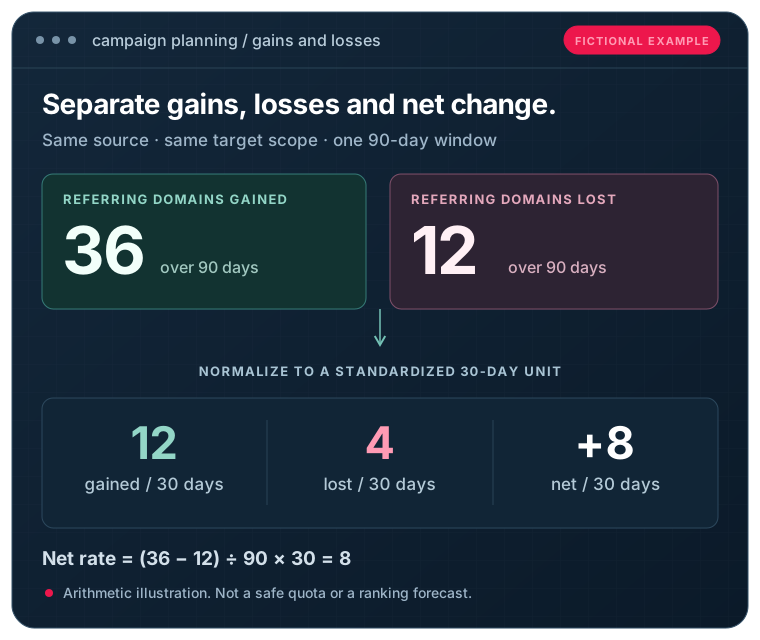
Normalize a 90-day reporting window
Suppose a consistent report shows 36 referring domains gained and 12 lost over 90 days.
- Normalized gains per 30 days: 36 ÷ 90 × 30 = 12.
- Normalized losses per 30 days: 12 ÷ 90 × 30 = 4.
- Simplified net movement per 30 days: (36 − 12) ÷ 90 × 30 = 8.
This uses a standardized 30-day unit. Calendar months have different lengths, so a calendar-month report and a normalized 30-day rate should be labelled separately.
Compare the current referring-domain counts
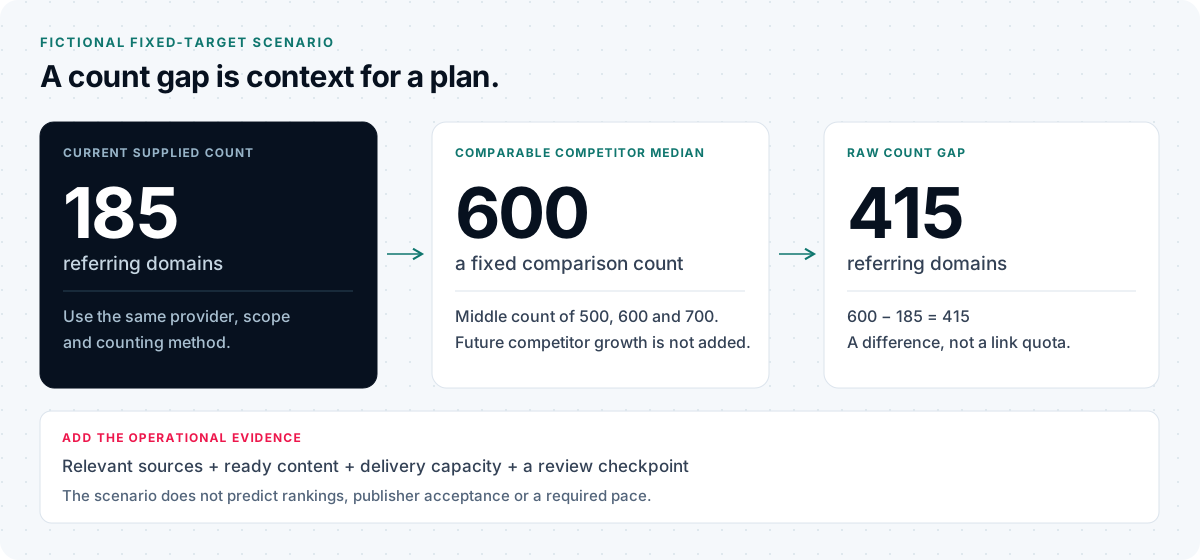
Suppose your website has 185 referring domains and three comparable competitors have 500, 600 and 700.
| Measure | Calculation | Result |
|---|---|---|
| Competitor median | Middle count of 500, 600 and 700 | 600 |
| Current raw gap | 600 − 185 | 415 referring domains |
| Coverage of median count | 185 ÷ 600 × 100 | About 30.8% |
| Fixed-target arithmetic | 415 ÷ 8 | About 51.9 normalized months |
That final figure assumes a fixed competitor target and constant net growth. It is a mathematical illustration, not a campaign recommendation or a ranking timeline. Equal counts can represent very different backlink profiles.
Put a budget beside a hypothetical campaign range
If a separate campaign scenario allows $1,500 a month for 10–15 qualified opportunities, the implied spending allowance is $100–$150 per opportunity.
Those numbers do not establish market prices or availability. Include writing, review, outreach and other costs when deciding what your budget can actually support.
For the fixed target, 415 ÷ 8 = 51.875 standardized 30-day periods before rounding. This illustration keeps the competitor count constant and does not predict a ranking date.
Capacity and relevance before a quota
How many backlinks should you build per month?
Start with your objective, evidence and resources. A useful monthly plan should consider:
- Relevant publishers and audiences you can justify approaching.
- Content and destination pages ready to serve those audiences.
- Recent gains, losses and retention evidence.
- The time required for research, writing, review and publisher decisions.
- A budget that fits the scope and quality requirements.
- A checkpoint for comparing the plan with actual outcomes.
Google does not provide a universal safe backlink quota that this calculator can certify. A small count does not make a manipulative campaign acceptable, and a large editorial publicity event does not become harmful solely because its count is high.
For advertisements and paid placements, links should be appropriately qualified with rel="sponsored" or nofollow. Pacing a paid campaign does not change that requirement.
Use the tool that answers your next question
Choose the right next step
Research competitor growth
A competitor’s current count provides a snapshot. For historical comparisons, use the Competitor Link Velocity Analyzer when its supported data source is configured. Keep provider discovery dates separate from the dates publishers actually created the links.
Review known link losses
For a specific source page that should link to you, use the Backlink Monitor & Known-Link Checker. It checks a supplied source-to-target relationship; it does not discover your full backlink profile. A blocked or incomplete check requires follow-up before concluding that a link was removed.
Check the pricing assumptions
Use the Guest Post Pricing Calculator to review estimates from comparable inventory cohorts. Small samples and broader matching filters affect confidence. Writing costs and final quotes are separate from the estimated placement range.
Find publishers that fit the brief
Use the Guest Post Site Finder to explore catalogue matches against your audience, niche, market and budget preferences. A fit ranking helps organize review; it is not a publisher endorsement or a Google score.
Our guide to choosing guest posting sites explains the editorial and audience questions to consider before selecting a publisher.
Review the proposed anchors
The Anchor Text Optimizer & Analyzer helps you review supplied anchor wording and context. Use it to improve clarity and relevance without treating anchor percentages as universal safety rules.
Prepare the delivery brief
Use the Guest Post Campaign Management Checklist to organize target pages, publisher review, content approvals, live-link evidence and follow-up.
Review the delivery scope
Turn your plan into a defined campaign scope
Once the assumptions are clear, compare service scope, publisher criteria, content responsibilities, delivery expectations and reporting before committing a budget.
For a defined package, review our guest posting packages. For help organizing publisher research and outreach, explore our guest posting and blogger outreach services.
If you prefer to review individual options, browse the guest post marketplace and confirm the current terms for shortlisted publishers. Your calculator plan is a brief for that discussion, not a reservation, automatic order or guarantee of acceptance.
Before you plan the campaign
Frequently asked questions
Is the Link Velocity Calculator free?
The public planner is available without connecting a paid backlink provider. Optional provider services, campaign work and publisher placements have their own access requirements and costs.
Does entering a website URL fetch my backlink profile?
The current planner uses supplied campaign inputs. Enter your referring-domain figures from a report you trust; entering a URL alone should not be treated as a complete backlink audit.
Should I enter backlinks or referring domains?
Use referring domains in the referring-domain fields. Total backlinks are a separate optional context field. Multiple links from one publisher should not be counted as multiple unique domains.
What if I do not know my current growth rate?
Leave historical growth unselected and add realistic monthly capacity if you know it. Without history or capacity, the planner needs more information for a numerical range. A starter plan should be revisited once you have evidence.
Should I enter zero if link losses are unknown?
No. Zero means you have evidence of no reported losses for the selected scope and period. Unknown means the figure is unavailable.
Can I use figures from different backlink tools?
Avoid mixing them in one calculation. Providers differ in coverage, grouping and discovery rules. Use the same source, reporting scope and dates for the figures being compared.
Is a discovery date the date the backlink was published?
Not necessarily. It records when the provider found the link. Use publisher evidence if you need the publication date.
Why can gained-minus-lost totals differ from the change in current referring domains?
Reports can use different grouping rules, index states or time boundaries. Reappearing domains and provider reclassification can also affect totals. Check the definitions before treating event counts and snapshot differences as interchangeable.
Does the calculator predict when I will rank?
No. A count-gap scenario describes arithmetic under its assumptions. It does not establish what causes your rankings or how long a keyword will take to improve.
Does higher link velocity mean better SEO?
A higher count describes more observed activity. Its usefulness depends on the sources, audience, editorial context and destination content. Review those factors alongside search and business outcomes.
Are DA and DR used to set the range?
The current form treats these optional third-party metrics as context rather than direct range-setting inputs. DA and DR use different provider methodologies and should be labelled accordingly.
Can the calculator model future competitor growth?
The current form accepts competitor referring-domain counts. It does not collect their ongoing monthly growth rates. Future competitor-growth modelling requires a separate scenario feature with explicit assumptions.
Is the suggested range a safe monthly backlink limit?
No. It is a campaign planning estimate based on supplied information. There is no universal Google-approved safe count, and delivery pace does not make an unsuitable linking method acceptable.
Does the budget result show live publisher prices?
Live marketplace price matching is not used in the current calculator result. The budget panel provides an implied amount per planned opportunity. Review pricing separately and confirm the final terms.
Can I download my plan?
Use Print My Plan. Your browser may let you save the print view as a PDF. After a successful current calculation, download the plan as CSV or JSON when local downloads are enabled. CSV lists report fields as key, path and value; JSON retains the structured inputs, result and planning assumptions. Dedicated spreadsheet formats and private project histories are not included.
How often should I review the campaign?
Use the checkpoint shown in the plan, commonly after the first 60–90 days, and review sooner if delivery, retention, publisher quality or the business brief changes materially.
Does the tool certify my anchor text or page distribution?
No. It offers planning guidance for the priorities and context you supply. Editorial relevance and clear destination wording still require review.
Is the calculation browser-local?
The current calculation sends the supplied form inputs to the site’s server. Consult the site’s privacy information for its handling of submitted data. This page should not describe the planner as browser-local or promise a retention period that has not been verified.
Your evidence. Your next checkpoint.
Plan, review and adapt
Enter the information you know, check the assumptions and choose a campaign scope your team can support. Use real delivery and retention evidence at the next checkpoint to decide what changes.
Independent learning resources
Put count growth in context
These third-party resources provide background on link velocity, link building and backlink data. They do not describe EduGuestPost’s calculator or imply an affiliation.
Watch the independent Ahrefs Academy lesson about backlink metrics. The lesson opens on Ahrefs; no third-party player loads on this page.