
Keyword Rank Checker
Review the conditions behind a keyword-position observation: the query, country, device, target and matching rule. A useful result needs that context before it can inform a page or campaign decision.
Live lookup is currently unavailable. The search source is not connected, and the public form is disabled. No search result has been created by opening this page. The site owner must connect and test a permitted source, confirm public-use rights and enable the mode before automatic lookup can run.
The documented public design concerns one keyword and one provider-observed Google organic results page. It does not establish an active tracking project, bulk campaign checks or historical position changes. Use this page to understand the intended matching method and prepare suitable public inputs.
Current action: Read the availability notice and matching rules.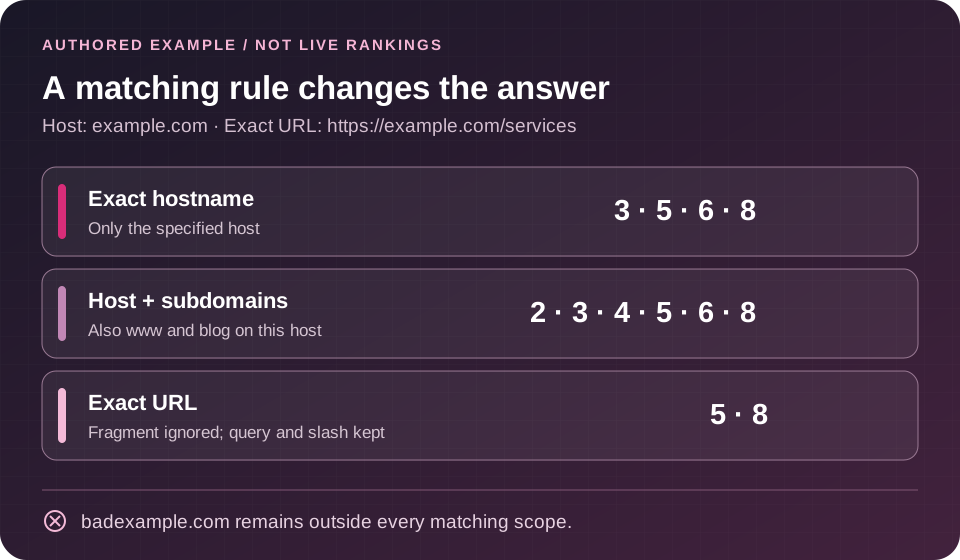
KEYWORD RANK CHECKER · SINGLE-QUERY WORKSPACE
Inspect the position. Keep the context.
One provider-observed Google organic results page. Three precise matching scopes. No tracking project or historical movement.
The search source is not connected, tested and enabled for this public mode. The site owner must confirm public-use rights before enabling it. No search has been made. The original integration remains available separately below.
Read the matching method or explore the clearly labelled authored matching example without submitting a query.
Matching, coverage and privacy
Exact hostname excludes www and other subdomains. Hostname and its subdomains includes only the specified host and its descendants, not sibling hosts. Exact URL preserves scheme, path case, query order, encoded components and trailing slash; fragments are ignored. A bare target assumes HTTPS. Standard ports are accepted and omitted for comparison; nonstandard ports and credentials are rejected. Unicode hostnames use IDNA conversion where supported. No redirect or canonical lookup is performed.
Positions not returned stay unknown. One organic page is not a complete top-hundred scan or a fixed guarantee of ten usable results. This does not measure historical change, Search Console average position or whether a page is indexed. Corrected queries, source metadata uncertainty and missing or old timestamps are labelled.
Only the query and context go to the configured search provider; the target is matched on this server. A query may itself contain a domain. This mode does not create a tracking project or read private histories. Optional shared query caching lasts at most one hour. Provider caching is separate. CAPTCHA, salted-IP counters and normal server/CDN/provider logs follow their own retention policies. Downloads are created in your browser only when permitted. This is not a blanket no-storage claim for the site or its contact forms.
Stopping a browser wait does not guarantee that upstream processing or charges stop. Requests are not automatically retried or switched to another provider.
OFFLINE LEARNING EXAMPLE · NOT A LIVE RESULT
Authored matching example — no search
These eight rows and positions were written for explanation. They are not Google, provider or checker output. Changing the scope below performs only a local comparison, never a search.
Target host: example.com · Exact target: https://example.com/services
Enable JavaScript to explore the fixture. Exact hostname matches authored positions 3, 5, 6 and 8; host plus descendants also includes 2 and 4; exact URL matches 5 and 8.
Original free-plan / custom-provider checker
Free-plan rank lookup
Know which question you want to answer
A position observation can answer a narrow question: did a target appear among the organic results returned for this query and context? It cannot, by itself, explain every person’s search experience or establish why traffic changed.
Decide whether you want to locate any page on a host, include that host’s subdomains, or inspect one exact URL. Those are different comparisons. A result for a blog article should not silently count as a result for a service page when your question concerns the service page specifically.
Write down the decision before collecting data. For example, you may want to investigate whether the intended page appears, whether another page is being surfaced, or whether a later observation is comparable with an earlier one. This keeps the number connected to a useful task.
The free SEO tools directory helps you choose a separate workflow when your question concerns planning, page access or supplied performance evidence. Review each tool’s current requirements before relying on its output.
Prepare a relevant, non-sensitive query
The disabled form contains one keyword field. Choose a query that relates to a page and audience you actually serve. Avoid private customer information, unpublished business details or other confidential text: the documented enabled workflow sends the query and search context to the configured provider.
Keep research and measurement distinct. A phrase you would like to target is not automatically a phrase people search, and a position observation does not measure demand. Record where a candidate came from and why it matters before making it a reporting priority.
The Keyword Research Tool offers a separate research workflow. Check its current source status and result labels; do not assume every suggestion includes measured search volume or that a generated phrase has been observed in search.
For several campaign ideas, prepare a reviewed list outside this inactive single-query form. The present interface does not establish a working bulk upload or a twenty-five-keyword run. Choose a small set with clear page purposes rather than collecting numbers without a decision attached.
Choose the matching scope deliberately
The form shows Exact hostname, Hostname and its subdomains, and Exact URL. All controls are currently disabled. The documented rules below explain the intended distinctions; live matching still requires testing after source setup.
Exact hostname concerns the specified host. A target of example.com does not automatically include www.example.com or blog.example.com. This is useful when the host boundary matters to the question you are asking.
Hostname and its subdomains extends that boundary to child hosts. A subdomain can belong in the comparison without becoming the same page as the main site’s target. Keep the returned URL visible so the reader can see which destination matched.
Exact URL is narrower. The documented comparison preserves the scheme, path, query and trailing slash, while ignoring the fragment. A bare target assumes HTTPS. A different query string or trailing slash can therefore matter even when two addresses look similar at a glance.
These are matching rules, not a canonicalization audit. Do not treat a close-looking address as equivalent merely because it appears to discuss the same subject. A redirect, canonical declaration or different page response needs its own evidence.
An authored matching example
This table is a training fixture written for explanation. It was not returned by Google, a provider or the live checker. The numbers are assigned example positions, not measured rankings. No query or website was searched to produce these rows.
Assume the target host is example.com and the exact target is https://example.com/services.
| Authored organic position | Illustrative result URL |
|---|---|
| 1 | https://other.example/guide |
| 2 | https://www.example.com/services |
| 3 | https://example.com/services?plan=team |
| 4 | https://blog.example.com/guide |
| 5 | https://example.com/services |
| 6 | https://example.com/services/ |
| 7 | https://badexample.com/services |
| 8 | https://example.com/services#pricing |
Under the stated fixture rules, Exact hostname matches positions 3, 5, 6 and 8. Hostname and its subdomains also includes 2 and 4. Exact URL matches 5 and 8 because the fragment is ignored; it does not include the query-string or trailing-slash variants.
The similar-looking badexample.com host is outside the boundary. Matching a target needs a proper hostname comparison, not a search for the target text anywhere inside an address.
These calculations explain the distinction among scopes. They do not certify the production matcher. A real report also needs the provider source, actual query, requested context, returned coverage and observation time before any position can be interpreted.
Try the matching exercise without running a search
The checker includes a separate, authored eight-row exercise. Change the scope to see which example addresses qualify while their assigned organic positions stay unchanged. It needs no search connection and creates no live ranking evidence.
Three scopes. One explicit target.
Compare exact hostname, hostname with its subdomains, and exact URL. The similar-looking badexample.com address stays outside the target host; a fragment does not make a different exact target.
Read the method beside the controls
The lookup area keeps its availability, coverage and privacy disclosures close to the form. A disconnected source is not shown as a missing target or a ranking loss.
Exercise, not search. No provider request, live observation, tracking history or exercise export is created by changing its scope.
View checker availability and the exerciseKeep country, device and language context visible
The form currently shows United States, United Kingdom, Canada and Australia, with United States selected by default. Device choices are Desktop and Mobile, with Desktop initially selected. These are displayed choices, not evidence that a source request has been made.
The public method describes country and an English interface as requested context. That does not establish precise city targeting or guarantee the language of every returned page. Do not label a country-level request as a local neighborhood measurement.
Keep devices separate when comparing observations. A mobile result and a desktop result may differ for reasons that the position number alone cannot explain. The same principle applies to a changed country, provider, query or matching scope.
Record the full measurement context alongside any later result. A useful note explains what was requested and what was actually returned, especially if the provider corrected the query or could not supply a reliable source timestamp.
Understand the limit of one results page
The documented lookup concerns first-page organic results. It does not establish a complete top-hundred scan, an exhaustive list of pages that rank, or a fixed number of returned organic items. Search layouts and available source data can vary.
Positions outside the returned coverage remain unknown. If no matching target is present in a successful limited response, describe that limited observation. Do not turn it into a universal statement that the website does not rank, or invent a numeric position beyond the checked range.
An unavailable source, failed request or incomplete response is another state again. None supplies a measured position. Keeping those states distinct prevents a service problem from appearing as a sudden ranking loss.
A numbered organic position also does not measure screen space. Ads, local results, images, video and other features can change what a searcher sees before reaching an organic item. Only describe features that the actual source returns and the accepted workflow can represent.
Preserve query and time qualifications
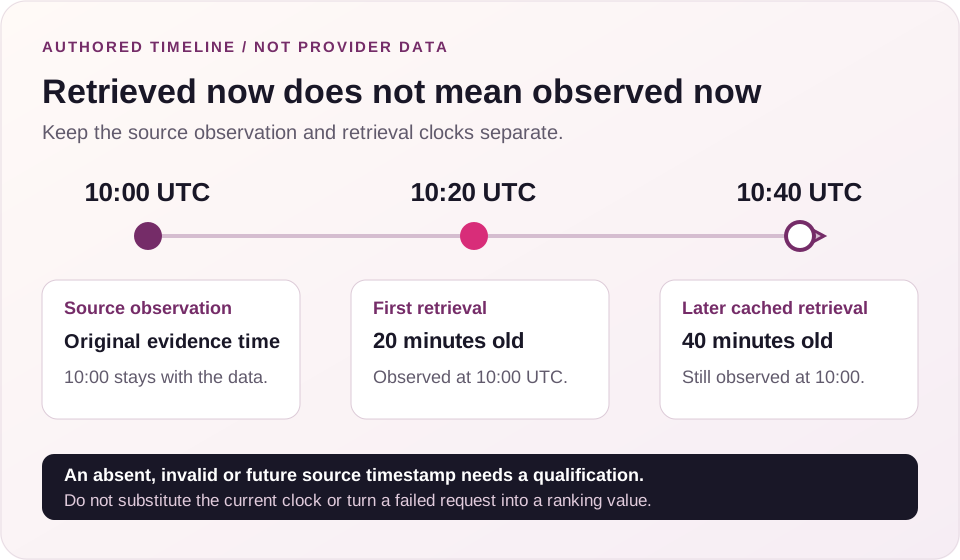
The documented design says corrected queries and missing or old source timestamps are labeled. Those qualifications matter because the result may answer a different query or represent an earlier observation than the time you opened the page.
Read the requested and returned query together. If a correction changes the question, decide whether that result is still relevant before comparing it with another observation. Do not quietly treat different wording as one continuous series.
Keep observation time separate from retrieval time. A response delivered now may have been observed earlier or supplied through a cache. Reopening a cached result does not make the original observation new.
There is no current result to inspect while this checker is disconnected. Detailed timestamp labels, correction handling and freshness behavior remain subjects for testing after source setup; this page does not certify them by describing their intended purpose.
Separate a snapshot from Search Console average position
A provider snapshot and Search Console answer different measurement questions. A snapshot describes one returned result set under stated conditions. Search Console summarizes eligible impressions and performance for the selected property, dates and dimensions.
Search Console position uses the topmost relevant property or page result under its reporting rules and averages observations in the selected data. It should not be expected to equal one current manual search or one provider lookup.
Segment before interpreting a difference. Country, device, query, page and date range can change the population behind an average. A combined view can hide that different pages or audiences are contributing to the result.
Use clicks, impressions and relevant business outcomes to understand what visibility means. A better numbered position does not guarantee a fixed amount of traffic. Demand, presentation and the type of answer people need can all affect the usefulness of a visit.
Keep the intended destination in view
Record which page is meant to answer the query. If a later observation surfaces another URL, review the two pages’ purposes before deciding what to change. A different ranking URL can prompt investigation without proving that the pages are competing harmfully.
The Keyword Mapping Tool organizes supplied phrases into reviewed page assignments. It can help document the intended destination and next action, while remaining separate from an observation of what appears in search.
For an existing site with possible query overlap, the Keyword Cannibalization Tool reviews supplied query-and-page performance evidence. A hostname match or one changed URL is not a replacement for that investigation.
Keep unresolved explanations visible. A change could involve page content, query interpretation, technical behavior or the measurement context. Avoid redirecting, deleting or rewriting a page solely to make an isolated number look better.
Check the page and its expected answer separately
A URL match does not confirm that the page is accessible, technically indexable or indexed by Google. The comparison concerns the address returned in the source data; technical checks concern the page’s own evidence.
Use the Indexability Checker for its separate technical review. Retain its limits and distinguish an observed access signal from confirmation of Google indexing.
The Search Intent Checker supports reviewing supplied search-result evidence when you need to understand expected answer formats. Keep that editorial review separate from the arithmetic of matching a URL to an organic position.
Read the actual page before prescribing work. A useful next action identifies a concrete unanswered question, access issue or planning conflict. A generic instruction to improve rankings gives the next reviewer little to assess.
Understand the documented privacy and cache boundary
The enabled design describes sending the query and context to the configured search provider while matching the target on this server. It does not create a tracking project or read private ranking histories. These statements describe the public contract, not an infrastructure audit.
Optional shared query caching is documented as lasting at most one hour. That is a retention limit for the described cache, not a claim that every observation is fresh or that all operational logs disappear after an hour.
CAPTCHA records, salted-IP counters and normal server, CDN and provider logs follow their own retention policies. The page also describes browser-created downloads. Actual requests, cache behavior and download files were not tested during this review.
Keep queries non-sensitive. Do not assume that the absence of a tracking account means nothing is transmitted or recorded anywhere in the workflow.
Use a position observation to frame a review
Start with a defined question, keep the context with the evidence, and identify the page that should answer it. A useful review can end with a decision to investigate, improve a specific section, resolve a technical issue or leave the page unchanged while gathering more evidence.
Changes observed at the same time do not establish causation. A content edit followed by a position movement does not prove that the edit caused it. A future history feature would need comparable observations and clear missing-data handling before displaying movement.
This disconnected lookup is not a substitute for a monitoring system. The current page does not establish scheduled checks, alerts, saved projects, multi-keyword histories or automatic comparisons. Any later addition needs its own clear scope and tested reporting behavior.
Connect reviewed pages to appropriate campaign support
When a page has a clear purpose and a useful answer, publisher outreach may be one part of a broader campaign. A position number alone does not establish a need for a placement, an authority gap or a guaranteed benefit from buying links.
Review guest posting and SEO services when you need help choosing scoped campaign support. Provide the target page, intended reader, topic, market and the evidence behind the proposed work.
For a suitable publisher article, compare guest post opportunities and confirm subject fit, current availability, content requirements and placement terms before approving an order.
Approved orders retain their dofollow placement commitment and their Google indexing guarantee under confirmed terms, including the stated review period and remedy. Those commitments are separate from this inactive rank lookup and do not guarantee rankings, traffic, leads or sales for the target page.
Common questions
Can I run a check now?
Automatic lookup is unavailable because the source is not connected. The displayed fields and lookup action are disabled. Opening the page does not run a search.
Does a missing result mean my page is not indexed?
No. A missing target in a limited organic response does not answer the indexing question, and an unavailable or failed source supplies no position evidence at all.
Does this checker already track changes over time?
The documented single-query mode does not create a tracking project or measure historical movement. Bulk checks, history, alerts and automatic comparisons require separately accepted capabilities.
Is the original free-plan integration connected?
It is labeled Not connected. Its public note describes an owner-configured free SerpApi account and public-display permission as prerequisites. That note is not evidence of an active account, tested source or working free allowance.
Share the question your page needs to answer
Include the public target page, intended audience, market and the decision you want to make. Do not include private customer data, passwords or provider credentials.
Explore rank-measurement workflows
These guides provide wider context for device and location comparisons and recurring tracking projects. Their platform features are separate from this disconnected single-query checker.