
Draft in. Evidence out. Judgment stays yours.
SEO Content Optimizer
Give your draft a careful review before it reaches a reader. Check where supplied phrases appear, find passages that deserve another edit and inspect selected structural details in article HTML. Use the observations to make clearer decisions about the writing.
Your review starts here
Bring the draft and its purpose together
Start with the article and the job it needs to do. Add a primary phrase, supporting phrases and any questions from the brief. Choose plain text or article HTML, then review the evidence in context. You keep control of every wording change and the decision to publish.
This workspace is useful when a draft is already taking shape. It brings several small checks together without pretending that a number can judge the entire article. Your sources, reader knowledge and editorial judgment still determine whether the page is useful.
Begin with the reader’s task
A useful article helps someone finish a task or understand a decision. Before measuring it, write down who will read it, what they already know and what they should be able to do next. A comparison needs clear criteria. A tutorial needs prerequisites, ordered steps and a way to recognize a successful result.
The reader and outcome fields keep that purpose close to the draft. Questions become prompts for your own review. They do not become automatically verified answers simply because the article contains matching words. Read each relevant section and check whether the explanation is specific enough for the intended audience.
If the assignment is still unclear, prepare it with the Content Brief Generator. Import its saved JSON so the title, phrases, audience, outcome and questions can travel with the assignment. Brief import preserves article text already in the editor; review the fields before applying an import.
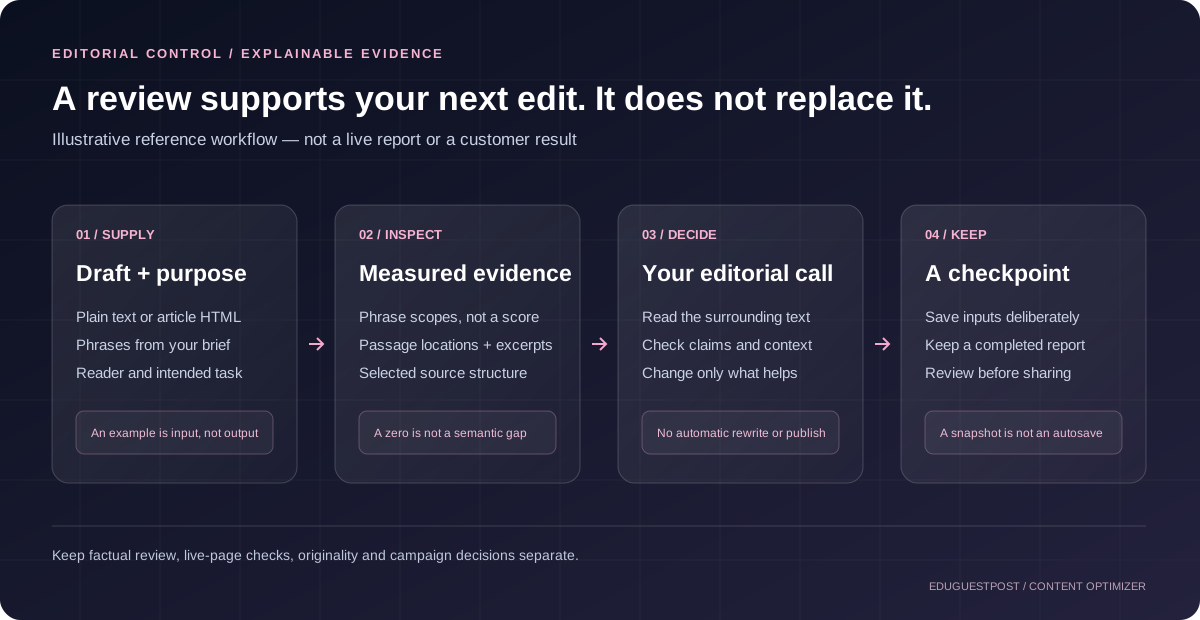
Supply the material you want measured
Choose plain text for wording and passage review. Blank lines separate blocks in this mode. A clean article draft is usually more useful than a copied page full of navigation, related posts, cookie notices and footer text. Unrelated material can change the measurements and distract the review.
Choose article HTML when headings, links and image descriptions matter. Supply the article fragment and keep a separate original copy. The parser excludes scripts, styles, templates, document-head material and explicitly hidden elements. It examines supplied source rather than the page as a visitor would see it.
CSS visibility, dynamic content, the website template and the finished page remain outside this review. The optimizer does not fetch source URLs or load embedded images. An HTML observation therefore describes your submitted fragment. It cannot establish that every visitor receives the same structure or that a published page works correctly.
Use the Example control to see a small editorial-calendar draft and its supporting inputs. The example deliberately contains material worth discussing, including a long passage and structural review points. Loading that draft fills the inputs; use Review draft to request an analysis.
Treat phrase counts as evidence
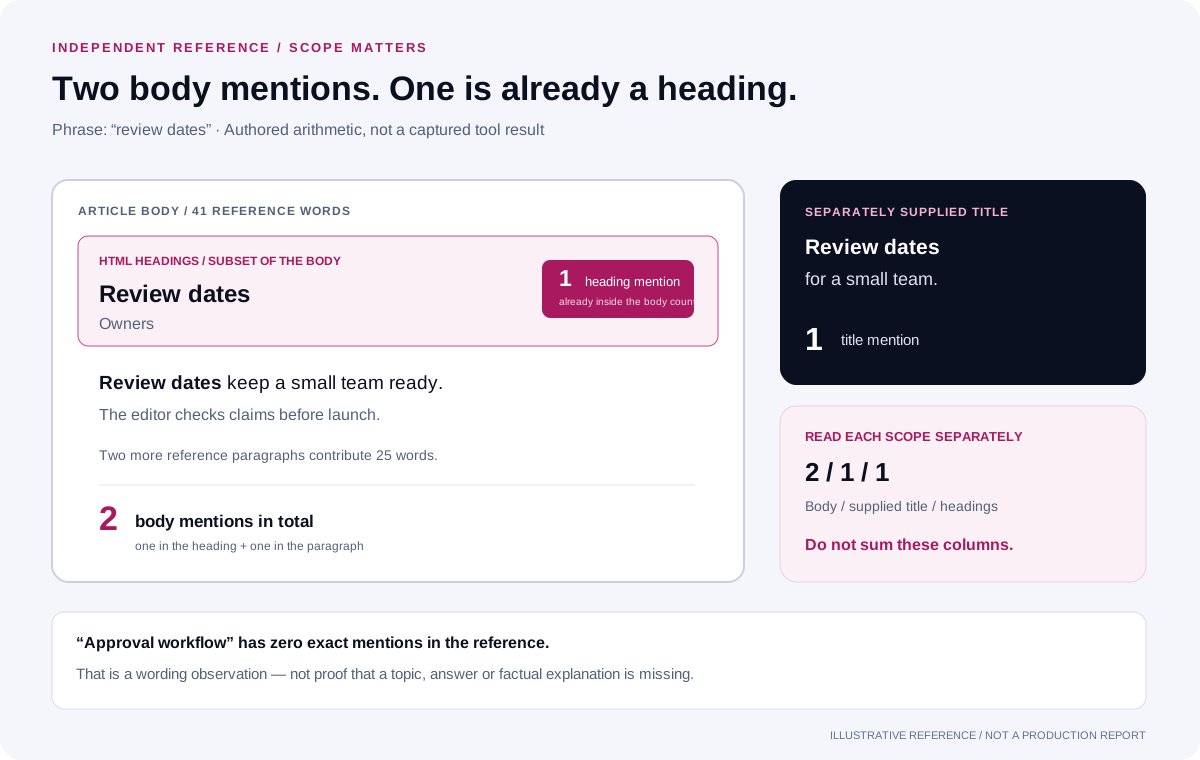
Enter a primary phrase and supporting phrases that belong to the assignment. The review separates mentions in the article body, supplied SEO title and HTML headings. Heading text also belongs to the body measurement, so those columns should not be added together as though they were separate pools of words.
Matching uses NFC Unicode normalization, Unicode case folding and collapsed whitespace; accents are preserved. Exact supplied phrases use letter, number, combining-mark and underscore boundaries. Repeated matches do not overlap within one phrase; different phrases are counted independently. These rules do not recognize synonyms, establish factual coverage or understand search intent. A clear explanation can use different wording from the phrase in your list.
A zero deserves a reading decision. Perhaps the phrase names an unanswered question; perhaps the article already answers it naturally. Add material only when it helps the reader. Repeating a term does not make an unsupported claim better, and removing a repetition should not delete an essential qualification.
For a separate view of supplied-text counts, use the Word Counter and Keyword Density Checker. Its measurements can support a wording review, but this optimizer has no recommended density or competitor-derived repetition target. Choose phrases because they describe the subject clearly.
Find passages that need attention
Long sentences can hide several decisions inside one piece of writing. Large paragraphs can make a useful explanation difficult to scan. The report identifies passages by paragraph or sentence number and includes an excerpt so you can return to the relevant wording.
The example settings use 30 words for sentences and 120 for paragraphs. The controls allow sentence thresholds from 10 to 80 and paragraph thresholds from 40 to 400. These are editorial filters, not search-engine quality requirements, and should reflect the needs of the article’s readers.
English ICU text segmentation underlies the counts. Abbreviations, lists, code and other languages can behave differently from ordinary English prose. Issue lists show up to 200 examples per category, with totals and omitted counts kept separate. A bounded list is not proof that a large draft has no further passages to review.
Read a flagged sentence before splitting it. Preserve the relationship between a condition and its exception. Keep accurate quotations intact, and make sure an edited instruction still identifies who acts and what happens next. For formula-based reading estimates, use the Readability Score Calculator, then interpret its result alongside a human reading.
Inspect HTML in its publishing context
Review heading levels as an outline. An empty heading or a jump from H1 to H3 may deserve attention, but a fragment can omit a heading supplied by the page template. Check the complete document before adding another main heading. Structure should help readers understand relationships between sections.
Image observations distinguish an absent alt attribute from an empty attribute. An informative image needs text appropriate to its purpose. A decorative image can properly use empty alt text. This optimizer does not inspect the image itself, so an attribute count cannot establish that the description is accurate or that the image is decorative.
Generic link wording is another prompt for review. A label such as “click here” may offer less context than the name of the destination or task. Consider the surrounding passage and the actual destination before editing. The optimizer does not visit destinations, test link status or provide a complete accessibility assessment.
When the draft is published, the SEO Checker answers a different question about returned page markup and on-page signals. Keep those findings separate from the editorial draft review. A sound fragment does not establish what the server returns after publication.
For crawl directives and related technical signals, use the Indexability Checker. A draft review cannot confirm that a URL is indexed. Even a technically accessible page still needs useful content, and search-engine inclusion remains a separate outcome from an editor approving the article.
A worked review you can inspect
Paragraphs 13 + 20 + 5
Headings 2 + 1
Body / supplied title / headings
Do not sum these columns
Sentences above 10 words
Paragraphs above 40 words
This is an authored reference example, calculated independently rather than captured from this tool. Imagine an HTML fragment with H1 “Review dates,” H3 “Owners,” three paragraphs, one link and three images. Its supplied SEO title is “Review dates for a small team.”
The first paragraph reads: “Review dates keep a small team ready. The editor checks claims before launch.” The second reads: “Assign one owner and one backup before the first draft reaches review so every decision has a named contact today.” The final paragraph reads: “Click here for the plan.”
With a simple ASCII word-count convention, the paragraphs contain 13, 20 and 5 words. The two headings contribute another three words, making 41 body words. The four paragraph sentences contain 7, 6, 20 and 5 words. A sentence filter above 10 flags the 20-word sentence; a paragraph filter above 40 flags none.
The primary phrase “review dates” occurs twice in the body, once in the supplied title and once in a heading. The heading occurrence is already one of the two body occurrences. Adding the three columns would double-count that occurrence. “Approval workflow” has zero exact occurrences, which says nothing by itself about whether the reader’s approval question is answered.
Suppose one image has no alt attribute, one has empty alt and one has “Review dates by owner.” The three states need different decisions; the last phrase is not body text in this reference. An explicitly hidden span also stays outside the reference body. The H1-to-H3 transition and generic link label are review candidates, not automatic judgments about the finished page.
Save a deliberate checkpoint
Save draft exports the current inputs as JSON: article, title, description, phrases, reader, outcome, questions, source format and both thresholds. Keep that file somewhere appropriate for the material it contains. It is a draft snapshot, not a completed analysis.
Download a text report, full JSON report or the reviewed source after a completed review. Report JSON can restore supported draft fields; it does not create a new analysis. HTML source uses an .html.txt extension so it opens as text. A saved report remains distinct from an editable draft checkpoint.
Drafts are not automatically saved. Submissions are processed by the plugin without saving article text or reports in WordPress. Shared protection records a salted IP hash, tool identifier and usage date; hosting and security-provider policies apply separately. This is server processing, not a browser-only workspace. Avoid confidential or unauthorized material unless your organization has approved the workflow.
Turn observations into useful edits
Review the substance first. Check the claim, its source, the example and the next action. Remove sections that merely repeat earlier explanations. Add missing prerequisites or qualifications where they help the reader complete the task. Do not invent experience, statistics or demonstrations to make the page sound authoritative.
Then review wording and structure. Make one coherent change at a time and keep a clear record of the reason. A shorter paragraph is useful when it makes the relationship between ideas easier to follow. A phrase edit is useful when it removes ambiguity. Neither change needs a promise of search performance to justify it.
Finish with the publishing checks appropriate to your workflow. The SEO and Content Tools hub helps you choose the next check by question. Keep originality, rendered-page behavior, technical access and campaign planning as distinct tasks so the handoff explains what was actually reviewed.
Common questions
Does the optimizer rewrite the article?
The optimizer provides a review, with edits left to you. It does not rewrite or improve every sentence automatically. Keep the original draft and judge any manual revision against the reader’s task, factual accuracy and the approved brief.
Does a missing phrase prove a topic is missing?
No. Exact phrase matching can miss synonyms, paraphrases and useful explanations that use different wording. Read the relevant section before adding text. A topic can also be mentioned repeatedly without being explained well enough to help the reader.
Can it inspect a live URL?
This version reviews supplied plain text or HTML rather than retrieving a live page. It does not inspect search results or the rendered website. Prepare a clean source fragment and use the appropriate published-page checks after the article goes live.
Will a clean report improve rankings?
A clean report cannot guarantee rankings, indexing, traffic or sales. This tool has no preferred article word count, and title or description character totals are measurements rather than fixed search-display rules. Approve the writing because it serves its reader and meets the brief.
Is the review a complete accessibility audit?
No. Headings, link wording and alt-attribute observations cover selected source details. They do not assess the entire interface, keyboard use, assistive technology, visual contrast or whether image descriptions fit their purpose. Review the finished experience where those questions matter.
Connect an approved article with a campaign
If the next task is campaign support, explore SEO and content services with a clear target page, reader, market and brief. People who search “buy seo services,” “buy ranking services” or “buy seo ranking” still need an agreed scope and evidence of delivery. Those search themes are not promises that any purchase produces rankings.
When you are ready to buy guest posts, use the approved article and audience requirements to discuss suitable publishers. A “buy guest post” or “buy backlinks” enquiry starts a commercial conversation; a brief submission alone does not create a confirmed placement or order.
Confirmed guest post orders retain the agreed dofollow-link and Google indexing guarantee, with the review period and remedy written into the approved order. Rankings, traffic, leads, sales and authority-score increases are not guaranteed. Paid-link qualification must also be resolved explicitly. Agree the actual link attributes and publisher terms before approval, including how they relate to the dofollow commitment, without treating payment as a search-engine endorsement.
Discuss your content plan
Share the page and audience you want to support with publisher outreach.