
Core Web Vitals Checker
Review your Core Web Vitals evidence with the target, device and collection dates in view. Bring a Chrome UX Report JSON response to inspect field LCP, INP and CLS, add a compatible previous period, or supply Lighthouse JSON for a separate lab review.
The report helps you understand the measurements you supply. Missing field data remains unavailable. A Lighthouse performance score stays a lab score, and a faster example does not become evidence that your own website improved.
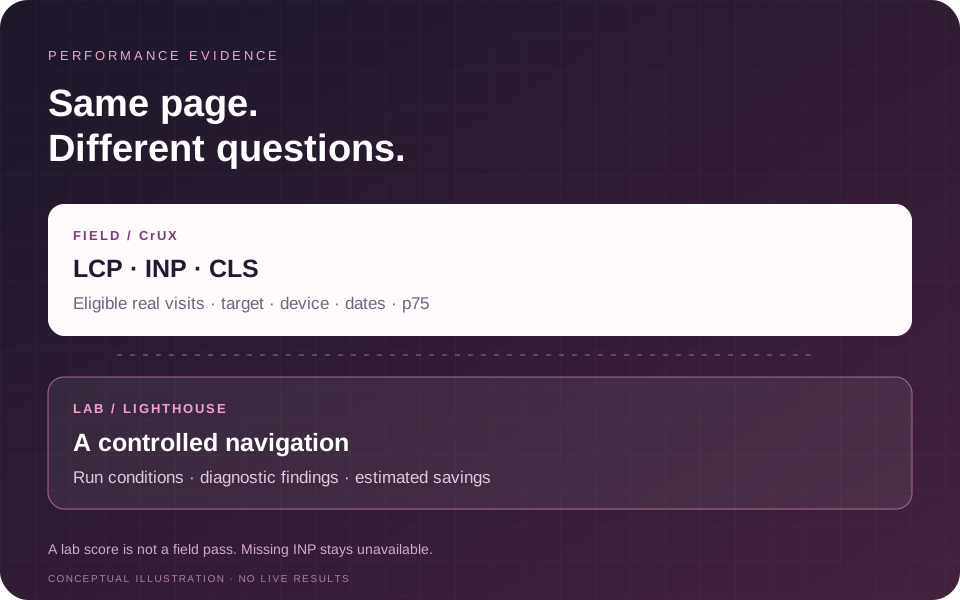
Start with your report: paste or choose a JSON file, check its context, and select Review report after completing the verification shown beside the form.
Automatic Lighthouse lab test · separate source setup
WEBSITE SPEED TEST · LIGHTHOUSE LAB
Run a fresh lab speed test
One public page, one mobile or desktop navigation. Keep lab results separate from real-user Core Web Vitals.
Setup required · automatic lab mode offThe same lab report can include page transfer weight, request counts and JavaScript, CSS, image and font breakdowns. These are observed transfer bytes, not uncompressed file sizes or guaranteed savings. Missing resource measurements remain unknown.
Automatic lab tests are not connected and enabled yet. The owner can configure the shared PageSpeed source. The original report imports and CrUX controls are in the evidence workspace above; no measurement or score is invented.
A Lighthouse score is not a field CWV assessment. TBT is not INP. For CrUX p75, historical field comparisons or existing Lighthouse JSON, use the evidence workspace above.
A clearer path from reports to developer review
Explain comparisons
See target, scope, device and window checks. Incompatible records remain visible without invented change figures; compatible overlapping periods show their shared days.
Keep gaps visible
Review valid supplied distributions independently of p75. Missing percentiles remain unavailable, and lab measurements never fill a field-data gap.
Carry context forward
Download source-labelled JSON, metrics CSV or a text handoff. Preserve collection dates, unavailable values, warnings and illustrative provenance.
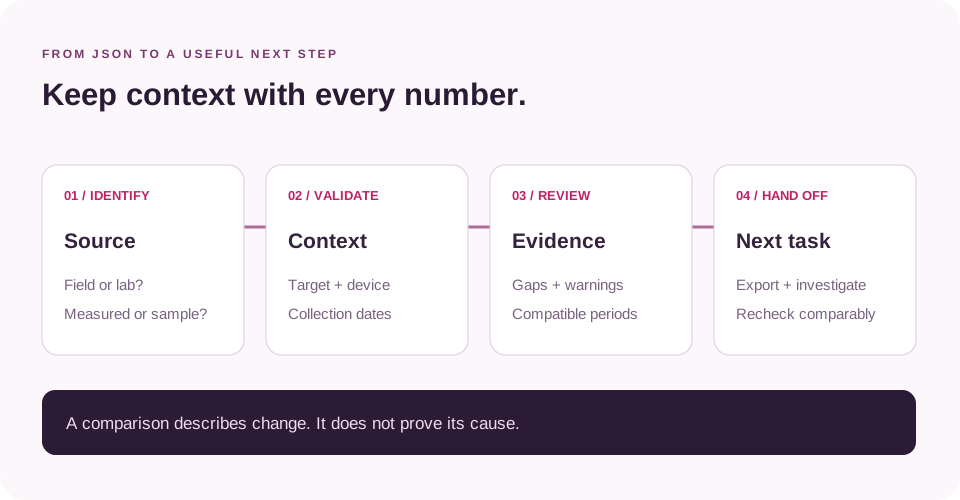
Choose the evidence you already have
Use Current CrUX JSON for a response from the Chrome UX Report API. The response should include its record, target key, metrics and collection period. Each report describes a particular URL or origin and a device grouping. Keep those details with the measurements so another person can understand what the numbers represent.
Open Previous field period if you have an earlier, compatible CrUX response. This is useful for reviewing how the same target’s reported experience changed between collection periods. A previous file from another page or device does not provide a suitable baseline.
Open Lighthouse lab report to paste or choose Lighthouse JSON. A PageSpeed Insights API response containing lighthouseResult is also supported by the documented import workflow. A Lighthouse report can be reviewed on its own; that produces lab evidence without a field assessment.
The current and previous field inputs expect individual CrUX record responses. They do not accept the CrUX History API’s time-series structure or legacy PageSpeed loadingExperience objects as equivalent field reports. A screenshot, a spreadsheet average or a copied performance score also lacks the required record structure.
Current connection availability
Report JSON is the available starting point on this page. The Live CrUX option is disabled until the owner configures its connection. The separate automatic website speed-test panel is also off pending shared PageSpeed source setup.
Those disabled controls have not measured your page. Use an existing CrUX or Lighthouse report while setup is unavailable. If a connection becomes available later, check its target, device and data-sharing notice before starting a request. Imported data and a new remote test are different ways of obtaining evidence.
For other questions about a page’s HTML, crawling or content, choose the relevant utility in the SEO and content tools directory. Selecting the right check keeps a performance investigation focused on the evidence it can actually provide.
Understand LCP, INP and CLS
The three Core Web Vitals describe different parts of a visitor’s experience:
| Metric | What it concerns | Good field p75 threshold |
|---|---|---|
| Largest Contentful Paint, LCP | When the largest eligible content element appears | At or below 2,500 milliseconds |
| Interaction to Next Paint, INP | Responsiveness to user interactions | At or below 200 milliseconds |
| Cumulative Layout Shift, CLS | Unexpected visual movement | At or below 0.1; unitless |
Field review uses the supplied 75th percentile, commonly written as p75. This is a different statistic from a mean or median. Keep the statistic visible when discussing results; “2.3 seconds” is incomplete without knowing which measurement and population it describes.
The checker’s documented all-good assessment requires all three supplied field p75 values to meet their good thresholds. When one is absent, the assessment remains incomplete even if the available values look good. Do not replace a missing INP with zero, or treat an empty result as a pass.
A value close to a category boundary deserves a careful review of the dates and audience. A small movement can change its label while leaving much of the experience similar. Use the metric and context together when deciding what to investigate next.
Check the page, origin and device
A URL-level CrUX record concerns the page identified in that record. An origin-level record combines eligible experiences across the origin. A good origin result cannot certify every article, category, product page or checkout journey beneath it.
Read the record key before making a page-specific statement. Protocols and subdomains matter: an origin for one hostname is a different target from another. A phone record and a desktop record also describe different groups of experiences, even when their page address matches.
CrUX does not publish a record for every URL. Missing coverage can reflect eligibility or insufficient observations. It does not establish that a page is fast, slow, poor quality or absent from Google’s index. The documented optional live workflow keeps the requested scope explicit instead of silently substituting an origin record for a missing page record.
If the investigation concerns supplied mobile markup or a mobile Lighthouse report, the Mobile SEO Checker provides a separate review route. Keep that evidence’s scope alongside the field record rather than assuming every mobile check measures the same thing.
Compare compatible field periods
Add a previous report only when its URL or origin, scope and device match the current report. The documented comparison also requires equal period lengths and an earlier ending date for the previous period. These checks help avoid a change figure built from unrelated records.
Read both date ranges before interpreting a delta. CrUX normally aggregates experience across a rolling 28-day collection window. Two reports a week apart may share many observations. Their difference is descriptive; it does not isolate a deployment’s effect or establish why visitors experienced a change.
Keep release dates and investigation notes separately. Changes to traffic mix, third-party scripts, content, browser behavior or page state may help explain a movement. A report comparison identifies a question to investigate; it cannot establish causation by itself.
When a histogram is supplied and consistent, it can show how observations are distributed across the reported bins. That distribution adds context to a summary number. It is not a substitute for a missing p75, and the checker’s documented workflow does not interpolate one from the bins.
An illustrative comparison
The page’s Example button fills three demonstration JSON inputs for https://example.com/article. These are explicitly illustrative, not a measured audit of that address or any customer website.
| Supplied field metric | Previous illustrative p75 | Current illustrative p75 | Arithmetic change |
|---|---|---|---|
| LCP | 3,600 ms | 2,300 ms | −1,300 ms |
| INP | 340 ms | 260 ms | −80 ms |
| CLS | 0.19 | 0.08 | −0.11 |
The previous period is 17 July–13 August 2026 and the current period is 14 August–10 September 2026. Both contain 28 calendar days and do not overlap. The changes above were calculated independently from the demonstration inputs; they are not captured checker output.
In this example, the current LCP and CLS meet their good thresholds. Current INP still needs improvement. Lower values for all three therefore do not mean the field record is all-good. A developer would still need evidence about the interactions contributing to the INP result.
The illustrative Lighthouse input contains a separate performance score of 88, lab LCP of 2,100 ms and TBT of 180 ms. Those values describe the supplied demonstration lab run. They must not replace the field INP value or be presented as a verified improvement for a real website.
Use Lighthouse to investigate
Lighthouse captures a controlled run. CrUX describes eligible real visits over a collection period. Different devices, network conditions, page states and user behavior can produce different results. A strong lab score beside a field metric that needs attention can be a useful investigation signal.
Export Lighthouse JSON from Chrome DevTools using the report’s Save as JSON option. Keep the original file so the developer can inspect the full evidence if needed. The checker’s documented import retains supported measurements and findings while omitting unrelated payload such as screenshots.
Review the Lighthouse version, requested and final URLs, device, throttling method, run time and warnings. A warning may limit how confidently a result can be interpreted. Comparing lab runs from different settings can create apparent improvements that come from the test conditions.
Supported findings retain their audit titles and estimated savings. Use these as prompts for investigation. Estimates may overlap; adding every savings figure together does not give a reliable total improvement. Check the purpose of a resource before removing or delaying it.
For an issue involving content or metadata after JavaScript runs, use the JavaScript SEO Checker to compare source with supplied rendered HTML. Performance measurements alone do not show whether important text or declarations changed after loading.
Keep TBT separate from INP
Total Blocking Time is a lab diagnostic associated with main-thread blocking during loading. INP concerns responsiveness to interactions across a visit. They can help investigate related problems, but they are different measurements.
A low TBT does not supply a missing INP value. A navigation audit also does not reproduce every menu, filter, form or purchase interaction a visitor might perform. When responsiveness is the concern, investigate the slow interaction and the work that delays its next visual update.
Likewise, a quick largest-content paint does not establish that the whole page stays stable afterward. Content inserted after loading, changing font dimensions and resizing components can require separate investigation. Match the debugging method to the metric and the affected experience.
Prepare a useful developer handoff
Start the handoff with the target, field scope, device and collection dates. State the metric that needs attention, its supplied value and the reason that page matters. Add the relevant lab finding only when its target and conditions are useful for that investigation.
The documented result workflow provides a full JSON download for context and a metrics CSV for a tracking sheet. Keep source type and units with each value. A spreadsheet row should make it clear whether it contains a field p75, a lab measurement, a missing value or an illustrative example.
After a change, repeat a comparable measurement process. An unrelated fresh lab score and an old origin record cannot establish a page-level improvement. Keep unresolved observations visible so the next reviewer can distinguish a completed check from a question still awaiting evidence.
Use the Rendered HTML Checker when the handoff also needs a source-versus-rendered markup comparison. That comparison can complement a performance investigation without becoming a substitute for field measurements.
Keep performance and search checks distinct
Core Web Vitals help teams investigate loading, responsiveness and visual stability. This report does not confirm Google indexing, explain a ranking change, measure conversions or guarantee a search position.
Use the Indexability Checker for a separate review of crawl directives and indexability signals. For a bounded review of several public pages, the Website SEO Analyzer can help organize HTML observations across a selected sample. Its fetched-page evidence has a different purpose from a real-user performance record.
If you need help turning several technical observations into a scoped review, discuss the affected pages and evidence through SEO audit services. Agree the investigation and deliverables before treating any work as complete.
If publisher outreach is a separate campaign priority, review guest-post publisher options against your audience, topic and confirmed placement requirements. A Core Web Vitals result does not establish a publisher’s backlink value or replace approval of its current terms.
Handle reports thoughtfully
Imported JSON is supplied evidence. The checker cannot authenticate who generated a pasted file or whether its values were edited. Retain the original report and record where it came from when the result will support a business decision.
Remove confidential details before supplying a report. Lighthouse files can contain URLs and other context beyond the headline metrics. Imported local or staging addresses are documented as text evidence rather than destinations the checker visits. That does not make a confidential report suitable for public submission.
The page states that this plugin does not save submitted JSON or generated reports. Hosting and verification-provider handling are separate. If live CrUX is enabled, the selected public target is sent to Google through the configured connection. Read the current notices beside the controls before sharing data.
Common questions
Can I use Lighthouse without a CrUX report?
Yes, the documented workflow supports a lab-only report. Field assessment remains unavailable because no field record was supplied.
Does a score of 100 prove that Core Web Vitals pass?
No. A Lighthouse performance score summarizes a controlled lab run. Review the relevant field metrics separately.
Why is there no CrUX data for my page?
CrUX coverage depends on eligibility and sufficient observations. An absent record is not a performance category or an indexing verdict.
Will a fix change field results immediately?
Not necessarily. A rolling collection period can include observations from before the change. Review the dates and gather comparable evidence over time.
Can I compare phone and desktop reports?
They can inform separate investigations, but the checker’s documented previous-period comparison requires matching devices.
Can the tool identify the cause of every slow interaction?
No. A supplied metric and supported lab findings guide investigation. Detailed interaction diagnosis may require a browser trace or appropriately configured real-user monitoring.
What should I do when an input cannot be reviewed?
Check that it is the expected report type, includes its identifying context, and contains valid JSON. Keep the original evidence; do not alter values simply to obtain a green result.
Share the page and the investigation
Describe the affected page, device and performance question. Do not send credentials or confidential reports.
Practical performance reading
For broader performance and user-experience context, see Ahrefs’ Core Web Vitals guide, Backlinko’s Core Web Vitals guide and Neil Patel’s technical SEO guide. These publishers do not endorse this checker.