
Free AI Citation Checker for AI Search Answers
See which passages in an AI answer cite a source. Separate mapped citations from ordinary links, compare quoted wording with source text and export the evidence for review.
This checker analyzes answers you supply. It does not run a fresh search on an AI platform.
Paste a captured answer or upload a structured record from ChatGPT, Perplexity, Gemini, Google AI Overviews or another AI product. Keep the prompt, references and capture details together so you can understand what the answer actually cited.
New to the tool? Use Example to explore a sample capture, or Capture template to prepare a structured record.

CITATION EVIDENCE WORKSPACE
Trace citations. Review the evidence.
Keep each answer passage, reference and source together. Start with your capture, then review what is mapped and what remains uncertain.
- 01Import your capture
- 02Add source evidence
- 03Review and export
01 / CAPTURE TO REPORT
How to check citations in an AI answer
1. Capture the answer and its references
Save the answer text, source URLs and reference markers. Record the platform, prompt, capture time and where you collected the answer. Include an evidence URL when available.
Preserve the full answer when possible. A shortened excerpt may leave out a reference or the passage it supports.
2. Import your captured evidence
Paste Markdown with explicit footnotes, or use the structured JSON format shown in the capture template. Structured records connect answer blocks to their reference IDs.
A source list on its own cannot establish which passage cites each URL. Preserve the relationships provided by the original answer instead of assigning references by their order.
3. Review the report and export your findings
Inspect the passage attached to each mapped citation. Review ordinary links, unused references and unresolved markers separately.
For a quote comparison, supply the quoted wording and text collected from the source. You can also choose to check that source’s HTTP response. Download the report as JSON or CSV for your review or client reporting.
02 / CLASSIFY THE EVIDENCE
Understand what each source is doing
A link in an AI answer can serve several purposes. The checker separates those roles so your citation totals reflect the evidence you supplied.
Mapped citation
- What it means
- An explicit reference connects a passage to a source URL.
- What to review
- Read the passage and check whether the source supports it.
Ordinary answer link
- What it means
- A URL appears in the answer without an established citation relationship.
- What to review
- Review its purpose before counting it as citation evidence.
Reference-list-only source
- What it means
- A URL is listed among the supplied references but has no mapped passage.
- What to review
- Check whether the capture omitted a reference relationship.
Retrieved-only source
- What it means
- A source appears in supplied retrieval context rather than as an answer citation.
- What to review
- Keep it separate from sources the answer explicitly cites.
Unmapped marker
- What it means
- A reference marker has no usable source mapping.
- What to review
- Inspect the original answer or export for missing evidence.
An ordinary Markdown link remains an answer link, including when it uses reference-style link syntax. Explicit Markdown footnotes provide passage mapping. An unexplained marker such as “[7]” remains unresolved; the checker does not assume that it means the seventh URL in a list.
03 / READ A WORKED EXAMPLE
See how a citation report works
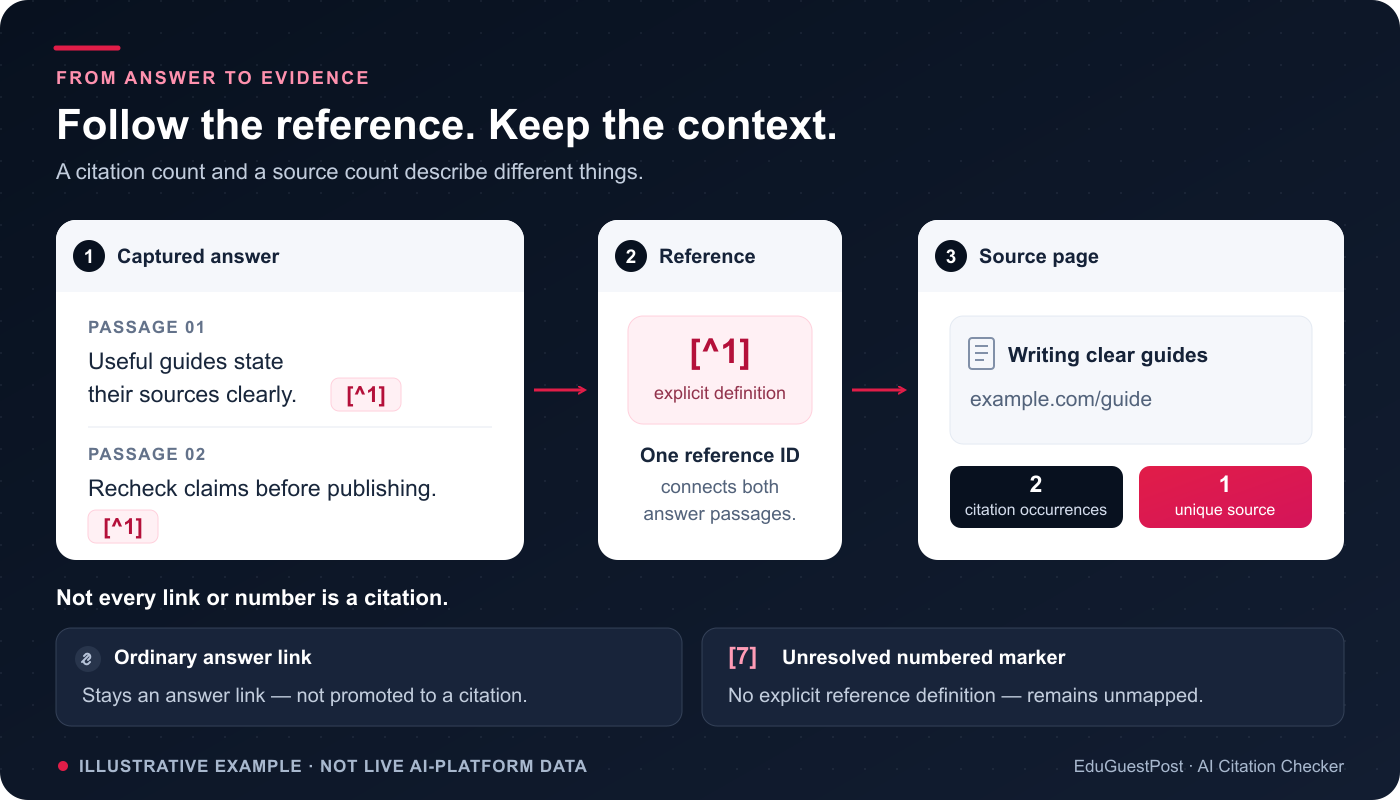
Illustrative example using invented evidence.
Suppose one captured answer explicitly connects two passages to the same reporting guide. It also contains a homepage link, an unused reference, a retrieved source and an unresolved marker.
| Captured evidence | Relationship in the supplied record | Report interpretation |
|---|---|---|
| Passage about comparing completion rates | Explicitly references the reporting guide | Mapped citation |
| Passage about recording a measurement period | Explicitly references the same guide | Second citation occurrence |
| Publisher homepage link | Appears as an ordinary answer link | Ordinary link |
| Separate research article | Listed as a reference without a mapped passage | Reference-list-only source |
| Background research note | Included only in retrieval context | Retrieved-only source |
| Marker with no source record | Cannot be resolved | Unmapped marker |
For the reporting guide, that produces two citation occurrences, one unique cited page and one capture citing its hostname. The other source roles do not add to those citation totals.
These numbers answer different questions. Occurrences show repeated references. Unique pages show how many distinct pages were cited. Captures citing a hostname show how many supplied answers cited that hostname, with repeated citations inside one capture counted once.
04 / REVIEW THE SOURCE
Review the passage and the source together
A citation tells you where the answer points. Reviewing the source helps you assess how the answer uses that material.
Read the surrounding passage, then inspect the original source. Ask whether the answer preserves the source’s date, conditions, units and scope. A narrow finding may need qualifications that are easy to miss in a summary.
If your page is cited, record the passage being used. It might be a definition, comparison, example or measurement. That gives you a specific place to review before deciding whether the page needs an update.

Compare quoted wording
Enter the source URL, the quoted wording and text collected from that source. Record where and when you collected the text.
The checker compares wording after normalizing Unicode and whitespace. Capitalization and punctuation still matter. A match establishes that the wording appears in the supplied text; factual support and fair use of the quotation still require review.
If a match is missing, check the original page. Partial text, a paywall or content that had not loaded can explain the difference.
Inspect source reachability
The optional HTTP status check follows redirects and records the final response using a HEAD request. It does not download and analyze the article.
Some sites reject HEAD requests while allowing browser visits. A successful response shows reachability at the time of the check. Read the source separately to assess its content.
Use the Redirect Checker when you need to inspect a source’s redirect route in more detail.
05 / MAKE THE FINDINGS USEFUL
Turn citation evidence into useful work
Review your own content
Start with the passage cited in the captured answer. Check that its wording remains accurate, its evidence is current and any important qualification sits close to the claim.
The AI Citation Readiness Checker can help review passage structure and declared evidence on your page. Use the Content Brief Generator to organize your reviewed findings into an editorial plan.
Research relevant third-party sources
Look at the pages cited alongside your competitors. Review their subjects, audiences and editorial formats before deciding whether they are useful research or outreach prospects.
A citation does not establish that a publisher accepts contributions or paid placements. If you need help researching and qualifying publications, explore our guest posting and blogger outreach service.
Keep agency reports traceable
Retain the prompt, platform, collection method and capture date alongside the passages and URLs. This makes a report easier to inspect and helps distinguish a new observation from an older capture.
JSON exports retain the full captured passages. CSV exports use passage excerpts of up to 4,000 characters. Choose the format that preserves the detail your review needs.
Compare visibility evidence carefully
For broader brand and domain comparisons across supplied answers, use the AI Visibility Checker. For Google-specific captured evidence, use the Google AI Overview Checker.
Keep prompts and collection conditions comparable when reviewing different dates. One answer describes one observation; a missing citation in that answer does not establish a platform-wide visibility loss.
Read our guide to getting cited by AI search engines for the wider research, content and measurement workflow.
06 / QUESTIONS, ANSWERED
Frequently asked questions
Can I enter a domain and find all of its AI citations?
This checker needs a captured answer and its reference evidence. You can inspect the report for citations to your website, but it does not discover every citation of a domain across AI platforms.
Can I check ChatGPT, Perplexity and Google AI answers?
Yes, when you supply a supported capture with its text and references. Preserve the platform’s reference relationships using Markdown footnotes or the structured JSON template. Unsupported or incomplete evidence may leave some references unresolved.
Does the checker verify academic references or detect hallucinations?
It maps AI-answer references to web sources and compares supplied quoted wording. It does not verify DOI records, journal metadata, bibliography styles or plagiarism, and it does not produce a hallucination score.
Why does the report show incomplete reference coverage?
Markdown cannot establish that every platform reference was captured. A structured record can declare complete coverage, but an unresolved marker or unsupported URL can still make that declaration uncertain. The report retains the positive evidence available in the capture.
Is a brand mention the same as a citation?
A brand mention names a business or product. A mapped citation explicitly connects an answer passage to a source URL. Naming a brand does not, by itself, establish that its website was cited.
Why can two URLs count as different cited pages?
Page grouping removes URL fragments, but preserves query strings, hostname differences and HTTP versus HTTPS. A tracking URL is not automatically merged with its redirected destination. The report keeps the original citation URLs available for review.
Are submitted answers and reports saved?
This tool does not save submitted answers, source text or generated reports. Shared abuse protection records usage against a salted IP identifier.
If you enable the optional status check, the checker contacts the selected source server. Otherwise, it makes no source-site or AI-provider request. Your downloaded report contains the evidence you supplied.
EVIDENCE → ACTION
Plan your next SEO improvements
Your citation audit can help identify a passage to update, a source to review or a measurement gap to resolve. A useful campaign connects those findings with the rest of your website.
EduGuestPost’s SEO campaign management brings together technical review, content planning, internal links, outreach and measurement. Share the page you want to improve, your target audience and the citation evidence you have collected so we can review the relevant work.