
SELECTED-PAGE RESEARCH WORKSPACE
Competitor SEO
Analysis Tool
Compare your page with one or two relevant competing pages before deciding what to change. Review titles, headings, literal topic phrases and source declarations together, then turn the evidence into a useful editorial or technical action.
Choose live initial HTML or supply complete HTML snapshots from your own inspection.
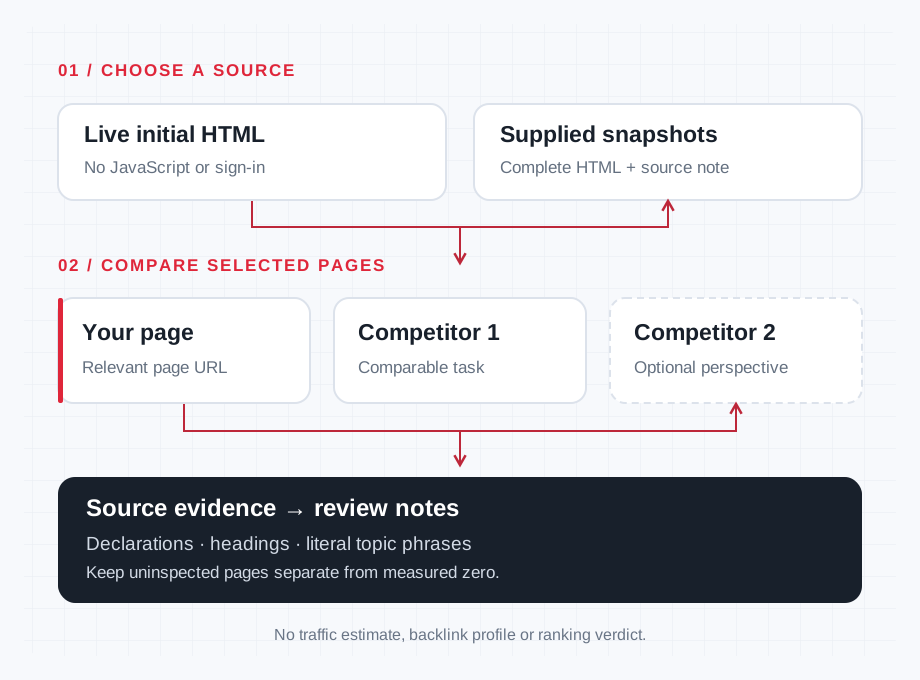
A source-evidence workflow, not a ranking simulation.
01 / COMPARE
Your pages. Your context.
A more focused review.
Start with your page and one relevant competitor. Use Example to explore illustrative inputs, Add competitor for a useful second perspective, or Clear comparison to start again.
Provenance stays attached
Review source bytes, a SHA-256 source hash and the source/date note with each inspected page. These identify the supplied or retrieved source; they do not certify authorship or accuracy.
Literal phrases, with context
Distinguish matches in main, navigation, footer and other extracted regions. Source-region labels are not computed visibility or a semantic coverage score.
Structured notes and reports
Record evidence, reader problem, proposed change, owner, effort and priority. Download versioned JSON or CSV. Uninspected pages retain unavailable values, not invented zeros.
02 / FRAME THE QUESTION
Choose pages that serve
a comparable task
A useful comparison begins with the reader, not a competitor’s word count.
Start with the reader and the question your page should answer. A business competitor’s homepage may be a poor comparison for a practical guide. A specialist publication, resource page or tool may serve the same search task more directly.
Use specific page URLs. Ask whether the pages help a similar audience make a similar decision. A product category, a comparison article and a repair tutorial can mention the same topic while requiring different evidence, page structures and next steps.
Use the Search Intent Checker when you need to organize supplied search-result observations before choosing comparison pages. Keep the actual market, device, language and observation date with that research. This tool’s query field does not collect a fresh Google result set.
Enter the search query and audience/market as comparison context. Those fields help explain why you chose the pages; they do not verify current rankings or localize an external data source. Keep a separate record of how you selected each competitor.
Live initial HTML
Live URLs mode requests each selected page’s initial HTML. It does not run JavaScript, sign in or bypass access restrictions. A public page that loads normally in your browser may still return a different or incomplete response to a source request.
Complete HTML snapshots
HTML snapshots mode accepts a complete HTML document pasted into the page field or supplied through its file control. Add a source or date note to distinguish a saved observation from a recent fetch. A short article excerpt cannot represent declarations and links that were left out of the supplied document.
Choose the page source deliberately
Do not treat these sources as automatically equivalent. An initial response, a browser DOM capture and an older saved file can differ. Record what each snapshot represents and compare like with like where possible.
For a separate source-versus-rendered comparison, use the JavaScript SEO Checker. Confirm its supported inputs and inspection boundary. A source comparison alone cannot establish the visual layout, completed JavaScript experience or content Google ultimately indexed.
Prepare the comparison inputs
Start with your page and one competitor. Add a second competitor when it offers a useful additional perspective. The form supports a maximum of two competitors alongside your page; it is not a bulk site crawl.
Give pages clear labels and preserve the original address. In snapshot mode, record the source or date for each document. A page label should identify the evidence, not claim a search position, traffic level or quality score that has not been measured.
The visible query field allows 200 UTF-16 code units, audience/market 300, page URL 2048 and label 80. Snapshot provenance allows 300 units. Some symbols use more than one unit, so these limits do not always equal the number of visible characters.
The HTML textarea has a browser limit of 1,048,576 UTF-16 code units. Separately, snapshot processing accepts UTF-8 HTML up to 1 MiB per page, or a lower configured limit, with a 3 MiB combined source ceiling. The browser character limit and encoded byte limits are different constraints. File controls accept .html, .htm and .txt files in strict UTF-8, with an optional UTF-8 byte-order mark. Keep the complete document within the displayed limits and inspect validation feedback.
Topic phrases are optional, with one phrase per line. The visible field allows 2500 UTF-16 code units. Choose specific questions or terms worth investigating instead of filling the list with every variation of a keyword.
When running your own comparison, complete the displayed human verification. Its code expires after ten minutes and can be used once. Clear comparison opens a confirmation prompt; review that prompt before removing work you still need.
03 / UNDERSTAND THE SIGNAL
A difference is evidence.
Not yet a diagnosis.
Keep source declarations, extracted counts and editorial judgment distinct.
Review declarations before drawing conclusions
Look at the source evidence behind each difference. Multiple title declarations, a missing main heading or an unexpected robots instruction may deserve investigation. A count tells you where to look; it does not finish the diagnosis.
A canonical declaration records what the HTML says. It does not identify Google’s selected canonical or prove that the destination is indexed. Use the Canonical Tag Checker for a separate canonical review within its current scope.
Robots and JSON-LD boundaries
Keep HTML robots declarations separate from a full indexability assessment. This comparison does not inspect robots.txt, evaluate HTTP X-Robots-Tag directives or confirm Google indexation. An apparently ordinary HTML response can still have conditions outside the report.
Declared JSON-LD types describe the markup’s stated types. They do not establish valid structured data, policy compliance or eligibility for a Google rich result. Use the Structured Data Checker when syntax and vocabulary need a separate review.
Avoid treating another page’s declarations as settings to copy. The right canonical, robots instruction and structured-data description depend on the purpose and content of your own page.
Read counts in context
Parsed text excludes scripts and explicitly hidden subtrees while retaining navigation and footer text. That scope matters when comparing page length or searching for a phrase.
A longer page may explain a difficult step clearly, repeat itself or include a large menu. Inspect the relevant section before deciding more content is needed. Google does not prescribe a preferred word count, and a competitor’s total is not your writing target.
Headings and outgoing links
Heading counts also need context. Review what the headings organize and whether the intended reader can find an answer. Matching another page’s heading list does not establish usefulness, originality or a complete accessible structure.
Same-host and other-host links are links found on the inspected page. They are not backlinks pointing to it. A page with more outgoing links has not automatically earned more authority, and the count does not verify the destinations’ availability or relevance.
Distinguish missing alt from empty alt
An image without an alt attribute and an image with an empty alt value are different source states. A decorative image may appropriately have empty alternative text. A meaningful image may need a concise description of the information or function it provides.
Review the actual image and surrounding content before writing an action note. A nonempty attribute can still be inaccurate or unhelpful. An attribute count cannot judge the visual quality, loading behavior or accessibility of the whole experience.
Useful follow-up might be to describe a diagram’s essential information or remove repetitive text from a decorative element. Avoid adding keyword lists to every image simply to make a count look complete.
Treat topic phrases as literal review prompts
Matching is literal and case-insensitive. It does not recognize synonyms, infer complete topic coverage or measure search demand. A missing phrase can reflect different wording rather than a missing explanation.
If the competing page mentions mounting a lamp while yours discusses installation, the subject may overlap even when the literal strings differ. Inspect the sections and decide whether the reader’s question is already answered.
Presence is not depth
A phrase found in navigation or a footer is also different from a useful explanation in the main article. Keep the evidence location and the page’s purpose in your notes. Presence alone does not establish depth, accuracy or relevance.
Choose an action because the audience needs an answer, example or practical resource. Do not add a section solely because a competitor uses a phrase or because an optional comparison field contains it.
04 / WORKED EXAMPLE
A study-desk
lighting guide
Independently authored illustration. Not a live fetch, production report, observed ranking or the tool’s built-in Example. These figures describe two illustrative HTML documents, with a third page unavailable.
| Review item | Your illustrative page | Competing illustrative page | Second competitor |
|---|---|---|---|
| Title declarations | Two | One | Uninspected |
| H1 declarations | One | One | Uninspected |
| H2 declarations | One | Two | Uninspected |
| Phrase: task lighting | Present | Present | Uninspected |
| Phrase: glare | Absent from the defined extracted text | Present | Uninspected |
| Phrase: installation | Absent from the defined extracted text | Present | Uninspected |
| Image alt states | One missing, one empty, one nonempty | One nonempty | Uninspected |
The first useful action is to inspect and resolve the two title declarations on your page. The phrase differences suggest reviewing whether a student needs practical advice about glare and lamp placement. They do not establish that the competing page covers those questions well.
The empty alt value requires a purpose check, rather than an automatic rewrite. The uninspected competitor remains unavailable evidence; its titles, words, images and links must not become zero-value measurements.
A DEFENSIBLE ACTION NOTEExplain how to position a desk lamp to reduce direct glare, using an original diagram and a clear example for the intended study space.
05 / MAKE THE HANDOFF
Turn observations
into prioritized work
Keep a clear trail from the inspected source to the change you want to make.
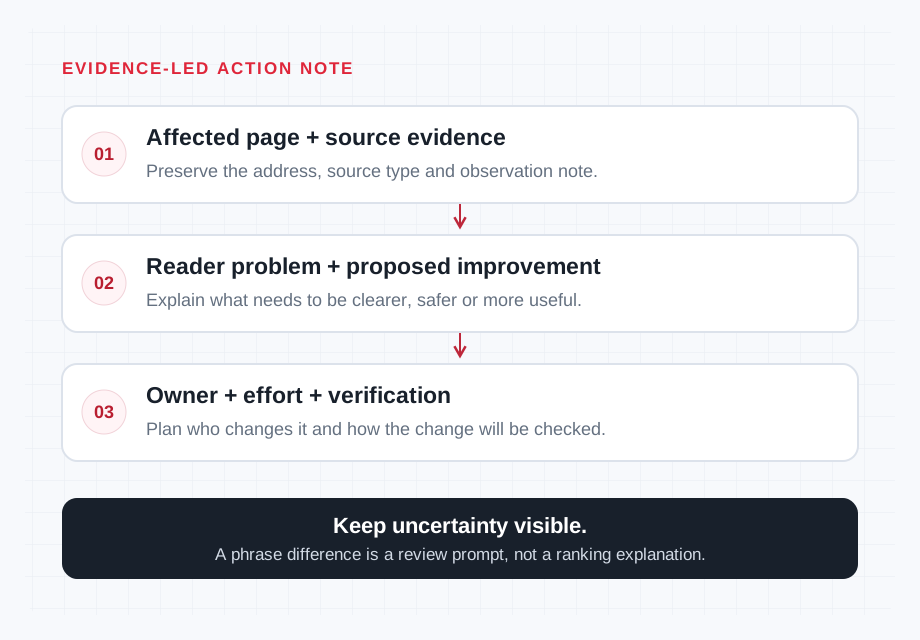
For each proposed change, record the affected page, the source evidence, the reader problem and the intended improvement. Separate a clear declaration conflict from an editorial question that needs more research.
Consider effort, responsibility and the evidence needed to review the change. A missing explanation may require original expertise or product testing. A source issue may require a developer. A difference in presentation may require checking the rendered page separately.
Use the Content Brief Generator to develop an editorial handoff from the reviewed audience, objective, evidence and outline. Keep unresolved questions visible. Do not hand a writer a competitor’s headings as an instruction to reproduce its article.
JSON and CSV reports include action notes. Inspect the actual downloaded fields before sharing a report with your team. A JSON report should not be assumed to restore an editable comparison unless that workflow is explicitly supported.
Keep failures and source dates visible
Your selected page or a competitor may be unavailable because of access restrictions, a timeout, a non-HTML response, an unacceptable redirect or an input limit. A partial report keeps inspected and uninspected pages distinct. Failed pages retain unavailable values as null rather than becoming zero counts.
Revisit the source when a decision depends on current content. A saved snapshot records an observation; it does not show a trend or establish that the live page still contains the same declarations. This workspace does not offer saved history.
The plugin does not save submitted HTML or reports. It separately uses shared abuse-protection metadata with a salted IP hash, tool identifier and usage date. Hosting and verification-provider policies apply separately, and live requests are visible to the destination server.
06 / KNOW THE BOUNDARIES
Questions before relying
on the comparison
Does this analyze an entire competitor website?
No. It compares your chosen page with one or two competing pages. A small selected sample cannot establish a site’s complete technical condition, content inventory or search performance.
Does Live URLs mode render JavaScript?
No. It requests initial HTML. Use an appropriate rendering review when a difference may depend on scripts, browser state or a later DOM update.
Is a missing phrase a confirmed content gap?
No. Literal wording is a prompt for inspection. Different wording may already answer the question, and a competitor’s section may be unnecessary for your audience.
Do counts show why a competitor ranks?
No. Titles, headings, phrases and outgoing-link counts describe the inspected source. They do not establish traffic, backlinks, search positions or causation.
Can a complete-looking report guarantee rankings?
No. The comparison has a defined source scope and cannot establish every technical or editorial condition. Choose useful changes, verify them appropriately and assess outcomes with suitable evidence.
FROM COMPARISON TO A CLEARER BRIEF
Choose the next review
or campaign step
Return to the SEO and content tools when another question needs a separate check. Keep page comparison, technical validation, content planning and performance measurement connected through clear evidence.
If the findings support a broader campaign discussion, review SEO services with a concrete brief: target page, audience, market, evidence, proposed changes, priorities and budget.
For publisher selection, use the guest post marketplace as a separate commercial route. Confirm current relevance, availability, editorial requirements and approved delivery terms. Confirmed guest post orders include the agreed dofollow link and Google indexing guarantee under the review period and remedy written into the approved order.
Those delivery terms are separate from ranking, traffic or revenue outcomes. Google’s paid-link guidance prefers sponsored and accepts nofollow. Resolve required attributes explicitly with the approved order and publisher; page-source differences cannot decide them.
Start with the evidence