
Evidence-led content planning
Search Intent Checker
Review what a supplied set of search results suggests a page should help someone accomplish. Record the search context, inspect the result pages and enter your classifications. Compare the overall mix with the actual leading organic ranks before choosing the page type, format and audience you will serve.
This checker works with results you enter or import. It does not fetch current Google results, visit the supplied URLs, measure search demand or predict rankings. Your report depends on the evidence and labels you provide.
Search evidence workspace
Build your intent review
Start with your snapshot or load the clearly labelled Example. Keep clues separate from accepted classifications.
Start with one query and one search context
Choose the question you are reviewing. Keep results for a single query, search engine, market, language, device and observation date together. A mobile search in one country and a desktop search elsewhere are different observations, even when the query text is identical.
Enter the query and record where the results came from. The form offers Google, Bing and Other as search-engine labels, with Desktop, Mobile, Tablet and Unknown as device choices. These choices describe your supplied snapshot; they do not start a live search.
Record the date on which the results were observed. A download date or today’s review date should not replace an older capture date. Add a clear source note, such as a manual review or the named export provider, so another reviewer can trace the evidence.
If you are still selecting possible topics, use the Keyword Research Tool for its current idea-discovery workflow first. An idea list and a reviewed results snapshot answer different questions. Collect the relevant result evidence separately before drawing an intent conclusion.
Enter or import the result records
Add results individually or use the CSV / TSV import area. Use rank, URL and title columns, with snippets and classifications when available. The import controls show the accepted headers and limits.
Preserve actual organic positions. If your source includes ranks 1 and 3, keep rank 2 missing rather than renumbering the third result. Record the organic depth you intended to review, then check the records against that scope. The visible depth and organic-rank controls range from 1 to 50.
Keep ads and features separate from organic results. An advertisement, video feature or map observation may help you understand the page, but it should not receive an extra organic vote. Use the result-kind control and supplementary observations to keep those distinctions visible.
Inspect the imported rows before continuing. Confirm that URLs, titles, ranks and labels landed in the intended fields. Choose whether to append to your evidence or replace it. Check the import feedback and resolve any rejected rows before generating a report.
The query field allows 300 UTF-16 code units. Other fields and imports have their own limits, so keep notes focused and retain lengthy source material separately. A long note or large file is not an unlimited evidence allowance.
Read the page before accepting a label
A title is a useful starting point, but it may not show what a visitor can actually accomplish. Inspect the result in your own research workflow. Ask what the page primarily does, what evidence supports that interpretation and which part remains uncertain.
An informational result explains something or helps someone learn. A commercial result helps compare or evaluate options. A transactional result enables an action such as ordering or booking. A navigational result helps someone reach a particular website or destination.
Choose Unknown when the evidence is insufficient. A brand mention alone does not establish navigational intent, and a word such as “best” does not prove that a page is a fair comparison. Short wording clues can direct attention without replacing inspection.
English wording clues remain separate, unconfirmed hints. A title containing “how to” can remain Unknown until a reviewer accepts a label. Editing a primary label does not replace its separate wording clue.
Separate primary purpose, secondary purpose and presentation
Primary intent records the main job of the result. Secondary intent is optional and should describe another purpose the page meaningfully supports. A useful buying guide may explain a product while comparing alternatives; that does not make every small FAQ on a shop page its main purpose.
Content type describes the page experience, such as an article, product, category, service, tool, video, forum or homepage. Format describes how it presents the information, such as a guide, comparison, review, tutorial or reference.
Angle adds a useful distinction: a specific audience, budget, setting or experience level. Record a meaningful difference that affects the answer. Avoid adding an angle merely because a word appears in the title.
These fields can disagree without being wrong. A product page and an article might both help with a purchase decision while offering different experiences. Explain the relationship in your notes instead of treating type, format and intent as interchangeable labels.
Read percentages as a description of the supplied rows
The report percentages count supplied organic results by primary label. They do not measure searches, clicks, conversion likelihood or the percentage of people who want one kind of page. Unknown rows remain in the denominator.
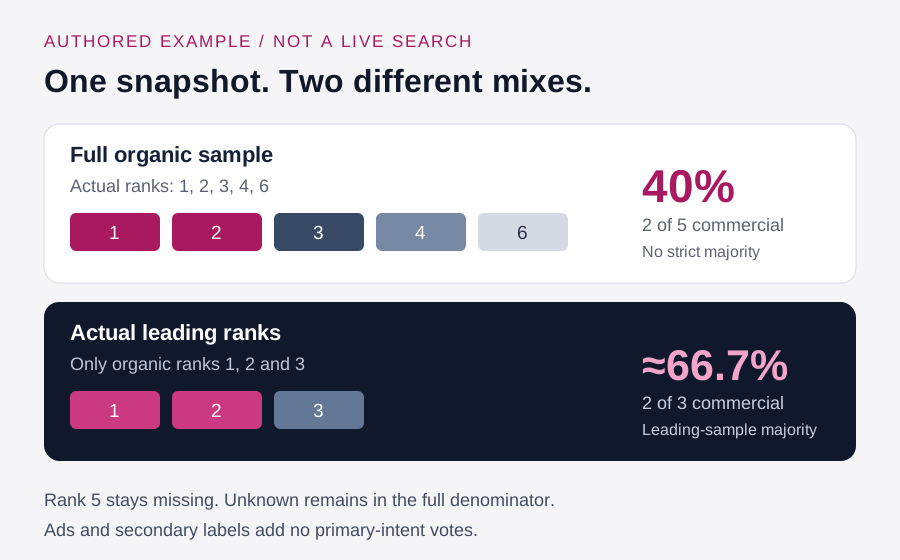
If two of five organic records are commercial, the commercial share is 40% of those records. Removing an unknown row would change the calculation to two of four, or 50%, without adding any new evidence. Keep the uncertainty visible.
Secondary labels do not create additional primary-intent votes. Ads and features remain separate. A record should not count twice simply because a page explains a topic and sells a product.
The method requires more than half of the supplied organic rows to share one known primary label for a strict majority. The largest category can still fall short of that threshold. A majority is a description of the sample and still needs editorial judgment.
Compare the full sample with organic ranks 1, 2 and 3
The top-three view uses the observed organic ranks 1, 2 and 3. It does not take the first three imported rows or promote rank 6 to replace a missing position.
A commercial majority among the leading results can coexist with a mixed overall sample. Record both findings. They may help explain a possible page direction, but neither proves that one format serves every audience or that a new page will rank.
Check completeness as well as percentages. A small or selectively captured set can give a confident-looking fraction without strong evidence. Missing ranks, unclear labels and repeated publishers deserve review before a content brief is approved.
Distinct-domain information describes repetition in the supplied sample. It does not establish separate ownership, independent evidence or publisher quality. Review the actual results and source method before interpreting diversity.
Worked example: choosing a study desk lamp
This is an authored illustration, not an observed search, a measured campaign or the widget’s built-in Example. The query is “best study desk lamps,” with an illustrative organic depth of six.
| Organic rank | Authored result purpose | Primary intent | Type and format |
|---|---|---|---|
| 1 | Compare lamp features for studying | Commercial | Article; comparison |
| 2 | Review several desk lamps | Commercial | Article; review |
| 3 | Order one adjustable lamp | Transactional | Product; landing |
| 4 | Explain lighting a study space | Informational | Article; guide |
| 6 | Insufficient evidence to classify | Unknown | Unknown |
There are five supplied organic rows. Their primary shares are commercial 40%, transactional 20%, informational 20% and unknown 20%; navigational is 0% of these records. No known label has a strict majority.
Among actual ranks 1, 2 and 3, two of three are commercial. That is approximately 66.7% of the three supplied leading records. The missing rank 5 remains missing, and rank 6 stays outside the top-three comparison.
A separately recorded shopping ad does not alter these organic totals. An informational secondary label on rank 1 also leaves the primary shares unchanged. These calculations describe this authored fixture, not a live search or a measured audience.
A reasonable editorial next step is to investigate a comparison for students, with clear criteria and reliable product evidence. Another useful page might explain study-space lighting. The sample does not decide whether your site has the knowledge, current information or offer needed to publish either well.
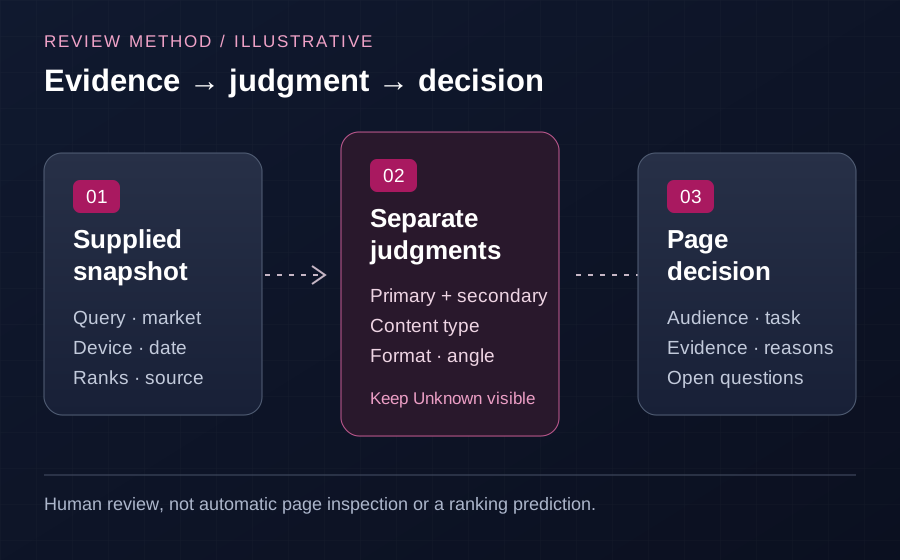
Turn the review into a page decision
Write down the audience, the task, the proposed page experience and the evidence behind your choice. Include the strongest supporting results and any important disagreement. Keep uncertainty attached to the decision so the next reviewer knows what still needs research.
When related queries need organizing, use the Keyword Cluster Generator with its supported inputs. A group shows a relationship worth inspecting; it does not establish that every query needs the same destination.
Record your chosen destinations in the Keyword Mapping Tool. A comparison, practical guide and product category can deserve distinct pages when they serve distinct tasks. Avoid creating near-identical URLs simply to target different wording.
Use the Content Brief Generator to develop the writing handoff from your reviewed audience, objective and outline. Include original evidence, examples and an accountable owner. A competitor pattern is a research observation, not permission to copy its headings or claims.
For a separate page comparison, the Competitor SEO Analysis Tool offers another review route. Keep the specific comparison evidence separate from your search snapshot and confirm that tool’s current requirements before relying on its findings.
Keep a useful review record
Download CSV and JSON reports retaining context, result evidence and the content decision. Review the exported fields before handing a report to another person. A report file is not an editable-project backup; no project-restoration or saved-history workflow is included.
Submitted search evidence and reports are not saved in WordPress. Shared abuse protection separately uses a salted IP hash, tool identifier and usage date. Hosting and verification-provider policies apply separately; the entire workflow does not stay on your device.
Clear evidence removes the records and clears the snapshot fields, returning the engine, device and depth to their defaults. Preserve any research you need before clearing. The built-in Example is explicitly illustrative and uses an older fixed observation date, so do not relabel it as today’s search.
Questions before relying on the review
Does this checker search Google for me?
No. It reviews entered or imported records. Collect your own permitted, dated snapshot and keep the search context with it. Choosing Google in the form identifies the source context rather than connecting a live ranking provider.
Are labels automatically accepted from the title?
No. You enter or import primary and optional secondary labels. English wording clues remain separate hints. Keep a row Unknown when you cannot support a classification.
Should a mixed sample become one page covering everything?
Not automatically. Several audiences or tasks may be represented. Choose a clear job for each page and document why a combined or separate experience would help the intended reader.
Can this review guarantee rankings?
No. It supports a content decision from supplied evidence. It does not establish demand, predict positions, verify a publisher or prove why an existing result ranks.
Choose a proportionate next step
Return to the SEO and content tools when the next question requires another check. Keep discovery, intent review, grouping, page planning and measurement connected through clear notes rather than treating any single report as a complete strategy.
If the evidence points to a wider campaign need, discuss SEO services with a concrete brief: target page, audience, market, reviewed search task, evidence gaps and budget.
For publisher selection, use the guest post marketplace as a separate commercial route. Confirm current relevance, availability, editorial requirements and approved delivery terms. Confirmed guest post orders include the agreed dofollow link and Google indexing guarantee under the review period and remedy written into the approved order.
Those delivery terms are separate from ranking, traffic or revenue outcomes. Resolve link qualification and required attributes explicitly with the approved order and publisher, taking applicable search-engine requirements into account; a search-intent label cannot decide them.
Methodology reading: Ahrefs on content types, formats and angles, Neil Patel on matching the visitor’s task, and Backlinko on inspecting result experiences. This independent checker does not use these publishers’ classification systems or reproduce their performance claims.
Plan relevant outreach
Share the page and audience your campaign needs to support.