
SOURCE → SNAPSHOT → REPAIR REVIEW
JavaScript
SEO Checker
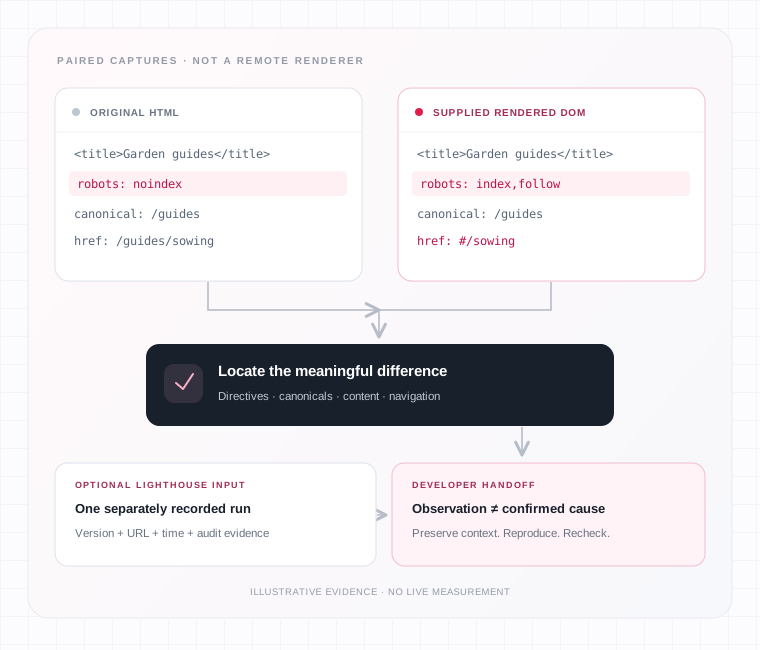
Compare the HTML a server sends with a rendered DOM snapshot you supply. Review differences in directives, canonicals, content and navigation, then add optional Lighthouse evidence when a recorded browser run can help explain what needs investigation.
Supplied evidence. Meaningful differences. No invented indexing verdict.
01 / YOUR COMPARISON WORKSPACE
Start with
matching evidence
Choose the original-source mode, supply the page URLs and HTML, add useful capture notes, complete the displayed verification and select Review JavaScript SEO.
Keep the original capture files. Similar address labels do not establish the same collection time, route, consent state or session.
02 / COLLECT COMPARABLE CAPTURES
Choose the
original source
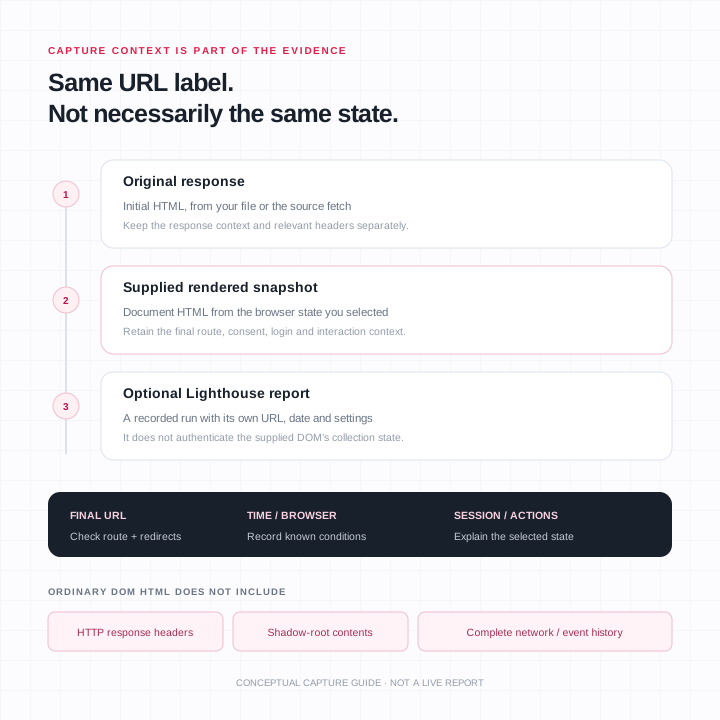
Original response HTML and a rendered DOM answer different questions. Decide which evidence you have before beginning the review.
Both modes still need your rendered DOM evidence. Keep the original file or response available so a developer can reproduce the observation. A copied passage from the page is not a complete substitute for the document context containing its title, directives and links.
For a different investigation, choose the relevant utility in the SEO and content tools directory. A clear question helps you collect the right evidence before reviewing a long list of differences.
03 / SUPPLY THE RENDERED SIDE
Capture the state
you want to investigate
A saved snapshot is a document representation. It is not a complete recording of everything a browser did.
Capture the DOM after the page reaches the state you want to investigate. Use your browser’s developer tools to inspect the document and copy its HTML, then paste it into Rendered DOM HTML or choose the saved DOM file.
Provide the Rendered snapshot URL as well. Check the final address after redirects and navigation. Comparing two captures labelled with similar addresses can still be misleading if one represents a different route, selected product option or application state.
A serialized HTML snapshot does not preserve every part of a browser session. It does not carry the complete network history, event listeners or HTTP response headers, and ordinary outerHTML serialization omits shadow roots. Keep those limits in mind when an application uses web components or depends on interactions beyond the captured state.
For a detailed source-versus-rendered comparison, the Rendered HTML Checker provides a separate route. This JavaScript review adds a repair-oriented interpretation, navigation candidates and optional Lighthouse browser-run evidence.
Leave a reproducible trail
Use Capture notes to explain the context another reviewer needs: browser, capture time, consent state, login state and any action required to reveal the relevant content. The current notes field allows up to 500 characters, so keep the summary focused and retain longer reproduction steps separately.
A logged-in view, country-specific response, experiment or consent choice can change content without establishing a JavaScript defect. A mobile menu and desktop navigation may also expose different markup intentionally. Compare equivalent states before asking a developer to change the application.
The two HTML captures and an optional Lighthouse report are separate pieces of evidence. Matching URLs alone do not prove they were collected at the same time. Preserve the original files and their context when the comparison will support a repair decision.
04 / DECLARATIONS BEFORE DIAGNOSIS
Start with the intended
page behavior
A changed directive or canonical deserves context. The desired state comes from the page’s purpose—not from making every finding disappear.
Directives that affect the intended page
An original response containing noindex deserves attention when the page is intended for indexing. Removing that directive later with JavaScript is not a dependable repair: Google may skip rendering after seeing the initial exclusion.
Check the initial response and the relevant HTTP headers. Pasted HTML does not include every response-header directive, so the absence of a meta tag cannot establish that all indexing restrictions are absent. Review the server and template configuration together when the intended behavior is unclear.
Keep deliberate exclusions where they belong. A private account page, error state or intentionally excluded duplicate should not be made indexable simply because the rendered snapshot differs.
Use the Indexability Checker for a separate review of crawl directives and indexability signals. Neither that signal review nor this snapshot comparison confirms Google’s current index status.
Canonicals and metadata in context
A page’s preferred canonical should remain clear across its original and rendered states. Investigate an application router or head-management component that replaces a declared canonical with a different target.
Resolve relative addresses against the correct page context before concluding that two values disagree. A relative canonical and an absolute one may identify the same destination. Conversely, similar-looking paths on different hosts or protocols may identify different targets.
Titles and descriptions also deserve a direct look when they change. Confirm the actual wording and template behavior rather than assuming that every difference is harmful. A selected route, language or product can explain an intentional update.
For a focused canonical investigation, use the Canonical Tag Checker. A declared preference remains different from evidence that Google selected that canonical.
05 / FOLLOW THE MEANINGFUL CHANGE
Content and navigation,
not just counts
Locate the passage or destination behind the difference. A changed number does not explain what a visitor gains or loses.
Find the content that changed
Treat a changed word count as a clue. Locate the specific passage, heading or destination that appeared, disappeared or changed meaning. A higher number does not prove better content or a successful JavaScript repair.
If useful content exists in the original response but disappears in the rendered capture, investigate the rendering and hydration path, data requests and conditional states. If important content appears only afterward, confirm that its required scripts and data complete in a suitable clean-session reproduction.
Browser parsing can also normalize HTML before application code runs. Differences in serialized markup are therefore not automatically proof that JavaScript caused a problem. Concentrate on the content and declarations that affect the page’s purpose.
An empty capture needs context too. It may represent a loading state, an error, an incomplete copy or a different session. Establish which situation occurred before calling it a confirmed content-loss bug.
Review navigation candidates
Compare the actual anchor and its href, along with the destination’s role. An element styled as a link or an anchor with only a click handler may not expose the same crawlable address as an ordinary hyperlink.
/guides/sowing#/sowingA route such as #/sowing deserves a different investigation from a link to a normal section such as #planting-notes. Both contain a hash, but they serve different purposes. Do not rewrite functioning in-page navigation merely because it uses a fragment.
Check whether a changed destination still represents the intended page and whether the application can reproduce the route. A navigation candidate is not proof that a URL returned an error, and this comparison should not be treated as a verified status check of every destination.
06 / OPTIONAL RECORDED BROWSER EVIDENCE
Add Lighthouse context.
Keep its boundaries.
The imported report describes one recorded run. It is a separate artifact—not a new browser execution or proof that the supplied DOM came from that run.
Use a relevant report
Open Lighthouse evidence (optional) to paste a Lighthouse JSON report or choose its JSON file. Use a report associated with the page and state you are investigating, and keep its original version, final URL and run time available.
The imported report describes one recorded browser run. It does not turn the checker into a live renderer or prove that the supplied DOM was captured during that run. A report collected before a deployment may still help investigation, but its date must remain visible in the handoff.
Supported console and resource evidence can help identify a question worth reproducing. The report’s audit identifiers and data structures matter; an unfamiliar or missing audit must not be treated as a pass.
For performance evidence, use the Core Web Vitals Checker separately. A Lighthouse navigation and real-user field measurements describe different populations and should not be blended into an indexing or ranking conclusion.
Read errors without inventing a cause
A recorded error is a starting point for investigation. Trace the message to its source, reproduce the affected action and establish what the visitor loses. A failing analytics request and a failing request for the article body can have different consequences.
503A recorded HTTP response. Keep it tied to its run, request and effect.
0No recorded HTTP response. Zero is not an HTTP status code.
nullNot a numeric score. Read the display mode and available detail.
Keep recorded response statuses distinct from unavailable response evidence. The page’s documented interpretation of status zero is that no HTTP response was recorded; zero is not an HTTP status code.
Likewise, an informative audit with a null score is different from a scored audit that failed. The available details may still be useful. Do not replace an unavailable audit with an invented green status, or count two references to the same failed request as two independently confirmed incidents.
07 / AN ILLUSTRATIVE COMPARISON
From an observation
to a better question
Supplied demonstration inputs. The public Example button loads inputs for https://example.com/guides. It does not perform a live measurement or prove a real website has these problems.
| Supplied example evidence | Observation | Useful next investigation |
|---|---|---|
Original robots value noindex; rendered value index,follow | The two inputs disagree about the directive | Check the intended initial response and headers |
| Title and relative canonical stay the same | Those supplied fields show no change | Keep the wider page context in view |
Link changes from /guides/sowing to #/sowing | A path destination becomes a hash-route pattern | Review the application’s routing and discoverability |
| Rendered paragraph adds “Choose a guide below.” | The supplied text changes | Confirm the capture state and intended content |
| Lighthouse input records a Fetch response of 503 | The illustrative run includes unavailable guide-data evidence | Reproduce the request and its effect on the page |
These observations come from reading the example inputs independently, not from a generated checker report. The Lighthouse input declares version 13.0.0 and a run time of 1 September 2026. It contains one console detail and one network-request detail referring to the guide-data endpoint.
The combination does not prove that the route change caused the request failure or that a developer has already found the cause. It demonstrates the kind of evidence that can support a focused repair review once the actual behavior is reproduced.
08 / MAKE THE HANDOFF REPRODUCIBLE
Preserve the evidence.
Repeat the comparison.
A useful developer handoff separates what was observed from the explanation still being investigated.
- 01
State the intended behavior
State the page, intended behavior, capture conditions and exact difference. Include the original and rendered evidence and the relevant recorded request or console message. Separate what was observed from the explanation still being investigated.
- 02
Keep the limitations with the repair findings
The documented workflow includes exporting repair findings. Keep the source evidence and unresolved limitations with any exported summary, and inspect the offered file before relying on its coverage. A convenient repair list does not authenticate a supplied snapshot or establish the root cause.
- 03
Recheck equivalent states after a change
After a change, repeat the comparison with equivalent page states. Check that the intended directive, content or route now behaves correctly, then perform any appropriate Google-specific verification separately. A changed local snapshot is not Google’s updated indexed copy.
09 / HANDLE CAPTURES THOUGHTFULLY
Supply only evidence
you are permitted to share
HTML and lab reports can contain more than the headline you intended to investigate.
Use captures and reports you are permitted to share. Saved HTML or Lighthouse data can contain private URLs, account content or other details beyond the visible headline. Remove confidential material and confirm the relevant handling before supplying sensitive evidence.
The current URL fields allow up to 2,048 characters. The HTML/DOM file controls list HTML, HTM and TXT files; the optional report control lists JSON. These input controls do not establish an unlimited processing allowance or compatibility with every saved-page format.
10 / TECHNICAL WORK, CLEARLY SCOPED
Keep campaign decisions
separate from findings
If several technical observations need a coordinated investigation, discuss the pages and agreed deliverables through SEO audit services. Define the work before treating a collection of findings as a complete repair project.
If outreach is a separate priority, review guest-post publisher options against your audience and confirmed placement requirements. A JavaScript finding does not establish a publisher’s backlink value or create a ranking guarantee.
11 / QUESTIONS & BOUNDARIES
Know what the
comparison can tell you
Meaningful differences are investigation leads. They are not automatic diagnoses or evidence of Google’s current indexed state.
Does the checker run JavaScript for me?
No. Supply the rendered DOM snapshot. Fetch source mode retrieves initial HTML only.
Does a difference prove a JavaScript bug?
No. Capture conditions, intentional page states and browser parsing can also explain differences. Reproduce the meaningful behavior before assigning a cause.
Does an initial noindex matter if the DOM removes it?
Yes, when the page is intended for indexing. Correct the initial response and inspect relevant headers rather than relying on later removal.
Is every console message an SEO failure?
No. Review the recorded message and its effect on the page’s purpose. Missing evidence and unrelated errors should remain distinct.
Can it confirm what Google indexed?
No. Use the relevant indexed and live evidence available in Search Console URL Inspection for a verified property, with those two states kept separate.
12 / OPTIONAL CAMPAIGN ENQUIRY
Discuss the scope
before the next step
Share the page and the work you want reviewed. This enquiry is separate from the checker and is not a confirmed order or a promise of rankings.