
Competitor SEO Analysis Tool
Compare your page with competing pages before deciding what to change. Inspect titles, headings, topic phrases and technical declarations side by side, then save the evidence with your next actions.
Choose a fair comparison
Start with the query and the audience your page should serve. Look at the current search results for that market, then choose pages that help people do the same job. A product category, a buying guide and a repair tutorial may mention the same subject without being useful comparisons.
Your closest search competitor may not be a competing business. For a workshop-lighting guide, a specialist publication could be more relevant than another lighting supplier’s homepage. Use the specific page URL, not the whole domain. The Search Intent Checker can help organize your observations before you compare the pages.
Bring the evidence
Live mode requests each selected page’s initial HTML. It does not run JavaScript, log in or bypass access restrictions. Snapshot mode accepts a complete HTML document pasted or uploaded from your own inspection. Add its source or date so you can distinguish an older saved page from a recent observation.
The query and audience fields record your comparison context; they do not trigger a Google search. Topic phrases are optional. Use specific questions or terms you genuinely want to check, one per line. The report finds literal matches, not synonyms or hidden search-demand data.
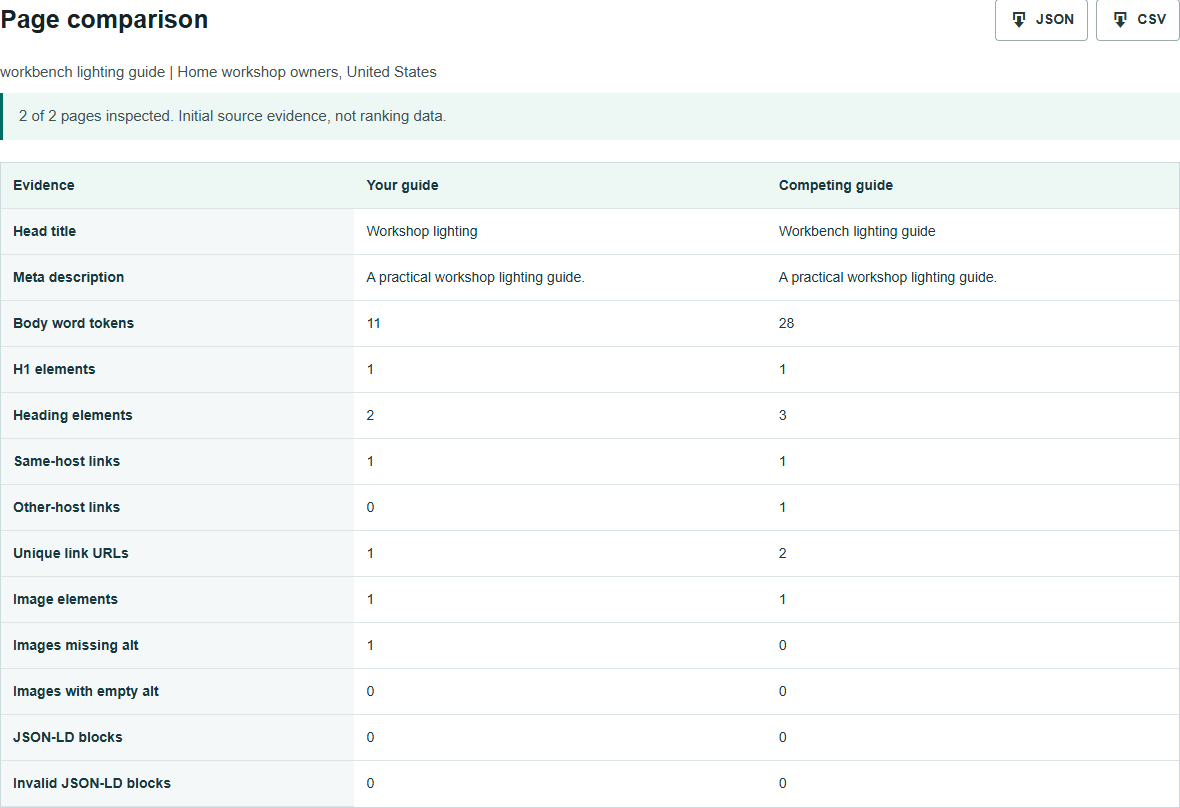
Read the differences
Open each page’s evidence before editing. Two title declarations, an unexpected noindex instruction or a missing H1 warrant investigation. A canonical declaration shows what the HTML says, not which URL Google selected. An empty alt attribute may be correct for a decorative image; a missing attribute requires a look at the image’s purpose.
Counts describe the supplied pages. They are not targets. A competitor with more words might explain a difficult step well, repeat itself or carry a larger navigation menu. Parsed text excludes scripts and explicitly hidden subtrees but still includes navigation and footer text. Inspect the actual section before deciding it belongs in your article.
Same-host and other-host links are links on the inspected page, not backlinks pointing to it. Declared JSON-LD types show the markup’s stated types, not eligibility for a Google rich result. An unavailable competitor is marked uninspected rather than given zero words or links.
Find a useful change
Suppose both lighting guides discuss bulbs, but only the competing page mentions glare and installation. That is a reason to inspect those sections, not an instruction to copy them. Does your reader need mounting advice? Could an original photograph, measured example or clearer explanation resolve a question your page leaves open?
A useful action note names the problem, the evidence and the change: “Add a diagram showing lamp position because the current guide never explains how to avoid direct glare.” “Add 500 words” does none of those things. Google does not prescribe a preferred word count, and matching every competitor heading does not establish quality.
Save the report and your notes as JSON or CSV. For an editorial handoff, use the Content Brief Generator. For differences between initial HTML and a browser DOM snapshot, use a rendering check rather than treating this source comparison as a visual audit.
Know what is missing
This is a selected-page SEO comparison, not a domain-wide competitor intelligence database. It cannot tell you a competitor’s traffic, rankings, backlink profile or why Google ranks a result. It does not establish indexation, inspect robots.txt or evaluate HTTP X-Robots-Tag directives. A page that looks complete here can still have other technical or editorial problems.
No submitted HTML or report is saved by this plugin. Keep your own downloaded copy when needed. Live requests are visible to the destination server. Shared abuse protection records a salted IP hash, tool identifier and usage date; hosting and verification-provider policies apply separately.
Questions
Does this compare entire websites?
No. It compares your chosen page with one or two competing pages. Live mode reads their initial HTML; snapshot mode reviews the complete HTML you provide.
Does the report show traffic or rankings?
No. Those require search or analytics data. This report contains observed source-page evidence, not estimated rankings, authority or visits.
Are missing topic phrases content gaps?
They are review prompts. Matching is literal and case-insensitive, not semantic. A page may explain a subject with different wording, and not every competitor section belongs on your page.
Why can a competitor fail?
A page can block automated access, redirect to a private destination, time out, return non-HTML or exceed the input limit. Failures stay separate and are never converted to zero-value comparisons.
Plan relevant outreach
Share the page and audience your campaign needs to support.