
Keyword Cluster Generator
Turn a supplied keyword list into groups worth reviewing. Compare shared words for a first pass, or use imported organic-result URLs when you have a complete search snapshot for each query.
Open the matches behind a group before deciding that its keywords belong on one page. A group can contain a direct relationship, an indirect connection through another keyword, or terms that still need separate treatment. Clustering organizes evidence; it does not finish the editorial decision.
The generator works with your inputs. It does not fetch current Google rankings, invent search volumes, calculate keyword difficulty or automatically assign search intent. Keep your source research and the purpose of the planned page alongside the grouping report.
Start with a list relevant to your audience
Choose keywords that concern the products, services or questions you can cover well. Keep one language and market together. A neatly organized group around an irrelevant subject is still a poor reason to publish a page.
Put one keyword on each line. Remove accidental clutter before grouping, but keep meaningful modifiers. Words such as free, without, a location or an audience can change what a reader needs. Similar wording does not guarantee the same answer.
Use the SEO tools hub to select a different workflow when your question concerns demand, existing page performance or a technical restriction. This tool compares supplied words or result addresses; it does not create the missing evidence for those other questions.
Keep a copy of the original research. If you change ignored tokens, thresholds or imported results later, you will need that source material to understand why the groups changed.
Choose the evidence you want to compare
| Method | What you supply | What a match represents |
|---|---|---|
| Word overlap | Keywords and any explicitly ignored tokens. | Shared distinct words as a proportion of the words across both phrases. |
| Imported results | Complete top-five or top-ten organic URL lists and their search context. | Enough matching page URLs to meet your selected minimum. |
Word mode is useful when sorting an early research list. Imported-results mode asks a different question: do the same pages appear in the supplied results for these queries? Neither method proves that one page should target every keyword in a resulting group.
If the expected answer is unclear, use the Search Intent Checker to review a supplied search snapshot. Compare page types and what the visitor can accomplish. A guide, category page, comparison and interactive tool can use related words while serving different needs.
Understand word overlap
Word mode compares distinct tokens, ignoring case and word order. Repeating a word does not increase its importance. The score is the number of shared tokens divided by the number of distinct tokens found across both phrases.
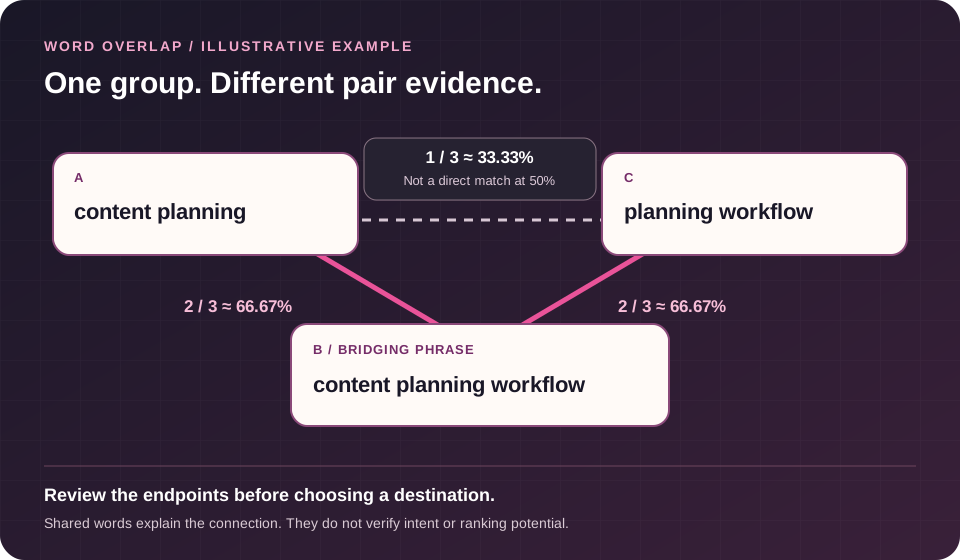
For example, “content planning” and “content planning workflow” share two words from a combined set of three. Their overlap is two-thirds, or about 66.67%. At a 50% threshold, they qualify as a direct match.
The method does not use stemming, a synonym model or an automatic stop-word list. Related meanings can therefore remain separate when their words differ. Conversely, shared words can conceal an important difference in purpose. Read the phrases before treating a mathematical match as an editorial instruction.
Use ignored tokens deliberately. Removing a common brand or other unhelpful token may make a list easier to inspect, but removing negations or audience modifiers can erase the distinction you need to preserve. Do not make groups larger simply by discarding the words that explain the difference.
Check the indirect connections
The public Example supplies six illustrative keywords. Three form a useful explanation of an indirect connection:
| Pair | Shared / combined distinct words | Overlap | Direct match at 50%? |
|---|---|---|---|
| content planning / content planning workflow | 2 / 3 | About 66.67% | Yes |
| content planning workflow / planning workflow | 2 / 3 | About 66.67% | Yes |
| content planning / planning workflow | 1 / 3 | About 33.33% | No |
The three phrases can still belong to one connected group because the middle phrase links the shorter ones. Group membership does not mean every pair meets the threshold. The generator flags these indirect connections and shows the group’s lowest pair value.
The other Example terms are “editorial calendar,” “editorial calendar template” and “newsletter welcome email.” Independently applying the documented rule at 50% gives a matching calendar pair and a separate newsletter keyword. These calculations explain the supplied example; they are not verified output from a generation request.
Raising the threshold can split groups, but no threshold turns word overlap into verified intent. A stricter number may also separate useful related terms. Choose a setting that supports review, then inspect the evidence behind the result.
Inspect the relationship, not just the group label
Use the report as a review workspace. Keep the calculation, source coverage and next decision separate.
Compare any two supplied terms
Inspect a pair even when it is not a qualifying direct match. In word mode, read the shared-token numerator and combined-token denominator alongside the threshold. Display rounding does not decide whether the pair qualifies.
See what the word rule used
Review the tokens retained for each phrase and the explicit exclusions that removed evidence. A phrase with no usable tokens needs correction; it is not treated as a perfect match. This is a word rule, not a semantic or intent model.
Keep missing observations visible
In imported-results mode, inspect selected-depth coverage and missing positions. Complete terms with no qualifying partner remain distinct from terms that could not be compared. Shared URLs are page counts, not confidence percentages.
Take the reasoning with you
Use the text handoff alongside the existing full report, Mapping CSV and project downloads. Preserve the selected method, settings and unresolved cases so another reviewer can follow the same decision trail.
Prepare imported organic results
Imported-results mode needs a complete set of organic page addresses for each query at your selected depth. Choose top five or top ten, then set the minimum number of shared URLs needed for a direct match.
Use CSV or TSV with exactly these three headers:
keyword,url,positionPut one organic result on each row. Every position within the selected depth must be present, and the addresses must be distinct for that keyword. Two rows showing positions one and two explain the format, but they are not enough for a top-five comparison.
Keep advertisements, map results and other search features out of the organic list. Declare one search engine, country or market, language, device and capture date for the batch. Add a source note so another reviewer can understand how the snapshot was collected.
Do not mix locations, dates or devices under a single context label. A keyword can return different pages in a different setting. Matching text labels in the form also cannot establish that an export was collected with those settings; check the source before importing.
Read shared URLs as a count
The minimum-shared-URLs setting counts matching page addresses. It does not count matching domains. Two different pages on the same website remain different results.
Suppose two complete top-five lists share three page URLs. At a minimum of three, that pair qualifies. This is a statement about the supplied lists, not a 30% ranking probability, a traffic forecast or proof of a common search intent.
Matching URLs receive equal weight within the selected depth. A page does not contribute more to the match merely because it appears first in one list and fifth in another. Position identifies which observations belong in the selected depth; this method does not add a rank-weighting score.
Indirect connections can occur here too. Query A may share enough URLs with B, and B with C, while A and C share too few. Review the direct-pair evidence and the group’s weakest relationship before assigning all three to one destination.
Keep incomplete evidence visible
A keyword without a complete result set remains visible as not compared. That differs from a complete keyword with no qualifying match. Missing research does not establish that a term deserves its own page or has a unique reader need.
Repeated rows at the same position collapse when their matching URL is identical. Conflicting URLs at one position, or the same URL at different positions, need correction. Resolve the source evidence rather than selecting an arbitrary winner to fill the list.
The importer rejects unexpected columns. Keep batch context in the dedicated fields instead of adding a country or date column that might otherwise be ignored. Review your export preparation before removing data you may need for a separate analysis.
Importing replaces the result rows and adds their keywords to the current list. Existing keywords remain, so the project can contain terms with no imported results. Check that the intended list and snapshot are still active before generating a new report.
Understand the URL matching rules
Imported-result matching ignores hostname case and URL fragments. It preserves protocol, path case, query strings and trailing slashes. Those rules concern address matching, not whether the destination content is equivalent.
For example, two fragment links to the same matching address can count as the same result, while two different paths on the same domain cannot. Do not remove every query parameter or trailing slash merely to create more matches.
The tool does not follow redirects or inspect canonical tags. If two addresses genuinely represent the same page, verify that separately and prepare a consistent source file. The Canonical Tag Checker can support a separate investigation of declarations; a declaration is not proof of Google’s selected canonical.
Generate and inspect the groups
- Choose the mode. Decide whether the task needs word similarity or a comparison of imported result URLs.
- Prepare the keywords. Keep relevant phrases, one per line, with their meaningful modifiers.
- Set the rule. Choose a word-overlap threshold or result depth and minimum shared URLs.
- Check the evidence. Review ignored tokens in word mode; review completeness and context in imported-results mode.
- Complete verification. The displayed code expires after ten minutes and works once. Request a replacement when necessary.
- Generate the review. Inspect groups, individual keywords and any not-compared cases.
- Open the direct matches. Read the words or URLs that connect the terms, including indirect-connection warnings.
- Save the evidence. Download the full report or a project draft before leaving the page.
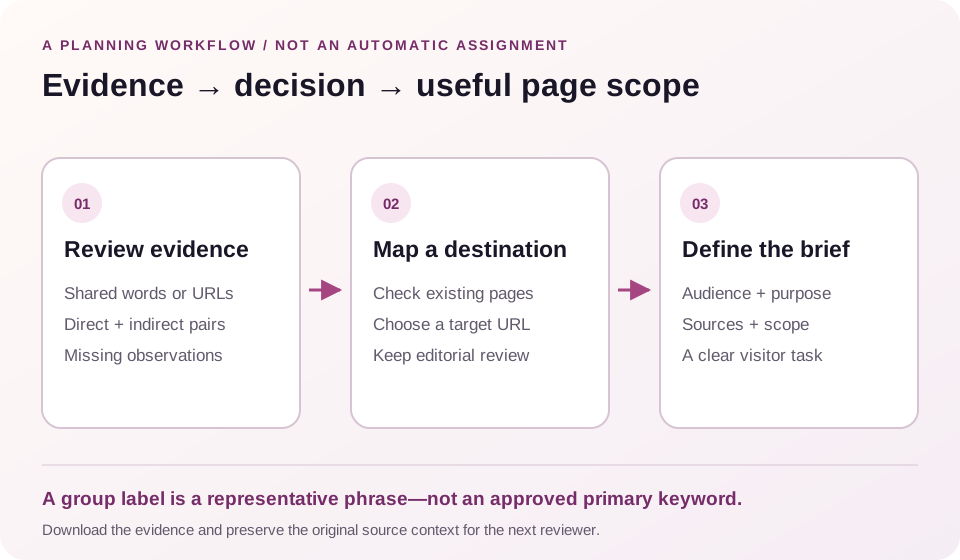
Group labels are representative supplied keywords. They are not automatically chosen primary targets. A single keyword remains useful evidence too: it simply has no qualifying partner in the supplied comparison.
Search and filter the report when working through a larger list. The documented downloads retain the full report, rather than only the current screen. Keep that distinction clear when passing a report to another reviewer.
Turn reviewed groups into page assignments
Export the Mapping CSV and open it in the Keyword Mapping Tool. Each keyword starts with a blank target URL, unknown intent and a review action. Those defaults leave the editorial choice with you.
Choose a primary phrase and destination only after reading the queries, reviewing the relevant results and checking existing pages. Several phrases may belong on one useful resource. Another phrase in the same connected group may need a different page or no new content at all.
Once destinations are agreed, use the Topical Map Generator to arrange the pages and their relationships. A topic structure should express a sensible visitor journey, not just reproduce the largest mathematical cluster.
For an individual page, use the Content Brief Generator to record the audience, purpose, evidence and scope. Explain what the page should help someone accomplish. A list of matching terms is not a complete writing brief.
Save a draft and retain the source context
Save a project JSON to keep inputs and settings. The published workflow also supports restoring inputs from a report JSON. Restored inputs are material for a new review, not evidence that the old result represents a fresh search snapshot.
Projects are not automatically saved in your browser or stored as WordPress content. Download what you need before leaving. Retain the original research and a note about any changes made during preparation so you can explain a later grouping difference.
CSV exports prefix spreadsheet formula-like values with an apostrophe; JSON retains the original text. Preserve the JSON when original wording matters. This documented precaution should not be treated as a guarantee of identical behavior in every spreadsheet application or after repeated saving.
No export changes your website. Assigning a URL in a planning workflow and publishing or consolidating an actual page remain separate actions.
Questions about keyword clusters
Does the tool fetch live Google results?
No. Word mode compares supplied text. Imported-results mode compares supplied organic URL lists from one declared context. You collect that evidence separately; the generator does not measure search volume or fetch current rankings.
Should every keyword in a group target one page?
Not automatically. A connected group can contain pairs that do not directly qualify. Even a strong direct match still needs a review of reader need, existing coverage and the expected page format.
Is a singleton evidence that I need another page?
No. It means no qualifying partner was found in the supplied comparison. It may still belong with other content after editorial review, or it may not be worth targeting at all.
What happens to incomplete imported lists?
The term remains visible as not compared. Provide every position in the selected top five or top ten with distinct URLs before expecting a result-based comparison. Do not interpret missing evidence as a failed match.
Can I compare mixed markets in one project?
Keep a single declared search context for an imported batch. Separate exports from different markets, languages, devices or capture dates so the relationships remain interpretable. A shared keyword spelling does not make those observations interchangeable.
Will a group prove that a page can rank?
No. The report describes a relationship in the supplied evidence. It does not measure ranking probability, validate demand or establish the cause of another page’s position. Use it to improve a review process, then make the content decision with wider evidence.
Discuss a defined content plan
Bring the reviewed topics, intended audience, existing destinations and open questions when requesting help. A clear brief explains what is uncertain and what work would resolve it.
Review available SEO services when you need support scoping that work. Keep page planning, technical investigation and campaign delivery tied to an agreed objective.
If publisher outreach fits the approved plan, review guest posting options and share your target page, niche, market and budget. Confirm availability and delivery terms separately. A keyword group alone does not establish a need to buy links or guarantee a ranking outcome.
Return to the generatorShare the question your plan needs to answer
Include your audience, target market, existing pages and the uncertainty you want to resolve. Do not include passwords or private account information.
Explore the planning method
These practical guides provide wider planning context. Their provider-derived topics and recommendations are not this tool’s calculations or a guarantee that one group belongs on one page.