
Open Graph Checker
Inspect the title, description, URL and images declared for a page’s link preview. Find missing or conflicting metadata, review each image’s properties, and optionally check the first image’s response and dimensions.
Start with the shared URL
Paste the exact address someone would share, not just the site’s homepage. An article, product page and category page can use different templates and metadata. A correct homepage preview does not tell you whether a specific article is ready to share.
URL mode requests the page’s server-returned HTML. It records the final address and any followed redirects. Pasted HTML mode is useful for reviewing a draft or comparing a copied source before a release. The supplied page URL gives relative references their context; it does not turn pasted code into a verified live response.
Read the first value
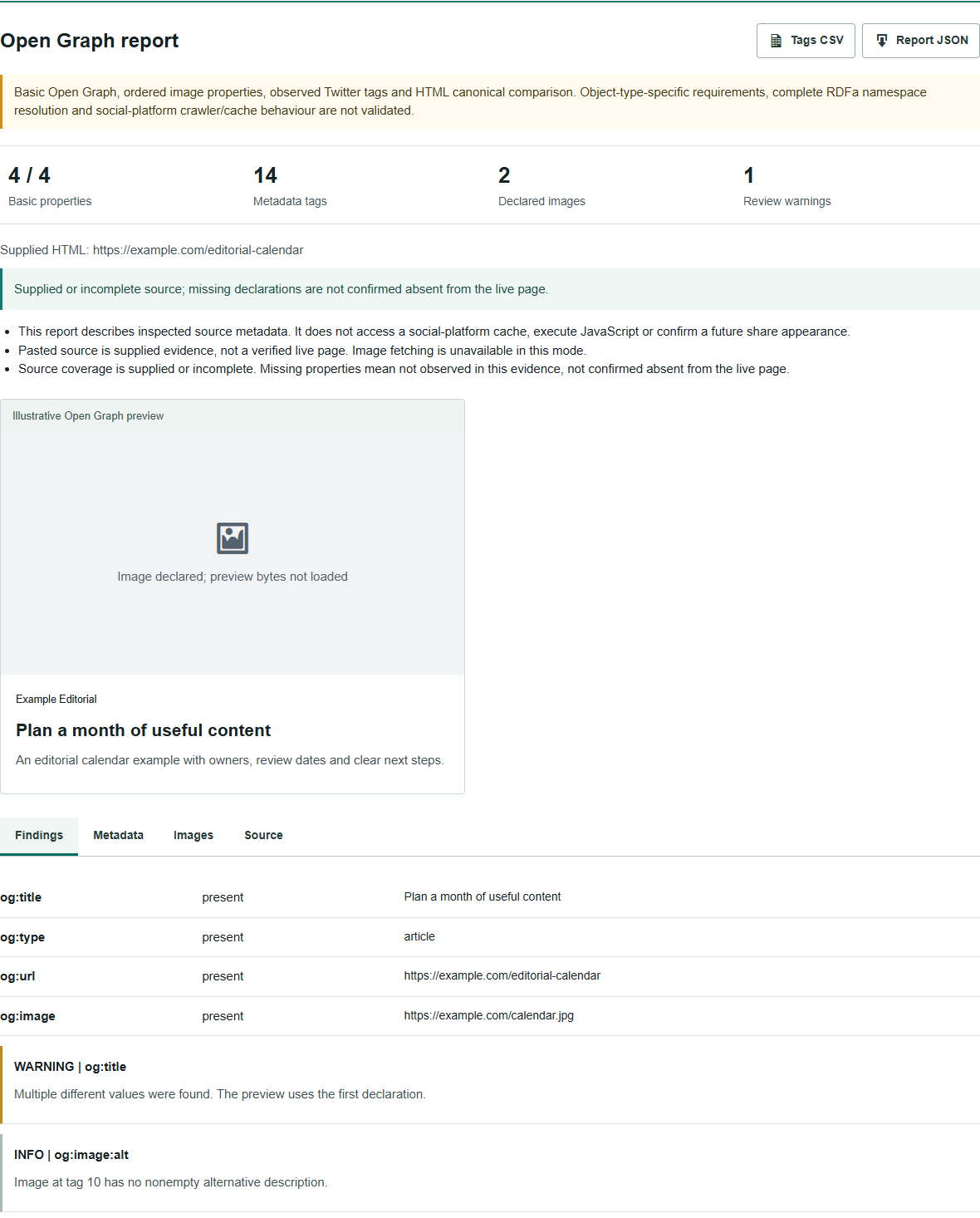
The Open Graph protocol defines four basic properties: og:title, og:type, og:url and og:image. It also supports a description, site name and other metadata. This checker keeps declarations in source order instead of quietly selecting the most appealing value.
That makes conflicts easier to spot. Your SEO plugin might output the current title while the theme prints an older one earlier in the head. Both tags exist, but merely counting them would miss the problem. The report shows the first declaration and identifies conflicting values. An empty first value stays visible rather than being replaced by a later, nonempty one.
Review which component owns the output before editing. On WordPress, inspect the page’s social settings, the active SEO plugin and any custom head snippets. Keep one clear source for singleton properties such as the title. Do not remove an entire plugin simply because it appears in the source; establish which component produced the conflicting tag.
Keep image alternatives
Multiple og:image roots can be intentional. The protocol gives the first image preference and associates structured properties with the preceding active root. A width belonging to the second image should not be used to describe the first. The Images view preserves that relationship, including image URL aliases and optional alternative descriptions.
Declared width and height are only claims in the HTML. Select the optional image check to request the first preferred image through the checker and inspect its actual dimensions. Where supplied, a supported HTTPS secure alternative is preferred. Other declared images remain listed without being silently fetched.
A mismatch gives you a practical investigation point. You may have replaced the image file but left old dimension tags, or the declared URL may serve a different asset. Compare the observed final URL and format before deciding what to change. The report does not prescribe one universal image size for every platform.
A preview is not a promise
The preview is an illustration assembled from the inspected Open Graph values. It does not read a platform’s cached copy, simulate its crawler identity or submit a real social post. If image verification is not selected, the image area remains unfilled rather than loading an external image into your browser automatically.
A link can still look different after sharing. The platform may have an older response, choose another declared image or apply a different crop. A website can also return different content according to location, browser identity or access restrictions. This report establishes what this checker received at its recorded time, not what every other service receives.
After correcting a live page, inspect the source again. Then use the relevant platform’s own inspection or refresh workflow, where available, to investigate its cached result. Repeatedly changing a correct title is unlikely to help when you are looking at an older saved preview.
Check the page head
The Metadata view shows the original property, value, attribute and location. Tags outside the head, incorrectly named Open Graph attributes and unsupported URL forms are kept as evidence but excluded from the illustrative preview. Template and noscript content is not treated as active head metadata.
The checker also compares the first supported Open Graph URL with the first HTML canonical. A difference is a review warning, not an automatic instruction to make them identical. Confirm which address represents the page and whether the difference is intentional. The Canonical Tag Checker provides a more focused canonical review.
Observed twitter: tags are included in the metadata table, but this release does not certify an X Card or model platform-specific fallback rules. It is a basic Open Graph and image-property checker, not a full validator for every article, music, video or custom object type.
Keep a useful report
Search the Metadata view to isolate a property or URL. Export the inspected tags to CSV for a review sheet, or download JSON for the findings, image evidence and response context. Filters affect the on-screen table; downloads keep all reported records. The JSON download excludes the image’s embedded preview bytes.
Source and optional image requests are bounded. A large response may be only partly inspected, and an unsupported or blocked image may remain unverified. Those limits appear in the report. An incomplete check should not be read as confirmation that the live page lacks a tag or that its image is broken.
The plugin does not save your submitted HTML or report in WordPress. Shared abuse protection records a salted IP hash, tool identifier and usage date. Hosting and verification-provider policies apply separately. Avoid submitting private source code, credentials or material you are not authorised to share.
Related checks
Use the Meta Tag Generator when you need to prepare metadata rather than inspect it. The SEO Checker covers broader on-page observations. A share-preview issue is a different question from whether a page can be indexed; the Indexability Checker reviews that technical evidence without claiming to know Google’s private index state.
Questions
Will the preview match Facebook or LinkedIn exactly?
No. It is an illustrative preview built from the first inspected Open Graph declarations. Platforms can choose different images, crops or cached values. This checker does not query their caches.
Why are multiple og:image tags not always an error?
A page can declare an ordered set of images. Each image keeps the structured properties that follow its root. Review conflicting dimensions or misplaced properties without removing intentional alternatives.
Does pasted HTML prove my live tags are correct?
No. Pasted HTML is supplied evidence. URL mode fetches a fresh server response without running JavaScript. Neither mode proves what a social crawler has stored.
Does the checker change my website?
No. It inspects the submitted page or HTML and returns a report. It does not edit metadata, post to social accounts or clear a platform cache.
Discuss your content
Share the page and audience you want to reach through publisher outreach.