
Useful mobile content / Reachable customer actions
Mobile SEO Services
Help phone visitors reach the information they need
A page can fit inside a phone screen while its menu hides important destinations, its enquiry form becomes difficult to complete or its mobile version omits useful information. Mobile SEO work starts with the pages people need and the tasks they should be able to finish.
Request a defined review of mobile content access, page relationships, navigation, controls and relevant performance evidence. The proposed engagement turns observed problems into priorities, implementation requirements and checks for an agreed release. Your quotation confirms whether the work includes investigation, developer specifications, supported configuration changes or release support.
Start with a specific mobile problem
You might be investigating a mobile traffic change, checking a new theme, repairing an enquiry journey or maintaining separate mobile URLs. These situations need different evidence. Identify the affected pages, markets and customer actions before treating every warning in an automated report as equally important.
The Mobile SEO Checker reviews supplied mobile HTML or a DOM snapshot, with optional matching desktop and Lighthouse evidence. It does not run a mobile browser, resize a live page or certify indexing or accessibility. Its observations can help frame the next investigation; a layout or interaction question still needs appropriate browser evidence.
Agree the scope around your website
Representative pages should cover the templates and states relevant to the problem. An article, product page, location page and booking form can behave differently. Browser, device, language, consent and login state can also change the result.
Price, timing, supported implementation work and follow-up belong in the quotation. Platform guidance alone does not establish which development work can be provided for your installation.
Request a mobile SEO quote with your website URL, main concern and any planned release. Public examples are enough to begin defining the work; private reports or customer data can be discussed separately.
Preserve useful content in the mobile version
Google’s mobile-first indexing guidance explains that its smartphone crawler’s view supplies content for indexing and ranking. Review what the mobile version actually delivers, including primary information, meaningful headings, metadata, relevant media and structured data.
A different layout does not require identical presentation. Moving useful information into an accordion can be appropriate when that content is already available in the document. Removing it from the mobile version, or fetching it only after a user clicks, presents a different question.
Compare equivalent page states
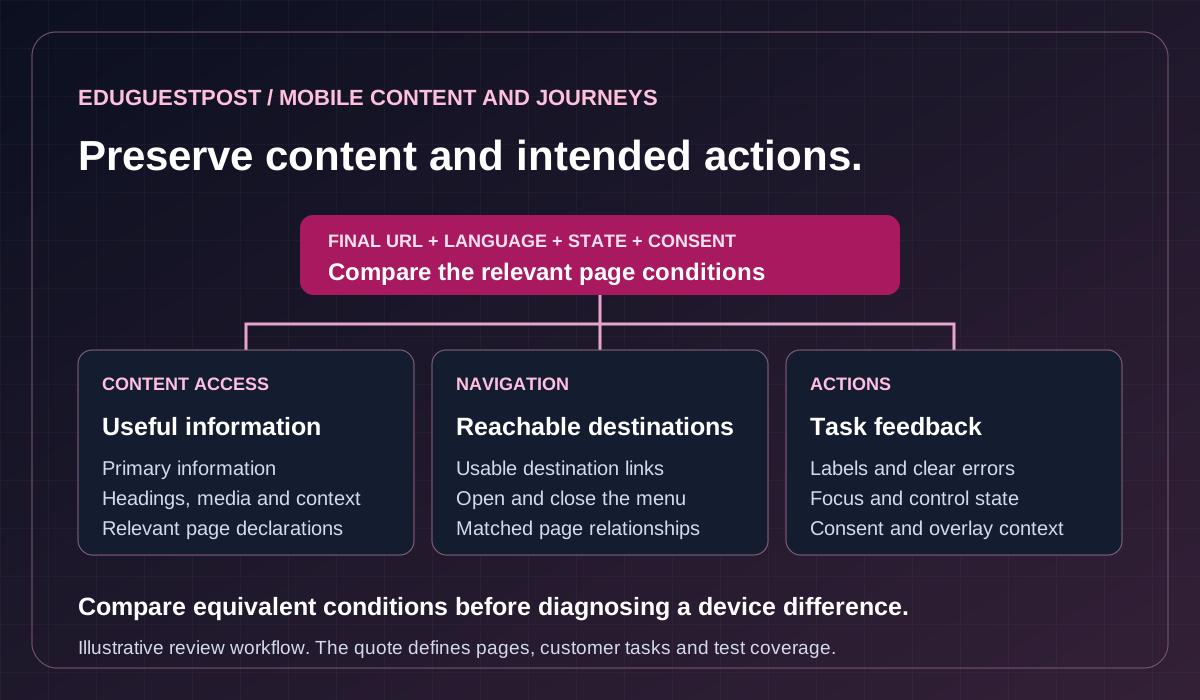
Match the final URL, language, selected product or location, login status and consent choice before comparing documents. A desktop capture made before a release and a mobile capture made afterward can differ for reasons unrelated to the device.
The Rendered HTML Checker compares initial source with a browser DOM snapshot you supply. It does not reproduce Google’s rendering, inspect every failed resource or explain the JavaScript responsible for a difference. A source-to-DOM change helps identify what needs investigation; it does not prove that Google failed to index the content.
Keep discovery separate from visual behavior
Google’s lazy-loading guidance distinguishes content that becomes available without user interaction from content dependent on clicks or other actions. Do not apply lazy-loading indiscriminately to the main content or image someone needs immediately.
Review mobile navigation against Google’s crawlable-link guidance. A working menu can still expose destinations through a click handler rather than a usable link. Check the actual link markup and destination as well as whether people can open, understand and close the menu. The release check should cover both discovery and the relevant customer action.
Check the website configuration before changing URLs
Responsive design, dynamic serving and separate mobile URLs require different investigations. Identify the current arrangement and its owners before recommending a theme change, canonical edit or redirect. A mobile problem does not automatically require a new URL structure.
Scroll across to explore all columns.
| Configuration | What needs review | Useful acceptance evidence |
|---|---|---|
| Responsive layout | Shared content and instructions, responsive components and actual controls. | Matching page content plus browser checks at relevant widths and states. |
| Dynamic serving | Device-dependent responses at the same URL, headers and content equivalence. | Recorded requests and responses with device and cache conditions identified. |
| Separate mobile URLs | Corresponding pages, canonicals, alternates, language relationships and routing. | A page-pair map with declarations, response outcomes and tested destinations. |
Preserve the intended page relationship
For a separate-URL arrangement, inspect the desktop canonical, the mobile page’s canonical back to its corresponding desktop page and the desktop mobile-alternate declaration. Review actual equivalents rather than sending every mobile visit to one homepage. Error states and regional relationships also need the correct corresponding destination.
Google’s canonical guidance treats declarations as preferences. The Canonical Tag Checker provides declaration evidence and conditional destination observations; it does not identify Google’s selected canonical. Redirect behavior, HTTP headers and recorded Google indexing need their own evidence.
For script-dependent templates, the JavaScript SEO Checker supports original-source versus supplied-DOM review with optional recorded Lighthouse evidence. It does not run the target JavaScript or reconstruct the complete browser session. Agree the capture conditions and any further investigation needed.
Google’s retirement notice confirms that the Mobile-Friendly Test and Mobile Usability report were retired. A current mobile review should use available evidence and browser testing rather than depend on those historical workflows.
Make important actions usable on a narrow screen
Content access and visitor usability belong in the same investigation, with distinct checks. A usable enquiry path might require readable service details, an understandable menu, a reachable button and a form that explains what went wrong. A viewport declaration alone cannot establish those outcomes.
Review layout and enlargement
Check representative widths, portrait and landscape orientations, larger text and zoom. Look for clipped content, fixed-width media, overlapping controls and sticky elements that obscure the current task. An on-screen keyboard can change the visible area, so a form that works before typing may need another check once a field receives focus.
W3C’s reflow guidance distinguishes ordinary content from elements that genuinely need a two-dimensional layout, such as some tables or maps. That exception does not justify horizontal overflow across the whole page. Preserve useful information while checking how the relevant component behaves.
Review controls and form feedback
Touch targets need context. W3C’s target-size guidance includes spacing, inline-link and other exceptions. A single dimension or old audit threshold should not become an accessibility certificate. Check actual target placement, keyboard operation, visible focus and how custom controls expose their purpose and state.
Forms need understandable labels, appropriate input behavior and clear error messages. Where testing is agreed, use an authorized test route and suitable test data. Do not assume a screenshot proves successful completion or that a visual label establishes every required programmatic relationship.
Keep overlays from interrupting the task
Google’s interstitial guidance distinguishes promotional interruptions from legally mandatory gates. Review banners, dialogs and app prompts in their actual state. Preserve required access and consent controls while checking whether visitors can reach content, see focused controls and dismiss a dialog through the supported interaction.
Interpret mobile performance in the right context
Performance work should answer an observed question: is main content delayed, does an important interaction respond slowly, or does a late element move the page? The same template can behave differently across devices, connections, customer states and collection periods.
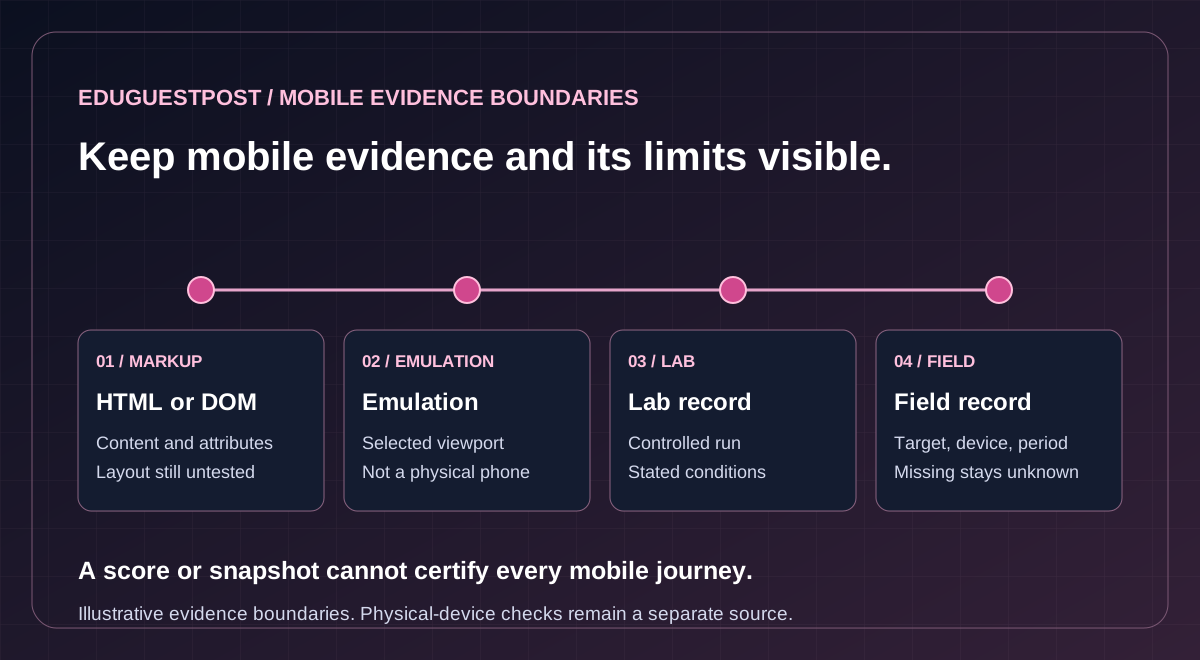
The distinction between field and laboratory data matters. Field evidence describes observed user experiences; laboratory evidence investigates a controlled run. A Lighthouse score does not certify field Core Web Vitals, and Total Blocking Time is not an Interaction to Next Paint measurement.
Scroll across to explore all columns.
| Evidence | What it can support | What remains separate |
|---|---|---|
| Mobile HTML or DOM | Observed content, declarations and selected attributes. | Visual layout, complete interactions and actual Google indexing. |
| Device emulation | Reproducing selected viewport and throttling conditions. | Physical-device behavior and untested browser differences. |
| Lighthouse or a browser trace | Investigating a recorded load or interaction under stated conditions. | The full population of real visits and untested journeys. |
| CrUX field record | Reported metrics for its target, device grouping and period. | Other URLs, devices, periods and missing observations. |
Chrome’s device-mode documentation describes emulation as an approximation. Actual-device checks remain useful for issues involving keyboards, controls, rendering or hardware behavior that a desktop simulation may not reproduce.
Use available reports without inventing measurements
The current Core Web Vitals Checker supports supplied CrUX JSON and supported Lighthouse JSON. Its live CrUX connection and separate automatic PageSpeed/Lighthouse panel are disabled pending setup. Missing field data remains unavailable; an origin record cannot certify every page beneath it.
Prioritize the affected template and reproduce the relevant behavior. Main-image discovery, server delivery, script work and space reserved for late content can require different changes. Agree the diagnostic evidence and repeatable checks before promising an implementation outcome.
Give your team a clear mobile repair plan
A useful handoff explains the observed problem, its affected pages and states, the proposed change and how the team will check it. The engagement should leave decisions that can be implemented and reviewed within the agreed scope.
Proposed deliverables
- Page and journey map: representative templates, priority visitor actions, relevant devices, browser conditions and coverage limits.
- Content and configuration findings: observed differences in mobile information, instructions, links and page relationships, with unresolved evidence identified.
- Usability and performance priorities: reproducible observations tied to customer tasks and the appropriate source, report or browser evidence.
- Implementation requirements: proposed repairs, dependencies, owners and acceptance checks, with supported configuration or development work confirmed in the quotation.
- Release and maintenance handoff: before-and-after checks for the agreed sample, exceptions, rollback responsibility and any separately quoted follow-up.
Confirm responsibilities before release
Agree who supplies captures and reports, who changes templates and who deploys or verifies the result. The scope should state which devices, browsers, pages and customer states are covered. A successful example cannot establish that every template or journey works.
Where private evidence is needed, agree secure exchange and retention. Browser permissions, account access, real customer details and transactional submissions need appropriate arrangements; they are not prerequisites for the first public-page enquiry.
For a wider question about search foundations, content or internal connections, SEO Audit Services can frame the broader investigation. A redesign, URL migration, detailed ecommerce review or full accessibility assessment may require its own work package.
Technical acceptance confirms the agreed behavior. Google’s crawling and indexing, search appearance and commercial performance require subsequent observation. No mobile score or template change guarantees rankings, traffic, accessibility conformance or enquiries.
Questions about mobile SEO
Can mobile content use an accordion or a different layout?
Presentation may differ when useful information is already available in the document. Removing information from mobile or fetching it only after an action raises a different content-access question, so equivalent states are compared.
Does a mobile problem require a new URL structure?
First identify whether the site uses responsive layout, dynamic serving or separate mobile URLs. Each arrangement has different evidence needs; corresponding pages and intended relationships are reviewed before URL, canonical or redirect changes.
Does a viewport declaration establish mobile usability?
The review also checks content, navigation, controls and form feedback at relevant widths and states. Zoom, focus, target placement and keyboard behavior need appropriate evidence, rather than a single declaration or dimension.
Does the Mobile SEO Checker run a mobile browser?
It reviews supplied mobile HTML or DOM evidence, with optional matching desktop and Lighthouse material. It does not run a mobile browser or resize a live page, and layout or interaction questions still need browser evidence.
Is desktop device emulation the same as testing a physical phone?
Emulation approximates selected viewport and other conditions. Physical-device checks remain useful for keyboards, controls, rendering and hardware behavior that desktop simulation may not reproduce.
Does a mobile score guarantee field metrics or search results?
Lab and field records answer different questions, and Total Blocking Time is not INP. Missing field evidence remains unavailable. Technical acceptance covers agreed behavior, while rankings, traffic, accessibility conformance and enquiries are not guaranteed.
Request a mobile SEO quote
Request your mobile SEO quote with your website, main mobile concern, priority pages and release plans. The quotation should confirm deliverables, responsibilities, evidence requirements, price, timing and follow-up before work begins.
Tell us about your mobile SEO requirements
Share public page examples, priority actions and the support needed. Agree private evidence and access arrangements separately.