
A focused batch. An explainable review.
Duplicate Content Checker
Compare a related set of page URLs or supplied content snapshots for repeated wording. Inspect the passages behind a match, understand how pages become connected and keep unchecked sources visible when deciding what to review next.
Comparison workspace
Bring related pages into one review
A useful duplicate-content review starts with a question. Are several location pages offering the same information? Has a migration left old and new guides available together? Do product descriptions repeat an entire introduction? Bring those pages into a focused batch so the findings have an editorial purpose.
The checker compares the sources you supply. Its scope is that batch and the comparisons that finish successfully. A result does not establish originality across the web, authorship, copyright ownership or what Google has indexed.
Choose pages with a reason to be compared
In Live URLs, enter full page addresses, one per line. Collect related pages from your own records, a content inventory or an export. The XML Sitemap Checker can help prepare an address list; this duplicate checker does not automatically import a sitemap or follow every link from a starting page.
Keep the set understandable. Comparing nearby service locations is useful when you want to inspect their local details. Mixing those pages with account policies and unrelated articles can make the review harder to explain. Record why the pages belong together before interpreting the percentages.
Treat the URL list as a review scope, not a website-wide crawl request. Pages omitted from the set are outside the conclusion. Likewise, a complete review of a small supplied set says nothing about unknown copies elsewhere.
For one particularly important pair, the Content Similarity Checker provides a separate two-source review workflow. Use the batch checker when relationships across several supplied pages matter.
Supply snapshots when live pages are unsuitable
Choose Imported snapshots to provide CSV or TSV content. Each row needs a url and content value; the optional type value identifies text or html. The address identifies the supplied record. Importing a snapshot does not verify that the live address contains the same material today.
Use quoted CSV cells for content containing commas, quotation marks or paragraph breaks. Keep a copy of your original file and check the preview before continuing. A record count and recognizable source addresses help reveal an accidental split paragraph or a missing row.
The Example control loads four illustrative snapshots: three editorial-calendar records and one warehouse record. It also selects snapshot mode and changes the review threshold to 80%. The separate CSV template contains two placeholder rows. Neither action runs a live-page audit.
Snapshots are useful for unpublished drafts, authorized exports from restricted systems or content that relies on JavaScript. Supply only material you are authorized to review. A pasted HTML snapshot remains supplied HTML; it does not establish a browser-rendered view, current publication date or successful access to an authenticated page.
Check the content area before trusting the comparison
The selected area determines what words can contribute to the findings. Auto selection looks for the first main element, then the first article element, then the body. Explicit choices let you request the first main, first article or body instead.
Navigation, headers, footers, sidebars and forms are excluded by default. This helps focus attention on page content, but markup matters. An introduction inside a header can disappear with that exclusion. A first article element might contain a teaser while the intended guide appears later.
Open each source’s details to inspect the selected text. Review whether it includes the intended introduction, meaningful headings, instructions and conclusion. A high score from the wrong section is a weak basis for changing a page.
Live checks use server-returned HTML. They do not run JavaScript, use your browser’s cookies or sign in. Blocked responses, oversized sources and unavailable content areas remain uninspected. Those outcomes describe missing evidence; they must never become a claim that the page is unique.
If the available markup does not isolate the intended copy, prepare an authorized snapshot of that copy and label its scope in your review notes.
Read a percentage with its supporting words
The comparison percentage is twice the aligned word count divided by the combined word counts of the two selected texts. The selected threshold filters which pairs receive a near-match flag. Moving that threshold does not change the underlying comparison.
The initial threshold is 90%. Choose a threshold as a review setting for the task, then record it with the findings. A lower setting can admit more pairs for inspection; it does not make those pairs more similar.
Normalized sequence equality concerns the words selected for comparison. Spacing and punctuation are ignored, and letter case can be ignored through the selected option. It is different from equality of HTML files, layouts, links, images or page functionality.
Word order also matters. Reorganizing material can change lexical alignment even when the subject remains the same. A paraphrase may preserve an idea while sharing few words. Conversely, a short page can receive a high percentage from a small amount of standard wording.
Read the matching passages, word positions and separate coverage figures for both pages. A symmetric pair percentage can hide an important length difference: a short description may fit almost entirely inside a much longer guide.
Worked example: a connected group with a weaker pair
This is an independently authored reference example, not output from the checker. Each readable source below has ten space-separated words. Source E has no available text.
| Source | Supplied reference text or status |
|---|---|
| A | Plan each workshop around clear goals tasks materials checks owners |
| B | Plan each workshop around clear goals tasks materials dates notes |
| C | Plan each workshop around clear goals questions examples dates notes |
| D | Warehouse staff count cartons inspect seals record shelves reconcile deliveries |
| E | Unavailable; uninspected |
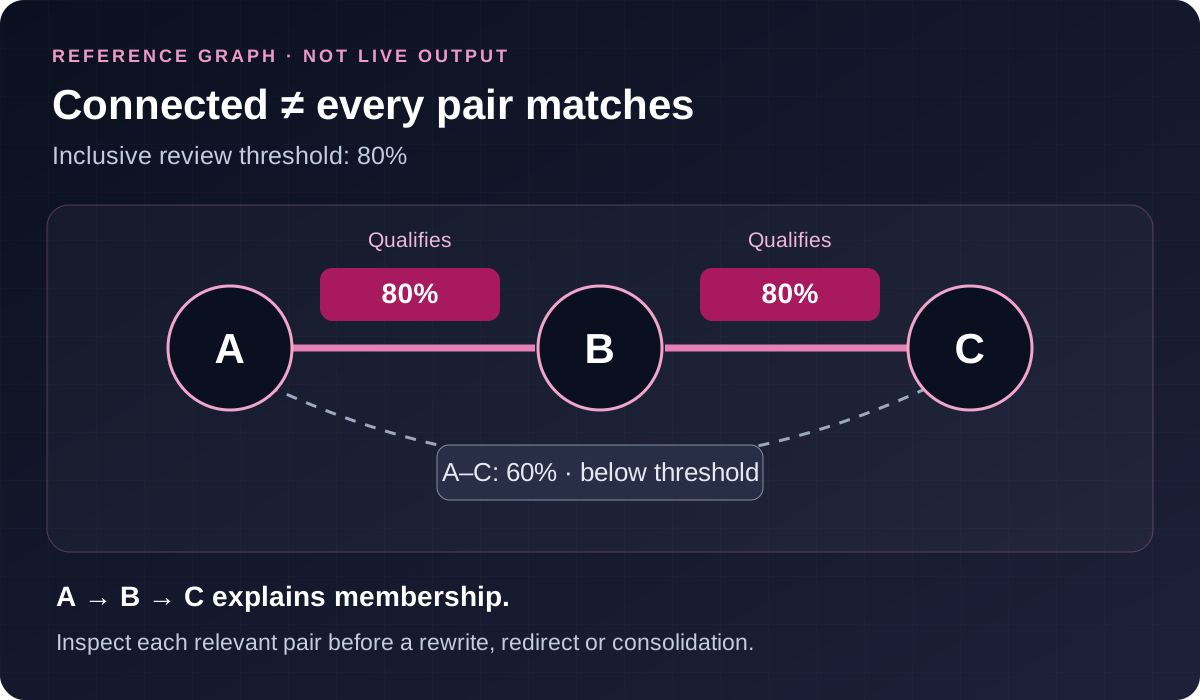
For this reference alignment, A and B share eight aligned words. B and C also share eight. A and C share six. The warehouse wording shares no aligned words with A, B or C.
| Completed pair | Reference aligned words | Independently calculated percentage | At an inclusive 80% threshold |
|---|---|---|---|
| A–B | 8 | 80% | Qualifies |
| A–C | 6 | 60% | Below threshold |
| A–D | 0 | 0% | Below threshold |
| B–C | 8 | 80% | Qualifies |
| B–D | 0 | 0% | Below threshold |
| C–D | 0 | 0% | Below threshold |
At 80%, A, B and C form a connected review group because A links to B and B links to C. The A–C pair still has only 60%. Calling the whole group an all-pairs match would conceal that difference.
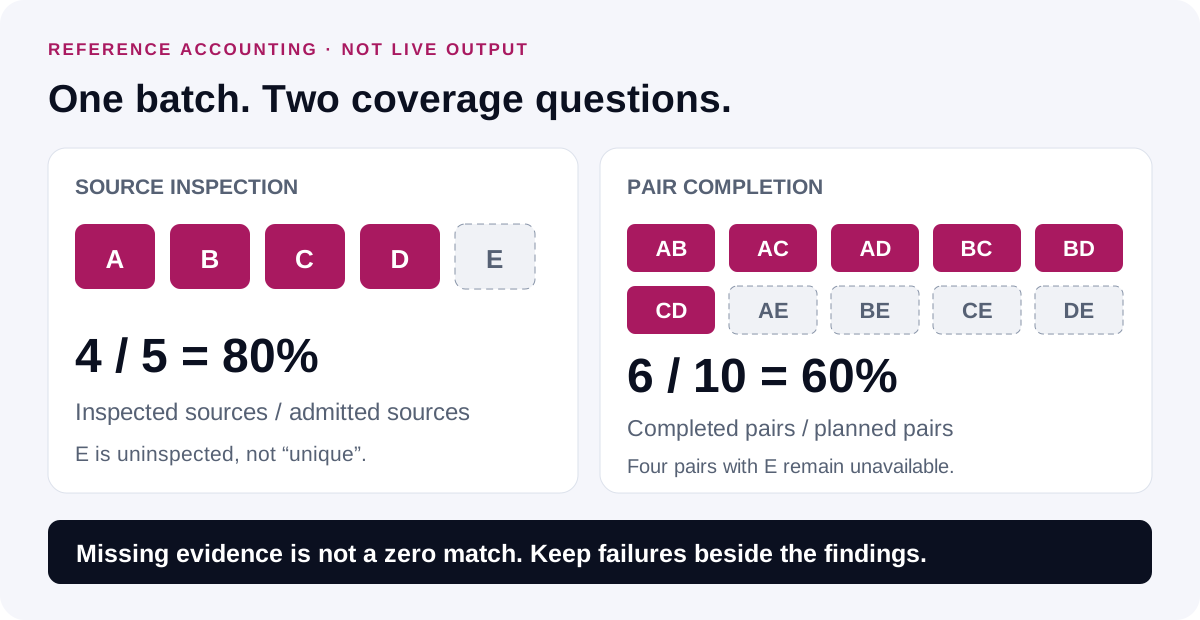
With five distinct admitted sources there are ten possible unordered pairs. Four readable sources produce six completed pairs; four pairs involving E remain unavailable. Page inspection coverage is 4/5, or 80%, while pair completion is 6/10, or 60%. These percentages describe different denominators.
D is inspected and unmatched within this completed set. E is uninspected. Neither statement establishes web-wide uniqueness. Raising the threshold to 81% removes the qualifying reference pairs; it leaves their calculated scores unchanged. The reference alignment is explanatory and does not identify the production algorithm.
Review groups without treating them as a merge instruction
Groups form through qualifying pairs, with indirect connections identified. Completed comparisons remain available. Use the pair-level evidence to understand why a page belongs to a group.
An indirect member may answer a different question or share a different passage with the connecting page. A group can therefore help organize work without justifying one combined page. Check each relevant relationship before proposing a redirect, rewrite or consolidation.
Start with the page’s purpose, audience and factual differences. Useful variation can include availability, service boundaries, local evidence, product specifications or instructions that change the reader’s next action. Changing a place name without adding useful information is a weak editorial distinction.
Choose an action supported by more than text resemblance
First investigate addresses that resolve to the same final destination. They may be aliases rather than separate published documents. Keep the submitted address and the destination in your notes so another reviewer can understand the finding.
For separate pages carrying repeated wording, examine whether both versions need to remain available. Google’s canonical selection is a separate issue from lexical similarity. The Canonical Tag Checker can support a review of declared preferred URLs; indexing evidence needs its own verification.
Where a page still has a distinct purpose, revise the information that makes it useful. If performance changes are also part of the decision, the Content Refresh Checker offers a separate period-comparison workflow. A wording match alone does not explain a traffic decline.
Turn an agreed rewrite into a focused assignment with the Content Brief Generator. Specify the audience, unanswered questions, factual sources and information that must remain accurate. Do not set a target percentage as a substitute for an editorial goal.
Use the SEO tools hub to choose further checks around the issue actually found. Retain the reasoning behind the decision as well as the score.
Keep evidence and incomplete work together
The pairs CSV includes source addresses, inspection time, source mode, match percentage and audit completeness. The JSON report also includes selected text, source notes and page failures. Review the selected export scope before sharing a file.
Before sharing a conclusion, review which sources were inspected and which pair comparisons completed. Include unresolved failures in the handoff. An apparently quiet result can reflect missing comparisons rather than a set of different pages.
Record the supplied batch, snapshot dates where known, area selection, case setting, exclusions and threshold. If a colleague repeats the check with different text or settings, the resulting comparison may differ for understandable reasons.
The tool makes no changes to the inspected pages. Submitted content and reports are not saved in WordPress by this tool. Abuse-protection records, hosting logs and verification-provider practices are separate. This is not local-only processing or a complete retention audit. Avoid credentials and confidential material in the supplied content.
Move from a review to an approved campaign brief
Content review can reveal that a destination page needs clearer information before outreach begins. If you need help planning that work, the SEO services overview provides a route for discussing the page, audience and campaign scope.
When the destination is ready, review the guest post purchasing options against the audience and requirements of the campaign. Sending a brief requests a review; an order becomes confirmed through its approved terms.
For a confirmed order, preserve the agreed dofollow-link and Google indexing guarantee, including the review period and remedy in the approved order. Rankings, traffic, leads, sales and authority-score gains are not guaranteed. Publisher fit, link attributes and delivery evidence should be explicit before approval.
Paid placements can carry different link qualifications and delivery terms. Reconcile any requested dofollow arrangement with the offered link attributes and actual publisher terms before approval. A content comparison does not resolve that choice. The checker does not prove that a placement complies with search policies or that a destination will rank.
Questions about the review
Does this check the whole website?
It checks the supplied batch. It does not follow links, discover pages from a sitemap or search the wider web. Describe the result in terms of inspected sources and completed comparisons. A full set of supplied URLs can still omit important pages.
Does a 100% match mean identical files?
Normalized wording equality can occur across different HTML and layouts. Check the selected content and settings before describing what matches. It does not establish equal images, links, structured data, scripts or ownership, and it does not prove that one author copied another.
Is there a safe duplicate percentage for Google?
No percentage in this tool is a Google penalty boundary. Shared quotations, product details and reusable instructions may be appropriate. Evaluate the pages’ purpose and technical signals before deciding what to change. A threshold is a queue-setting choice, not a search-engine verdict.
Can I review pages behind a login?
The URL workflow does not sign in or use your browser session. Supply authorized text or HTML snapshots when appropriate. Their results apply to the supplied material, not verified current content at the identifying addresses.
Should every connected page be combined?
No. A connected group can include a below-threshold pair. Inspect the direct relationships and each page’s purpose. Retain pages that provide a useful distinct answer, and plan changes only after reviewing their technical and editorial context.
What should I do with an uninspected page?
Keep its status visible, investigate the reason and decide whether an authorized snapshot can fill the gap. Do not replace an unavailable comparison with zero or label the source unique. Explain how that missing evidence limits the batch conclusion.
Discuss your content
Share the page and audience you want to reach through publisher outreach.