
Two sources. Inspectable evidence.
Content Similarity Checker
Compare the wording of two selected sources before deciding what to revise. Bring two drafts, supplied HTML or public page addresses, then review the aligned passages, differences and text selected for comparison.
Words align.
You decide what matters.
Not a web-wide plagiarism search or a verdict about meaning.
Comparison workspace
Bring the two sources into focus
Begin with a clear question. Did the revision preserve an important qualification? Do two service pages repeat the same explanation? Is a short summary contained within a longer article? The useful result is a passage you can inspect and a decision you can explain.
The percentage describes word alignment between the two sources. It does not establish who wrote the material, whether permission exists, which page Google indexes or whether the content answers the reader’s question well. Read the evidence alongside the number.
Choose two sources that answer your review question
Each source has its own format control. Select Text for ordinary copy, HTML for supplied markup or Live URL for a public page when live fetching is available. The formats can differ: a published page and its proposed revision can be reviewed together.
Keep the source roles clear. For a revision, place the earlier version in A and the proposed version in B, then retain that convention in your notes. For two existing pages, record what each page is supposed to help its reader do. A result is easier to interpret when its purpose is defined before comparison.
The Example control loads two illustrative editorial drafts. Swap sources moves the source content, selected format, live URL and content area together between sides. Keep A and B consistent with the review roles you intended.
Preserve your original drafts outside the page. Drafts are not saved automatically, and a downloaded report does not restore an editable project. A comparison report and a recoverable editing project are different deliverables.
Select the part of the page you intend to compare
For HTML and live sources, choose the content area. Auto selects the first main element, then the first article element, then the body. Explicit main, article and body choices are also available.
Those elements are useful clues, but their presence does not guarantee the right selection. A page can contain several articles, an introductory card or a main area containing more than the story you want. Check that both selected texts represent comparable material.
The default exclusion option removes navigation, headers, footers, sidebars and forms. That can reduce repeated template text. It can also remove useful content when a template places an article introduction inside a header.
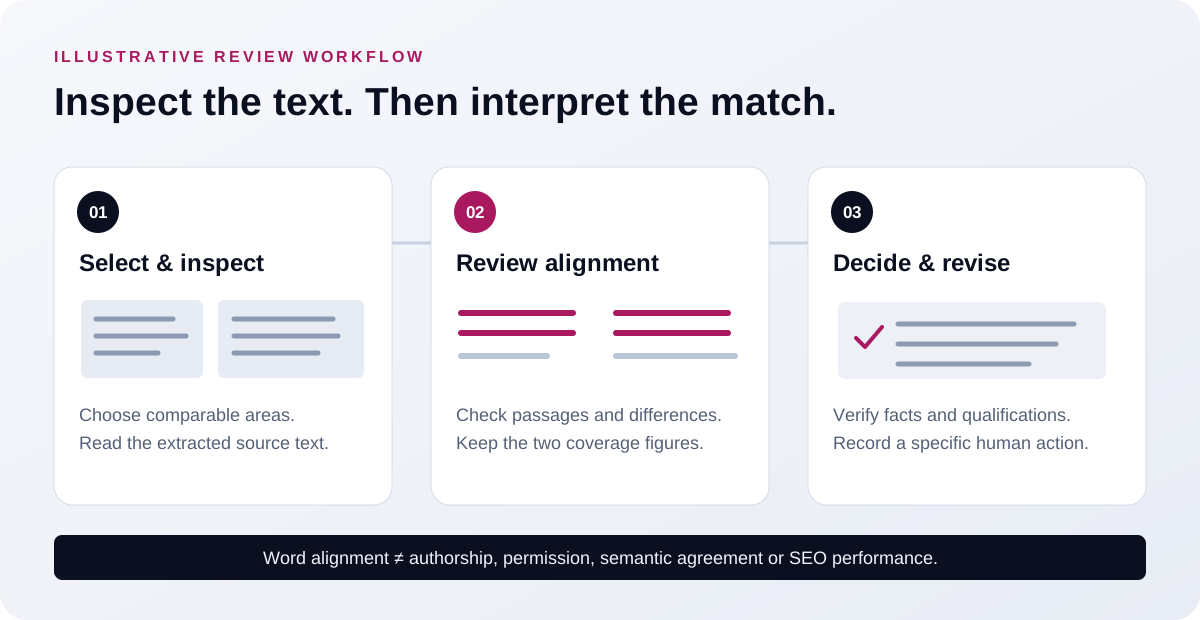
Use the Source text view to inspect what the checker compared. Look for the beginning and end of the intended passage, missing sections and unrelated menu text. When markup makes selection unreliable, paste the intended copy and record that it was supplied manually.
Understand the limits of a live page check
The live workflow reads the HTML returned by the server. It does not run the page’s JavaScript, use your browser’s logged-in session or complete an interaction that reveals more text. Content visible in your browser may therefore differ from the material available to the checker.
Live requests have size and time bounds and a bounded redirect route. Unread, incomplete or oversized sources need correction or a narrower selection. An unavailable source remains uninspected; it is not a page with zero overlap.
Do not treat a failure to retrieve an article as evidence that its wording is unique. Review the reported source state and use an authorized text or HTML copy when appropriate. If a source exceeds a processing limit, choose a narrower area or supply the intended passage.
Each text area has a browser limit of 110,000 UTF-16 code units, and each URL field has a limit of 2,048. These are interface limits, not server byte limits or a guarantee that every input of that size can be compared successfully.
Read the word-match calculation
The formula doubles the aligned-word count and divides it by the total number of words across both selected texts. Express that ratio as a percentage. Keep the two source word counts beside the result so its denominator remains understandable.
Punctuation and spacing are ignored. Letter case is ignored by default and can be included by changing the option. Numbers remain in the comparison. The checker uses NFKC Unicode normalization and ICU word segmentation with the undetermined locale. These rules do not imply equal segmentation quality for every language.
The label for an identical normalized word sequence describes that sequence. It does not say the HTML, punctuation, layout or files are identical. Preserve the original copy when those differences matter to the review.
Order also matters. Moving a paragraph can affect alignment even when its words still occur in both sources. Rephrasing can preserve an idea while changing much of its wording. The percentage should direct attention to the passages and differences that need a closer reading.
Read coverage for each source
A combined match percentage can hide a difference in source length. A short excerpt can align almost completely with part of a long article, while most of the longer article remains outside that excerpt.
The coverage figures describe how much of A and B was aligned. Read both. They help distinguish a contained summary from two sources that repeat most of one another. Neither coverage figure establishes originality elsewhere on the web.
Keep the selected scope consistent when comparing revisions over time. Adding a footer to one source or excluding an introduction from another changes the material under review. A different percentage after those changes may reflect extraction choices as well as editorial work.
An authored example you can check
The following short texts and calculations form an independently authored reference example. They explain the calculation, not a customer campaign or a screenshot of a production report.
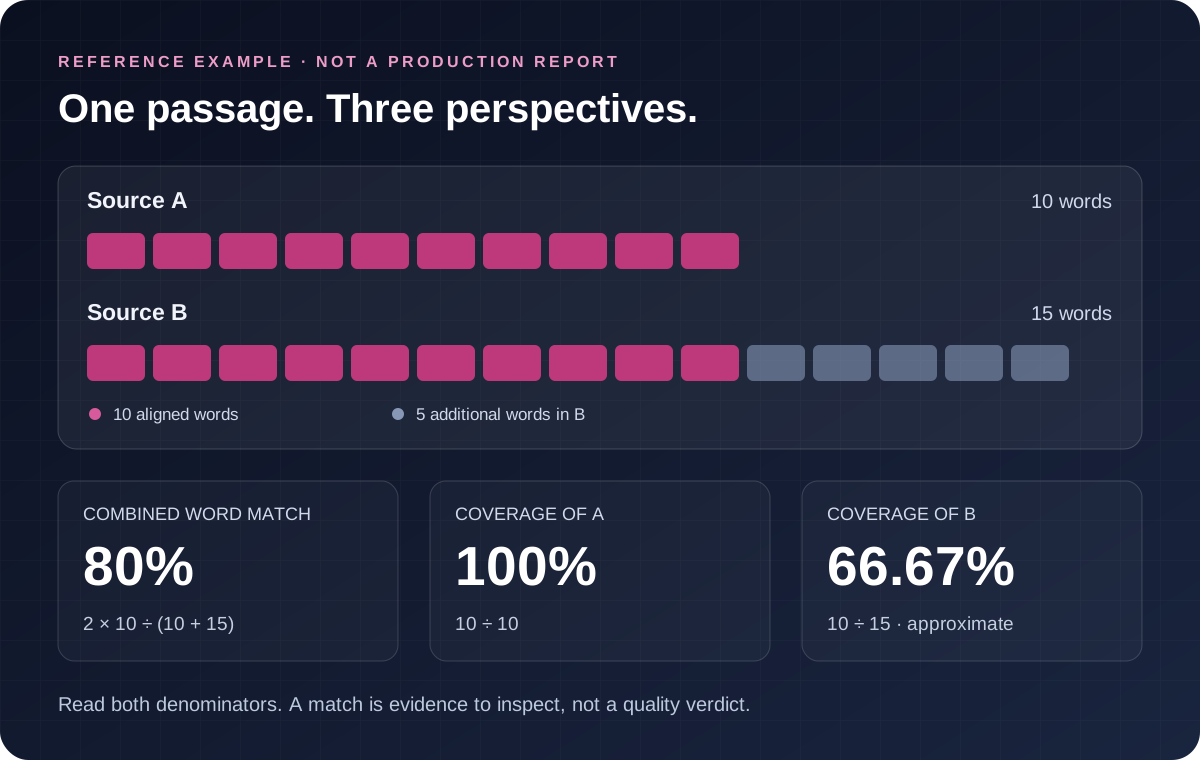
Source A: “A workshop plan gives each participant clear tasks and materials.”
Source B: “A workshop plan gives each participant clear tasks and materials before the session begins today.”
Using ordinary word boundaries for this English example, A has ten words and B has fifteen. The ten words from A appear as one unchanged, ordered passage in B. For this authored reference alignment, the combined match is twice ten divided by twenty-five: 80%.
| Authored reference measure | Calculation | Result |
|---|---|---|
| Combined word match | 2 × 10 ÷ (10 + 15) | 80% |
| Coverage of A | 10 ÷ 10 | 100% |
| Coverage of B | 10 ÷ 15 | Approximately 66.67% |
The figures describe the selected texts under the stated reference alignment. They do not prove that the longer version is better or that the added timing detail is accurate. Those decisions depend on the actual workshop and the reader’s needs.
The ten-word shared block also illustrates the passage filter. A six-word minimum includes that block; an eleven-word minimum excludes it from the visible passage list. Filtering the list does not change the underlying alignment percentage.
Follow matching passages and differences
The report shows matching wording with positions in both sources. Use those positions to locate the relevant material, and read the surrounding context before deciding whether a shared passage needs a change.
The minimum-passage control starts at six words and ranges from three to twenty. Raising it concentrates the evidence list on longer blocks. A report with fewer visible passages after a filter change does not necessarily contain less underlying alignment.
Search within the results when reviewing a name, statement or repeated phrase. Keep view filters separate from conclusions about the full comparison. An empty filtered view can mean that no displayed passage meets the current view conditions.
Read the Differences view carefully for changed quantities, dates, names and qualifications. Consider the authored sentences “The coating is safe for indoor use” and “The coating is not safe for indoor use.” Most words survive, while the added negative reverses the statement. These are fictional test sentences, not a safety claim about a real product.
A useful review records what changed and why it matters. “Confirm the revised opening date against the approved announcement” is an actionable finding. “Reduce the match percentage” does not explain which reader problem needs attention.
Keep SEO decisions separate from wording observations
When two pages share wording, first review their purpose. Different products, locations or audiences may need some common instructions and some distinct evidence. A similar template does not establish that one useful page should disappear.
For preferred-URL declarations, use the Canonical Tag Checker. It supports a separate technical investigation. The similarity comparison does not determine the canonical URL Google selected or confirm whether either page is indexed.
For overlapping query performance across multiple pages, use the Keyword Cannibalization Tool with suitable supplied records. A lexical match between two texts does not establish that they compete for the same searches or harm one another’s performance.
If performance is the reason for the review, use the Content Refresh Checker to compare suitable page exports. Keep any decline, its possible explanations and the wording observations as separate evidence. Similarity alone does not identify the cause of a traffic change.
Turn the review into a specific revision
For an earlier and later draft, check whether the revision added useful facts, removed an obsolete instruction or clarified an important step. Confirm that required statements and appropriate attribution survived. A lower wording match does not automatically represent a better revision.
For two service pages, define the different decision each page supports. Distinct availability, eligibility, examples, constraints and supporting evidence can matter more than exchanging a few repeated words. Keep standard wording where it serves the reader and remains accurate.
Once the change is agreed, organize the assignment in the Content Brief Generator. Record the intended reader, outcome, source evidence and scope of the revision. Preserve any uncertainty that still needs a subject expert’s decision.
Use the SEO Content Optimizer for a separate review of a supplied draft against its supplied requirements. Phrase mentions and passage flags can support that review, while accuracy, evidence and usefulness still need human judgment.
Keep the comparison evidence
Download matching passages as CSV, or keep the JSON report with extracted texts, settings, differences, response context and comparison time. Review the export scope and fields before using the file as evidence in another workflow.
Keep enough context for another person to understand what was compared: source identity, format, selected area, options and observation time. A page can change after a live check. A pasted draft represents the supplied copy, rather than an independently verified snapshot of the address mentioned beside it.
Review exports before sharing them. They may contain the selected source wording and page addresses. Submitted content and results are not saved as WordPress content by this tool. Abuse-protection records, hosting logs and verification-provider practices are separate.
Avoid supplying confidential drafts or credentials. Save your own working copies and the agreed review notes in the appropriate project location. An exported comparison records evidence; it does not publish a revision or establish an automatic monitoring schedule.
Choose the next task deliberately
Use the SEO and content tools directory to select the next question. A two-source wording review, an editorial assessment, a technical observation and a performance investigation produce different evidence.
If your team needs support developing an agreed content or campaign scope, compare the available services. Define the intended audience, source material, responsibilities and delivery expectations. A high match percentage does not by itself establish a need for paid work.
Where a separately approved campaign needs publisher opportunities, review the guest post marketplace. Confirm current availability, pricing, article requirements and offered link treatment before approval. Confirmed orders carry the agreed dofollow-link and Google indexing guarantee, with the review period and remedy recorded in the approved order. Rankings, traffic, leads, sales and authority-score gains remain outside that guarantee.
Paid placements can carry different link attributes and delivery terms. Confirm the offered qualification and link treatment before approving an order. A text comparison cannot settle publisher terms or replace the agreed commercial commitment.
Questions before you compare
Does a high percentage prove copying?
It identifies aligned wording in the selected pair. Common instructions, quotations and shared templates can contribute. Authorship, permission and the circumstances of reuse need separate evidence.
Does this compare meaning?
The method compares word sequences. A paraphrase can retain an idea with limited lexical overlap, while a small qualification can change meaning despite a high match.
Does this search the whole web?
Its scope is the two selected sources. The result cannot establish that no other matching material exists.
Can it compare two live pages?
Yes, when live fetching is enabled. It uses server-returned HTML and does not run JavaScript or use a logged-in browser session. If retrieval is unavailable, use an authorized text or HTML copy.
Discuss your content
Share the page and audience you want to reach through publisher outreach.