
Versioned checks / Clear requirements / Named release owners
SEO Release QA and Pre-Launch Audit Services
Give your release owner a clear decision
A new template can look ready in a preview and still carry a noindex instruction onto the live site. A navigation update can pass a desktop check while leaving mobile visitors without a route to a key service page. SEO release quality assurance (QA) checks the changes that matter for this launch and gives the release owner evidence to decide whether to proceed.
Ask EduGuestPost to scope a pre-launch audit for a new site, a shared template change, a routing update or another defined release. Agree which pages and visitor states to test, what each should do, and what would hold the launch. The audit records what was observed, which findings need a fix and which checks require the public site. An agreed live recheck then tests the changes in the environment customers actually use.
Know what you will receive
A release review can include a test plan, dated baseline and findings, a recommendation for signoff, and a record of agreed checks after deployment. Each blocker should point to a page or template, the expected behavior, the observed result and the person responsible for resolving it. If a test could not run, the record should explain why and name the next step.
This service suits teams with a release to review and someone who can own the decision. If you still need to decide which old URLs should move and where they should lead, Website Migration SEO Services can scope that wider work. Recurring checks after the release window can be quoted separately.
Start with the change and the date
Request an SEO release QA quote with your public website, intended release date and the changes you are making. Tell us which pages or customer tasks matter most. The quote can define the test sample, access arrangements, decision deadline, retests and production review window. Your team can arrange any authorized private access separately.
Define the release and its test sample
Start with the version the team expects to release. Record the build or theme, the pages and shared components it changes, and the current behavior worth preserving. Include a comparable unaffected page where it helps isolate the change. For a new site with no previous version, use approved page, routing and content requirements as the baseline.
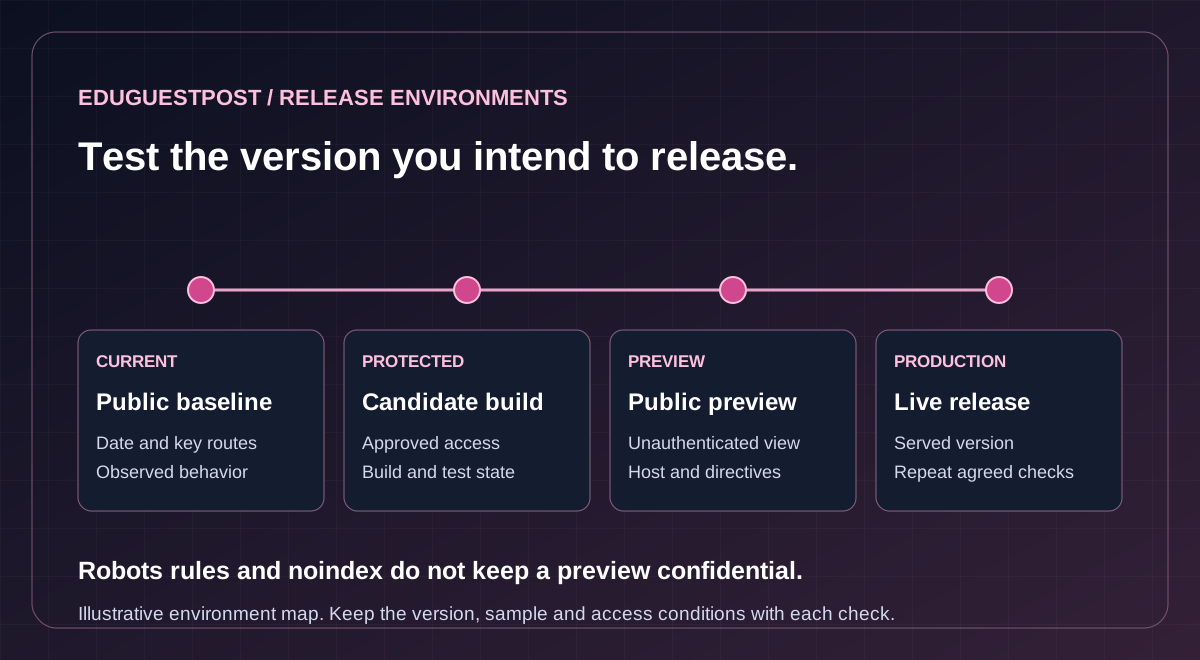
Decide which environment can answer each question
Scroll across to explore all columns.
| Environment | What it can show | Evidence to carry forward |
|---|---|---|
| Current public site | How key pages and routes behave before the change. | Date, final URL, content and request conditions. |
| Protected staging | How the candidate build behaves with agreed access and test data. | Build, tested states and checks that depend on production. |
| Public preview | What an unauthenticated request receives at the preview address. | Preview URL, expected directives and any access limits. |
| Live release | What visitors receive on the public domain after deployment. | Served version, production responses and retest results. |
Choose examples that exercise the change. If a location template is changing, sample a priority location and one with different content or navigation. Check another language, device or visitor state when the release affects it. The sample should show which cases were covered and which remain outside the decision.
Preserve the right access and evidence
Private staging needs an approved way to restrict access. Robots rules govern crawler behavior; a noindex instruction governs indexing where supported. Neither keeps a preview confidential. For instance, Shopify distinguishes visitor preview links from merchant previews that require authentication. Check what your actual preview permits before sharing any material.
Record the final URL, time, version and relevant browser or session conditions with each capture. Confirm which checks must wait for the live domain: a preview may use a different host, configuration or data. Vercel’s promotion guidance describes cases where promotion rebuilds the preview for production. An earlier preview pass still needs to be tied to the version that actually goes live.
Check what the public URLs should return
Write down the intended outcome for each sampled route: a working page, a redirect to a relevant destination, an access restriction or a deliberate removal. Confirm both the response and the content it serves. A 200 response containing an error message or an empty template does not meet the requirement for a usable page.
Compare crawling and indexing instructions
Check the applicable robots.txt rules, the reached page’s HTML and any indexing instructions in the response headers. Google’s noindex guidance explains that the crawler must be able to read the instruction. Remove temporary restrictions only from production pages that are meant for discovery. Check the original response as well as the rendered page; a browser script that removes noindex does not reliably undo the original instruction for Google.
The free Pre-Launch SEO Audit compares noindex and optional canonical expectations for up to five supplied public URLs. All must use the same scheme, host and port; a redirect outside that origin stops the trace. The tool does not fetch canonical targets or establish Googlebot access. A match confirms only the observed signal against the expectation you supplied.
Verify destinations and discovery paths
Where URLs move, trace the old address and confirm the intended redirect, final response and relevant page. The Redirect Checker separates a proposed map from a live HTTP trace. The SEO Migration Audit starts from the supplied old URLs; expected destinations are comparison values, not separate fetches.
Check that internal links, declared canonicals and relevant sitemap entries point to the intended production URLs. For changed language or regional pages, verify the intended alternates and links back to their counterparts using Google’s localization guidance. The XML Sitemap Checker examines one file at a time. If the release changes child sitemaps, check those files separately and verify selected listed pages. File validity does not establish indexing.
Test the pages people will use
A release can preserve URLs while changing the information available on them. Compare each affected template with its approved content and expected purpose. Check the title, description, visible heading, important text and the routes visitors use to reach related pages. A search result can use different wording; the release check records what the page actually serves.
Compare source and browser behavior
Use Google’s JavaScript guidance to separate the server response from content added when scripts run. A navigation control can work for a person yet fail to provide a discoverable link if it only responds to a click and has no usable link destination. Verify that key content and links appear in the intended state and that required images, scripts and styles load.
The Rendered HTML Checker compares original HTML with a supplied browser snapshot. Capture both for the same final URL and relevant state. It does not run a browser or establish what Google rendered. Use the Mobile SEO Checker for supplied mobile and desktop evidence; separately check the real interaction when layout or device behavior matters. For example, a correctly declared booking link may still be covered by a banner on a narrow screen.
Verify markup and measurements within scope
Review markup on the affected templates against what the visitor actually sees. The Structured Data Checker can inspect JSON-LD in fetched source or supplied markup. Its URL mode does not run scripts; it cannot verify every feature requirement or predict a rich result.
If performance is an acceptance criterion, compare representative runs with the same device, test conditions and baseline. Lab and field measurements answer different questions. A controlled test can flag a regression for investigation; a rolling real-visit report cannot isolate a change made this morning. Record any unavailable evidence and the checks that still need a browser or device.
Decide whether the release can proceed
Before testing begins, agree which requirements can stop the release and who can decide. A noindex header on a priority page intended for search can justify a hold. A difference in an optional description may be suitable for follow-up if the authorized owner accepts the impact. Choose the response based on the requirement and affected pages, rather than counting warnings.
Scroll across to explore all columns.
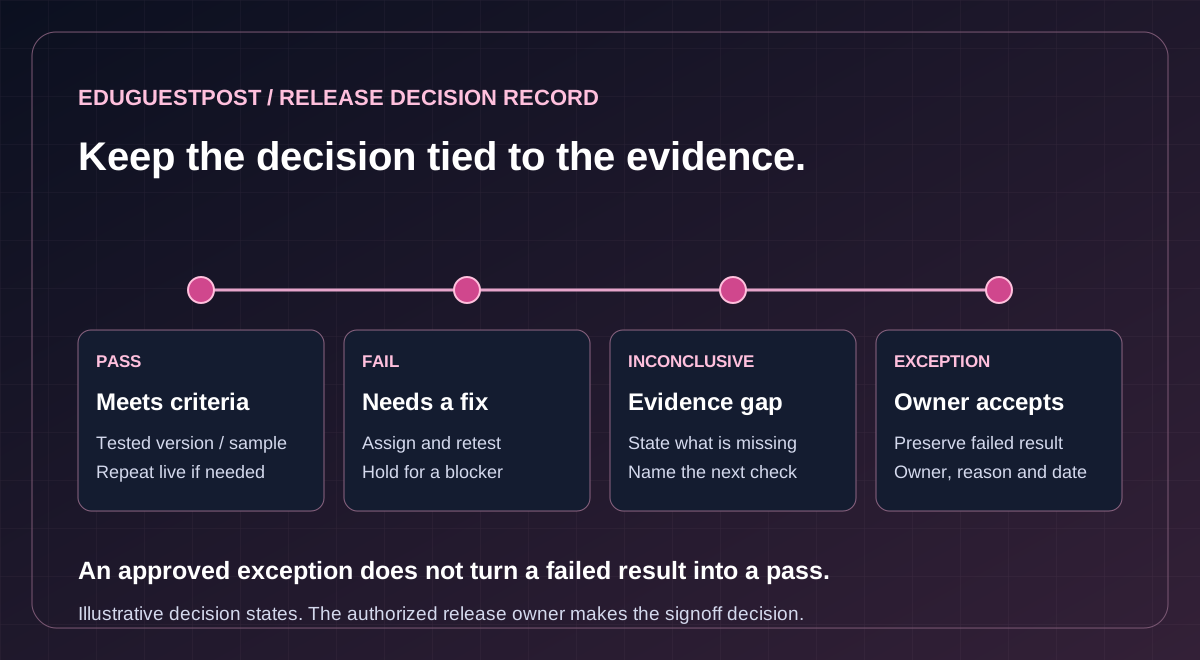
| Result | What it means | Release action |
|---|---|---|
| Pass | The evidence meets the stated requirement for the tested version and sample. | Keep the evidence and repeat the check live if needed. |
| Fail | The observed result conflicts with the requirement. | Assign the fix. Hold for a blocker and retest the corrected build. |
| Inconclusive | The sample, access or evidence cannot settle the requirement. | Identify what is missing and when it can be checked. |
| Approved exception | The release owner accepts a specific outstanding risk. | Keep the original result, rationale, owner and review date. |
Keep the decision tied to the evidence
For a failed or unresolved check, give the owner enough detail to reproduce it. Include the tested version, URL and state, the expected result, the actual observation and its impact. If the fix changes a shared component, retest the affected sample and a comparison page as appropriate. An approved exception records a decision to proceed; it does not turn the underlying finding into a pass.
Agree who can pause or restore the release
Safe deployment guidance recommends matching rollout checks and recovery to the risk. Where gradual rollout is supported, agree what evidence permits expansion and what requires a pause. Identify the release owner, the person who can deploy, and the person who can restore service. Confirm what the recovery option actually restores: an older build may leave database writes, content edits, redirects or tag settings untouched. The audit supplies the evidence and recommendation; the authorized team makes and carries out the release decision.
Recheck the live site and hand over the evidence
Once the release is live, repeat the agreed checks on priority public routes. Confirm the version served, the destination and content, any temporary indexing instructions, and the actual links and files visitors rely on. Include a relevant device, location or cache state when it could change the result. Cloudflare’s cache guidance explains what its edge response indicators describe. Use the delivered page and headers to confirm the observed version; one request cannot describe every visitor’s experience.
For example, a public service page might return 200 with the right copy and still send a staging noindex header. Record the live response and check other pages using the same template before the release owner decides whether to pause or correct the change.
Verify measurement where it affects signoff
If the release changes analytics or consent behavior, use the approved test cases and environment. Check the expected event and parameters, when it fires, and whether the visitor’s consent choice changes it as intended. Tag Manager preview can show what fired in a debug session. Verify the live container separately where agreed. A debug event cannot confirm that reporting or attribution has settled, and any live test transaction needs its own authorization.
Separate launch acceptance from later search evidence
Where property access is agreed, Search Console URL Inspection can provide a bounded live test or show the recorded indexed version. Keep each result dated and labeled. The live test cannot predict Google’s eventual canonical choice or guarantee indexing. Agree who will review any later indexing, traffic or unresolved issues and how long that observation period lasts.
Questions about SEO release QA
What needs to be agreed before release testing begins?
Define the candidate version, priority pages and visitor states, expected behavior, access arrangements and requirements that can hold the release. Keep a comparable baseline or approved new-site requirements with the test plan.
Does a staging pass certify the live release?
A preview can use a different host, configuration or data, and promotion can rebuild the candidate for production. Tie the findings to the version that goes live and repeat the agreed checks on priority public routes after deployment.
Can robots.txt or noindex keep a preview private?
Robots rules govern crawler behavior and noindex governs supported indexing behavior. Neither keeps a preview confidential. Protected staging needs an approved access restriction, and the actual preview permissions should be checked before sharing material.
What can the free Pre-Launch SEO Audit confirm?
For up to five supplied public URLs sharing the same scheme, host and port, it compares observed noindex and optional canonical signals with your expectations. A cross-origin redirect stops the trace. It does not fetch canonical targets or establish Googlebot access.
What happens when a check fails or remains inconclusive?
Record the version, URL, state, expected behavior, actual observation and impact. Assign a fix for a failure or identify the missing evidence and next check. Retest the corrected build where needed. An approved exception retains the original result rather than converting it into a pass.
Who decides whether to launch, and what is handed over?
The audit provides evidence and a recommendation; the authorized team makes and carries out the release decision. Keep the decision record, open findings, agreed production retests and follow-up owners. The quote confirms environments, samples, responsibilities, coverage, price and timing.
Request an SEO release QA quote
The handoff can include the decision record, open findings, agreed production retests and the person responsible for each follow-up. Request a pre-launch SEO audit quote with your release date, what changes, and which pages must keep working. The quotation confirms the environments, samples, signoff and retest coverage, responsibilities, price and timing before work begins.
Tell us about your release requirements
Share public page examples and release scope. Arrange authorized private access and test data separately.