
Business identity / Owner-controlled access
Google Business Profile Setup and Verification Support
Start with the right profile and a clear plan for verification.
EduGuestPost’s Google Business Profile setup and verification support helps you establish an eligible business profile, prepare accurate information and work through the verification steps Google makes available. We review the starting position, document the work included and identify the actions your business representative needs to complete.
Send your business website, country, location count and any existing profile link. Request setup and verification support with a brief description of your current position.
Establish a profile your business can control
A new business may need its first profile. Another business may already appear on Maps with an unclaimed listing, or have a profile managed through an account the current team cannot access. Those situations need different next steps.
We check the existing identity and available access before recommending creation, claiming or an ownership request. That helps you avoid building another listing while the original profile remains unresolved.
Your setup scope can include an eligibility review, an approved information record, guidance through the appropriate setup route, verification preparation and an agreed period of follow-up. The handoff shows what was completed, what Google has confirmed and what still needs attention.
Your business confirms its operating details and authorizes the work. The account arrangement keeps ownership with the business and gives any supporting provider an appropriate role. Credentials and verification codes remain under your control.
This service focuses on getting the profile established and working through its verification requirements. A larger optimization project, recurring management or a suspension case can need its own scope. We identify those needs when reviewing your brief.
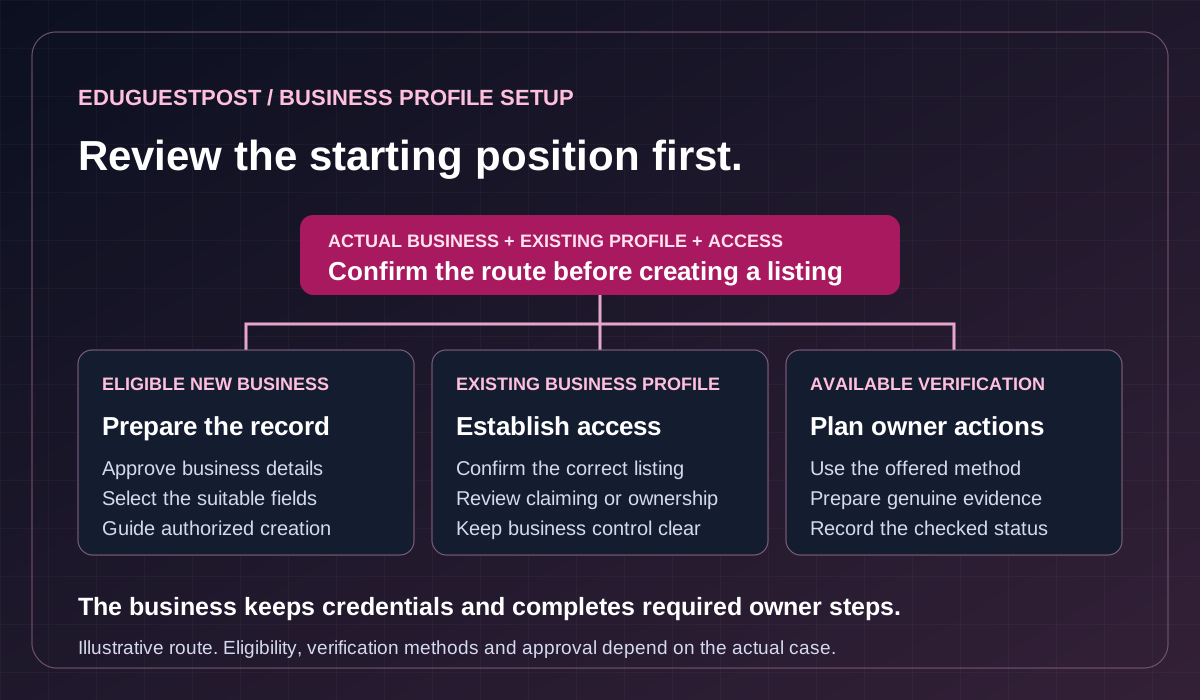
Choose the setup route before creating a listing
We begin with your business model and the profile evidence available. Google’s eligibility and ownership guidance governs whether the business can have a profile. Eligibility generally requires in-person contact with customers, with specific exceptions and restrictions for some business types.
A storefront, a business that travels to customers and a hybrid operation need different location settings. We confirm how the business actually operates. A rented mailing address or an online-only offer does not establish a customer-facing business location.
Scroll across to explore all columns.
| Work area | Starting position to review | Proposed route and deliverable |
|---|---|---|
| New profile | No matching profile found for an eligible business. | Prepare approved business information and guide the authorized creation process. |
| Existing unclaimed profile | A matching profile appears and is available to claim. | Confirm the match and guide claiming and the available verification steps. |
| Existing managed profile | Another account controls the correct profile. | Record the access issue and prepare the appropriate ownership or account-recovery route. |
| Possible duplicates | Similar profiles may describe the same business or distinct eligible operations. | Compare identity and location facts before recommending any removal, merge or separate setup. |
Prepare the initial business information
The setup record can cover your real trading name, business category, operating location, public address or service area, phone, website, hours and opening date. It also identifies the applicable description, service details, attributes and assets included in the agreed batch.
Your team approves the facts before they are entered. We use the categories and fields available to the actual business, rather than treating every optional field as compulsory. A home-based service business may need its address hidden from customers while confirming its genuine operating location to Google.
For a business preparing to open, we record the genuine planned opening date and readiness of the location. We do not present future trading as if it were already established.
Prepare for the verification method Google offers
Google determines the available methods and can require more than one. The options depend on the particular business and circumstances. Our support starts with the prompt shown on your profile, as described in Google’s verification guidance.
Phone or text verification needs access to the relevant business number. Email verification needs access to the address shown. If mail is offered, your representative receives and enters the code. A live video call, where available, requires an authorized person at the business during its operating hours.
We help you understand the requirements and plan the owner actions for your available route. The proposal identifies the preparation, guidance and follow-up included. It also records who can be present, access the business systems and respond to Google.
Plan a recording that represents the real operation
If Google offers a recorded video, we prepare a checklist suited to your business type. The recording should demonstrate the actual location, business activity and the representative’s authority. A storefront and a service-area business can demonstrate those facts differently.
Google’s recording requirements call for a live, continuous, unedited recording made and uploaded through the profile on a mobile device. Keep faces and sensitive personal or financial information out of the footage. Your representative completes the recording and submission through the available Google process.
Keep account and evidence responsibilities clear
You identify the business owner and the authorized representative who can complete the required steps. We can organize preparation instructions and identify missing business facts. The representative must have genuine access to the operation and be able to demonstrate it when required.
Public marketing photos and verification evidence serve different purposes. A polished promotional video is not a substitute for the required recording. Any additional evidence request is reviewed for the actual case, and documents are submitted through the appropriate official route. Passwords and one-time codes stay with your team.
How our setup support runs
Review the starting position and agree the work
We confirm the business model, location count, existing profile links and known access or verification issues. You identify the person who can approve the business details and the representative who will complete any required owner actions.
The proposal names the locations, preparation tasks, implementation responsibilities, follow-up coverage and completion criteria. It also identifies work that depends on Google, a current profile owner or another supplier. A significant ownership dispute or suspension may need a separate support project.
Prepare and approve the setup record
We organize the agreed fields and note information that needs confirmation. Your team checks the real name, location model, contact route, categories and relevant hours before proceeding. Access is arranged through individual accounts with the appropriate role, following Google’s third-party policy.
If the correct profile is already managed elsewhere, we use the relevant ownership-request guidance. The record distinguishes a request made from access granted. Creating a replacement profile does not resolve the original ownership issue.
Guide the agreed steps and record the result
Owner-completed steps and authorized provider actions are identified in the plan. We record the route taken, the status checked and any next action. If Google asks for more information, the agreed follow-up covers reviewing that request and preparing an appropriate response.
An upload problem, a video that needs correction and a suspended profile are different issues. We identify the actual message before recommending the next step.
A fictional example of an existing listing
A bicycle repair workshop owner asks for a new profile and discovers that the workshop already has one, managed by a former supplier. The setup review identifies that listing and the access route. The owner contacts the supplier and obtains the appropriate business access.
The approved record then addresses the workshop’s current opening hours and contact details. The handoff records the access confirmed, changes submitted and any further verification prompt.
Receive a handoff with the current status
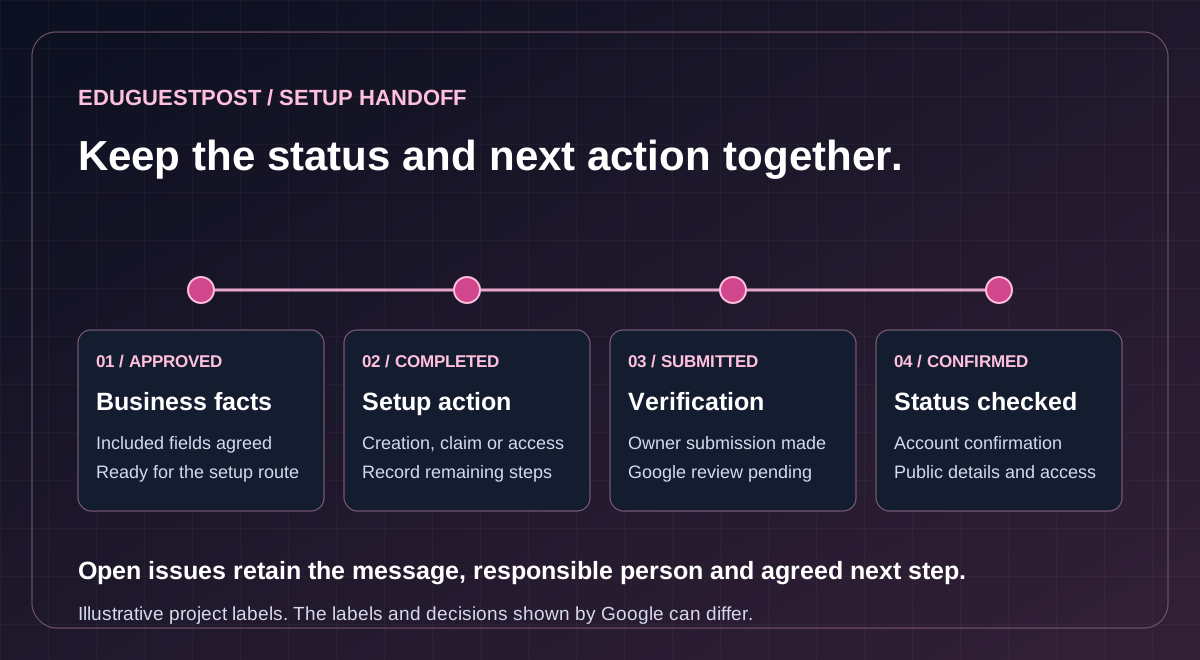
The handoff identifies the correct profile, the account your business controls, the approved information and the steps completed. It includes outstanding decisions, the status last checked and the person responsible for each next action. The proposal defines how long follow-up continues and which unresolved issues are included.
We keep our work stages clear so a completed preparation task is not confused with Google’s decision. The following describes the project record; the exact labels shown by Google can vary.
Scroll across to explore all columns.
| Project record | What has been established | What still needs checking |
|---|---|---|
| Information approved | Your team has confirmed the included business facts. | Entry or submission through the agreed route. |
| Setup or access step completed | The recorded creation, claim or access action has taken place. | Any remaining verification or ownership requirement. |
| Verification submitted | The representative completed the available submission step. | Google’s review and any further request. |
| Verification confirmed | The account provides confirmation of verification. | The included public details and the owner’s working access. |
| Issue remains open | The record identifies the message, evidence and responsible person. | The agreed correction, owner action or support response. |
We also check the included information where it is publicly visible and note pending or rejected edits. Verification and individual field approval are separate checks. A public result alone does not prove who controls the profile.
Tools for setup and verification
EduGuestPost’s Google Business Profile Audit Tool currently shows setup required, with no verified live Google source result. Its implemented operations read bounded profile information. It does not create or claim profiles, complete verification or carry out profile changes.
Your proposal identifies the tools and review process to be used. We agree any additional software, account permissions and subscription costs before use.
If your website needs clearer business or location information, on-page SEO services provide a separate route for editing those pages. Website changes are identified and approved as their own deliverable.
Questions before you request support
How long does verification take
Google’s current guidance describes a review period of up to five business days after the required verification steps, with longer reviews possible. Preparation, access issues, additional requests or delivery of a mailed code can add time. We agree the schedule for our work separately from Google’s processing and decision.
Can you support several locations
We review each genuine location and its current profile. Eligible portfolios may use bulk verification, which has specific same-business and account requirements. It is separate from uploading a spreadsheet or grouping profiles. An agency portfolio containing unrelated businesses does not qualify simply because its total reaches ten locations.
The proposal identifies the suitable route and required portfolio information. Further location evidence or verification can still be requested. A service-area business without a customer-facing location is not eligible for bulk verification.
What if the profile is already verified
We first establish whether the business has the right access and what help is needed. A profile already under your control may be ready for an improvement project or ongoing management. If your team needs help choosing wider priorities, our SEO consulting services provide a separate advisory route.
What does the professional fee cover
Google provides Business Profile creation and verification without charge. Our fee covers the preparation, guidance, authorized work and follow-up agreed in your proposal. We confirm the deliverables, responsibilities and service terms before you commit. Verification approval and local search positions remain Google’s decisions.
Who keeps ownership of the business profile account?
Ownership stays with the business. Supporting access uses individual accounts and an appropriate role. Your team keeps passwords and verification codes under its control.
Who completes a verification video or live call?
An authorized business representative completes the owner actions required by the available Google process. We can help prepare the checklist and explain the requested evidence. The representative needs genuine access to the business operation.
After setup, local citation building and cleanup can address eligible directory records using approved business details. It receives its own scope and reporting.
Request your setup and verification proposal
Send your website, country, business category and number of genuine locations. Include existing profile links and explain whether you need creation, claiming, access help or guidance with a verification prompt. A brief description is enough to begin; keep account passwords, codes and sensitive documents private.
Contact EduGuestPost to agree the preparation, owner actions and follow-up needed for your business.
Tell us about the setup support you need
Share public business information. Keep passwords, one-time codes and sensitive documents private.