
Dofollow Nofollow Checker
Check whether a link uses nofollow, sponsored or ugc, or has unqualified dofollow markup. Enter the page containing the link, then add a target URL to inspect that specific backlink.
Check the right page
The source is the page where the link appears. The target is the address it points to. If a publisher links to your course page from an article, put the publisher’s article in the source field and your course URL in the target field. Entering your own homepage as the source will inspect links on your homepage, not backlinks pointing to it.
Leave the target blank for a page-wide inspection. With a target supplied, the report keeps every matching occurrence. That matters when an article mentions the same destination in its main text, a sponsored box and a reader comment. One occurrence can be unqualified while another carries nofollow.
Read the attributes
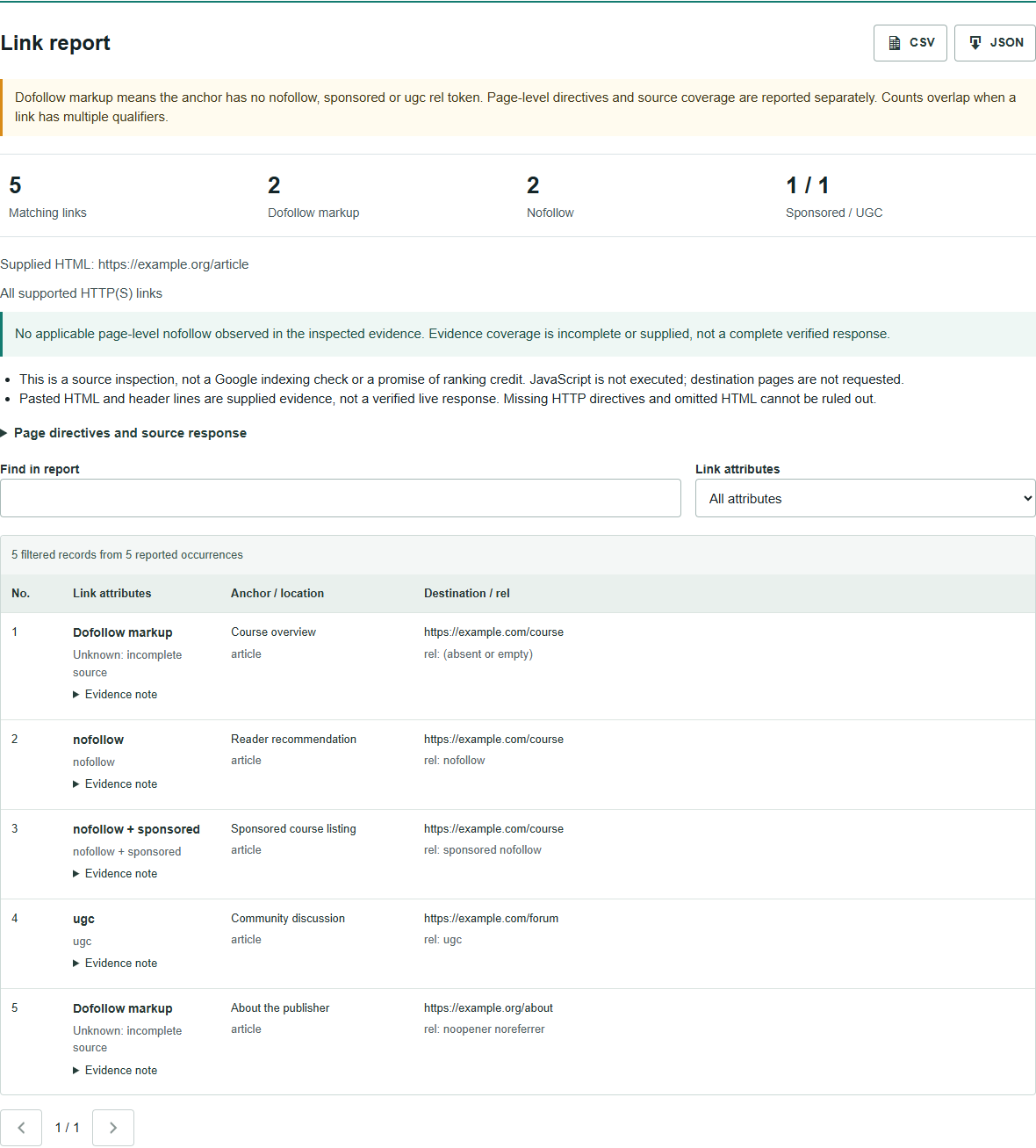
An ordinary link can be written as <a href="https://example.com/course">Course</a>. People often call this a dofollow link. There is no need to add rel="dofollow". The checker uses Dofollow markup when the anchor contains none of the three qualification tokens below; it checks page-level evidence separately.
- Nofollow: the anchor contains
rel="nofollow". - Sponsored: the anchor identifies a paid or sponsored relationship.
- UGC: the anchor identifies user-generated content, such as a forum contribution.
These labels are not mutually exclusive. An anchor containing rel="sponsored nofollow" appears in both counts. Attributes such as noopener and noreferrer do not, by themselves, make a link nofollow. Google’s link qualification guidance explains the intended uses of these values and recommends sponsored for paid placements; nofollow remains acceptable for that purpose.
Look beyond the anchor
A link can have an empty rel attribute while the source page contains <meta name="robots" content="nofollow">. The same instruction can arrive in an HTTP X-Robots-Tag header. Stopping at the anchor would miss that evidence.
The report includes applicable robots and Googlebot directives from the inspected source. It recognises none as including nofollow, but does not confuse noindex alone with nofollow. A page can address indexing and link following separately. Consult Google’s robots directive reference when reviewing conflicting instructions.
The result is an observation of the response received at the recorded time. It cannot tell you that Google has indexed the source, discovered your destination or assigned ranking credit. A desirable-looking rel attribute is not a complete assessment of a publisher or placement.
When a link is missing
Check the exact destination before concluding that the publisher removed it. This tool ignores URL fragments and normalises protocol and hostname case, plus default ports. It preserves path case, query parameters and trailing slashes. A link to /course/ is therefore different from /course, and a tracking URL is not automatically treated as its eventual destination.
Source-page redirects are followed within a bounded chain, but the target links are not fetched. If the publisher uses a tracking address, run a page-wide check to find the actual href. The separate Redirect Checker can help inspect that address afterward.
URL mode reads server-returned HTML without running JavaScript. A link inserted after the page loads may not appear. You can inspect a rendered HTML copy in pasted mode, but that is supplied evidence, not a fresh live check. Optional X-Robots-Tag lines are also supplied evidence; leaving them blank does not establish that the live page has no HTTP directives.
Keep the evidence
Each reported occurrence includes its destination, rel value, anchor text, image alt text where present, and a structural location such as article or footer. A structural label reflects the markup, not a judgment about visual prominence or editorial quality. Expand an evidence note when a row needs context.
Download CSV for a review sheet or JSON for the full response evidence. Filters narrow the visible report; downloads retain all reported rows. When the source or row cap is reached, the warning explains what was inspected and what was omitted. A blocked request, empty response or unsupported document produces an error instead of a clean bill of health.
The plugin does not save the submitted HTML or report in WordPress. Shared abuse protection keeps a salted IP hash, tool identifier and usage date. Hosting and verification-provider policies apply separately. Do not paste credentials or private material you are not authorised to share.
Choose your check
Use this page when you need an answer about a particular link or its qualification evidence. Use the Outbound Link Counter for an overview of a page’s internal and external link totals. The existing dofollow vs nofollow guide covers the broader concepts.
Questions
Can this check one backlink?
Yes. Enter the page containing the link as the source and the linked page as the target. Each matching occurrence is listed separately. Leave the target blank to inspect all supported links in the source.
Why does a link with no rel attribute show a warning?
The anchor may be unqualified while the page has a robots or Googlebot nofollow directive. Pasted or incomplete source can also leave evidence missing. Read the page-level result with the individual row.
Does dofollow mean Google will count the link?
No. Dofollow is a common label for unqualified link markup. This checker cannot confirm crawling, indexing, ranking credit or the value of a placement.
Can it find links added by JavaScript?
Not in URL mode, which checks server-returned HTML without running scripts. You can paste a rendered HTML copy for a separate markup inspection, but its live status and response headers are not verified.
Discuss a placement
Share the source page and the link you want reviewed.