
Content Refresh Checker
Compare two Search Console page exports to find changes in clicks, impressions and click-through rate. Build a review list, add the next action and export your notes before deciding what to update.
Choose what to revisit
The difficult part of refreshing content is deciding which pages deserve attention. An older article can still answer the question well. A recently updated page can lose visitors because demand changed, a redirect broke or the search results look different.
Start with evidence, then read the page. This checker compares the metrics you supply and puts larger click losses near the top. It does not grade the writing, inspect the page or tell you that a rewrite will recover traffic. A review can end with a small correction, a technical repair, closer monitoring or no change at all.
Prepare two exports
Open Search Console’s search performance report and select Pages. Export the earlier period, then export the later period separately. Keep the property, search type, country, device and any query, page or search-appearance filters identical. Use the page table, not the chart totals, Queries tab or a daily breakdown.
Choose equal numbers of complete days. Four weeks against four weeks is a useful starting point when weekly patterns matter. A seasonal business may need the equivalent period last year instead. Equal length makes the arithmetic comparable; it does not remove seasonality, holidays or changes in search demand. The periods can have a gap, but must not overlap.
Use finalized data rather than the newest preliminary dates. Google explains the distinction in its performance data notes. Those notes also warn that unavailable values can become zeros in exports. Check an unexpected zero in the original report before treating it as a measured loss. Avoid exporting a date-comparison table that mixes two periods and placeholder values into one row.
| Column | What to supply |
|---|---|
| Page URL | One complete page address per row |
| Clicks | The page’s total clicks for that period |
| Impressions | The page’s total impressions for that period |
| Position | Optional average position; blank or zero means unavailable |
Import a CSV or TSV and match its columns to these fields. Standard Top pages, Clicks, Impressions and Position headers are recognized. The mapping screen names the columns that will not be imported. CTR is recalculated from clicks and impressions rather than copied from a rounded percentage column.
Use English numeric formatting: 1,200 is a count and 6.25 is a position. Abbreviations such as 1.2K are not supported. Repeated URLs within one period are rejected because adding them could double-count the same performance. Do not combine separate query rows and call them a page export.
The checker matches URLs after ignoring hostname case and fragments. It keeps HTTP and HTTPS, path case, trailing slashes and query strings distinct. It does not follow redirects or merge canonical variants. Check those separately before making an address consistent across your source files.
Read the change
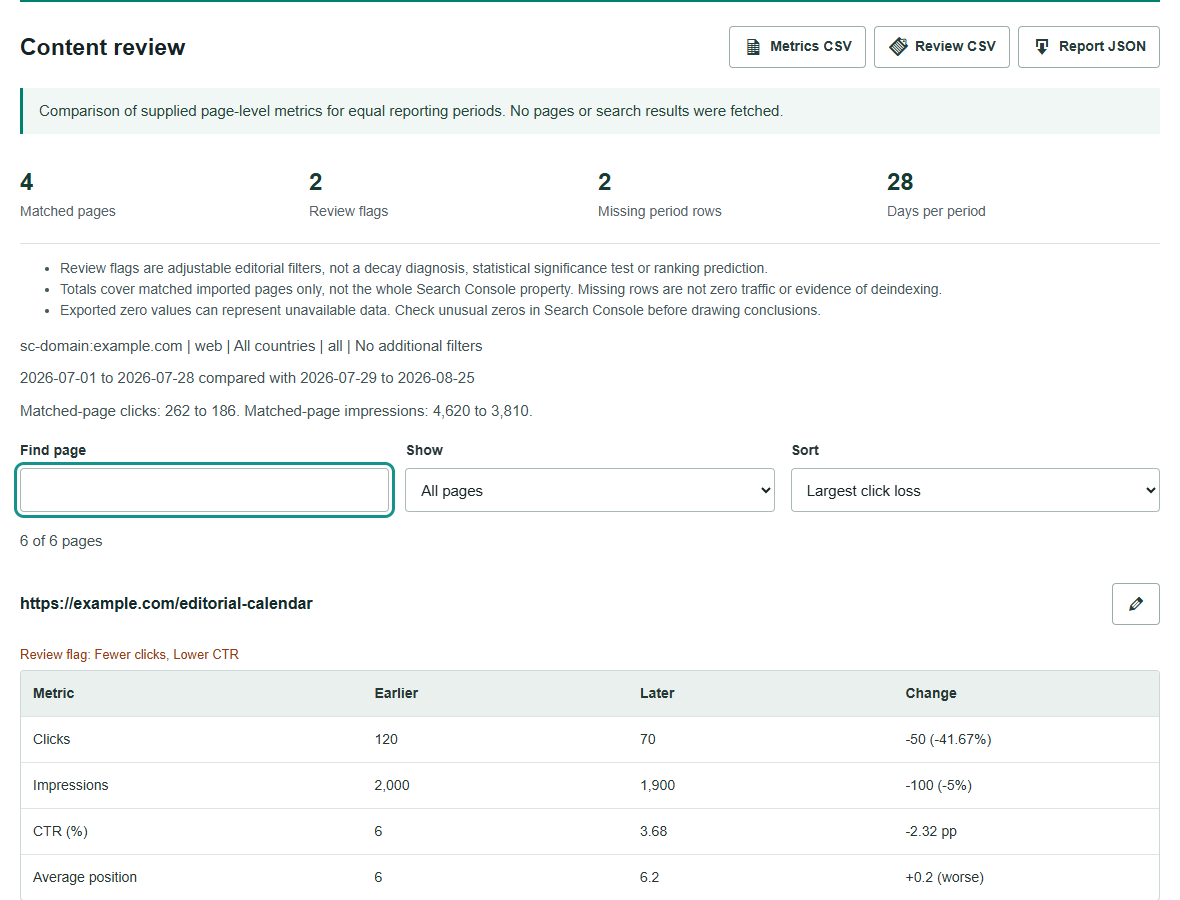
Suppose a page received 120 clicks from 2,000 impressions in the earlier period, then 70 clicks from 1,900 impressions. It lost 50 clicks, or 41.67%, while impressions fell by only 5%. CTR moved from 6% to about 3.68%: a fall of 2.32 percentage points, not 2.32%.
That pattern is worth inspecting at query level. Did the page start appearing for a different mix of searches? Did a title change, or did other results become more appealing? The numbers do not isolate the cause. Google defines these metrics and explains why page-table totals differ from property totals in its performance report overview.
A fall in impressions tells a different story from a stable impression count with lower CTR. Review the affected queries, their positions and demand. For a sharp loss across several pages, check technical changes and Search Console reports before commissioning rewrites. Google’s traffic-drop guide covers several possible causes, including seasonality, ranking changes and technical problems. A small fluctuation alone does not justify radical edits.
Average position is supporting context, not a fixed ranking for one query. A positive position change means the supplied average moved to a larger, worse number. The report does not combine page averages into a supposed sitewide ranking.
Set a useful threshold
The default review filters look for a 20% click or impression decline. A click flag also needs at least ten lost clicks. The earlier period needs at least 100 impressions before decline flags apply; the CTR flag needs that impression count in both periods and a drop of one percentage point.
These are adjustable review filters, not universal benchmarks or tests of statistical significance. A small specialist site may need different settings from a large publisher. Low-baseline pages stay visible without being promoted into a confident diagnosis. A page with no selected flag can still contain an outdated price, broken example or wrong answer.
Percent change is unavailable when the earlier count is zero. A missing page row is also unavailable, never automatically zero. Exports may omit pages because of their coverage or filters; absence does not prove a page is new, deleted or deindexed. The Search Console comparison guidance explains how filtering and rare values can affect the data. Report totals here include only pages present in both imports.
Make the review specific
Read a flagged page with a task in mind. Can a visitor still complete what they came to do? Verify dated claims, examples, screenshots and links. Replace instructions that no longer work. Add missing evidence where the answer depends on it. Remove repetition that makes the useful answer harder to find.
Write the proposed change before opening the editor. Replace the discontinued product example and retest the setup steps is a usable assignment. Make it fresher is not. Keep a note of the previous version and the publication date so the next review has a clear reference point. Ahrefs’ content decay guide is another useful reference for investigating a decline before choosing an update.
Assign an action, owner and notes beside each page. Choose Review, Update, Technical check, Monitor or Keep; these are your decisions, not automatically generated recommendations. Export the review list for handoff, or download the full metrics and JSON report. Search and filters change the screen view, while exports retain every page.
For a technical investigation, start with the Indexability Checker or Redirect Checker. For an agreed editorial update, use the Content Brief Generator to define scope and the SEO Content Optimizer to review a supplied draft.
Projects are not automatically saved. Draft JSON keeps the inputs and your review notes; report JSON also includes the comparison. Restoring a report restores its project for a fresh comparison, not a verified historical result. The tool does not store the project as WordPress content or change your website. CSV downloads protect formula-like text for spreadsheets; JSON retains the text itself.
Questions
Does a flagged page need rewriting?
Not necessarily. A flag means the supplied metrics crossed your review thresholds. Check search demand, query mix, technical changes and reader needs before editing.
Does a missing row mean the page is deindexed?
No. The page may be absent because of filters, export limits or low activity. Missing rows are kept separate and are never converted to zero.
Does this connect to Search Console?
No. Import two separate page-level exports from the same property and filters. The checker compares the supplied metrics; it does not fetch pages or verify Google indexing.