
Source concentration, with the denominator visible
Referring Domain Diversity Audit
See which sources your backlink dataset depends on.
A high backlink count can hide a narrow source base. EduGuestPost’s Referring Domain Diversity Audit helps you review the domains behind those links, see where concentration occurs and decide what deserves closer attention.
Analyze supplied CSV or TSV records in your browser. Review hostname counts, links per source, top-source shares and final-label TLD distribution. Optional valid country and IP data and compatible competitor sets add context.
A diversity audit describes your available data. It does not establish common ownership, diagnose a Google penalty or prescribe a safe link ratio.
Free analysis of supplied records
Start with your export
Choose a CSV or TSV file, preview its columns and confirm what the counts mean. Processing happens in your browser. No data connection is needed for this mode, and no additional backlinks are discovered.
Analyse your referring-domain export
Paste a CSV, TSV, or newline-separated domain list. Processing stays in this browser: there is no upload, URL lookup, AI analysis, background job, or saved history. Limit: 2 MiB and 5,000 data rows per import.
Start with your supplied export. No external requests are made by this analyser.
Your supplied-export snapshot
HHI uses a 0–10,000 scale; effective sources = 10,000 ÷ HHI. Top 1/5/10 shares use only known positive links to target after deduplication. With no positive counts, these metrics are unavailable. These are descriptive concentration measures, not a link-quality score or ranking prediction.
| Source hostname | Final DNS label | Links to target | Supplied country | Supplied IP | Input rows | Comparison |
|---|
Filtered exports include all matching records across every page. CSV cells are escaped against spreadsheet formulas. JSON includes source/scope labels, notes, normalization rules, rejected-row reasons, duplicate diagnostics, full-import metrics, selection, and records. Data is downloaded locally; no server copy is created.
Existing backlink-data connection
Provider lookup and availability
Automatic target checks require a permitted DataForSEO or Majestic source to be connected, authorized and tested. The provider tool below shows its current availability. A connection error or unavailable source is not a zero-domain result.
A connected report uses the selected provider’s bounded returned sample and source-specific fields. Its coverage and request controls remain separate from the supplied-file analysis above.
Inspect concentration
Review links per referring domain and top-domain shares, with the denominator shown.
Separate the signals
TLDs, provider hosting clues and link-type counts have different meanings. Missing fields stay unknown.
Review with context
Shared IPs do not prove shared ownership. A limited provider sample is not a complete backlink profile.
CONNECTION STATUS
Automatic checks: source setup required
The tool is installed, but its shared backlink source is not connected or authorized for this tool. The administrator can configure DataForSEO or Majestic under Link Review → Anchor Profile, then opt in under Link Review → Domain Diversity.
No paid requests are enabled for this tool. Provider access, public-display rights and a real source report must still be verified.
Different evidence, different limits
TLDs are hostname labels, not geography. Hosting-country codes are provider observations, not publisher nationality. An IP or address-prefix group may contain unrelated sites on shared hosting or a CDN.
This audit does not judge common ownership, link schemes, penalties or an ideal diversity ratio. Review actual placements and business context before acting.
Questions and limits
What does this diversity audit measure?
One bounded provider sample of referring domains and their links to your target. It shows concentration and final-label TLD groups, plus hosting or link-type fields where supported. It is not a health score or complete-web inventory.
What counts as a referring domain?
The provider defines each domain row. The tool validates and deduplicates those identities but does not infer public suffixes, merge subdomains or decide whether separate publishers share an owner.
Does a country code identify the publisher location?
No. Majestic hosting-country codes describe provider observations tied to hosting, not the audience, author or business. TLDs are never used as a substitute for missing country information. DataForSEO individual hosting country/IP is unavailable in this adapter.
Does sharing an IP mean the sites are related?
No. Shared hosting and CDNs can serve unrelated publishers. IPv4 /24 and IPv6 /48 groups are arithmetic address prefixes, not verified networks, ASNs or ownership evidence. No link-scheme verdict is generated.
Are the percentages for my entire backlink profile?
No. They use only returned rows. Row caps, provider index coverage, collection method and Majestic analysis-depth limits can bias this sample. Even a provider response with no further rows does not establish whole-web completeness.
Why can a link-type breakdown be unavailable?
Majestic GetRefDomains does not supply a type mix. DataForSEO may return bounded type counts per domain; missing or invalid breakdowns stay unknown. Those counts are not presented as an exhaustive mix or a nofollow percentage.
Why is source setup required?
Domain-only discovery needs an index. This tool reuses the encrypted DataForSEO/Majestic source under Link Review → Anchor Profile, with separate Domain Diversity opt-in. No paid calls occur until credentials, usage authorization and display rights are configured. Free graph data needs separately operated indexing infrastructure.
What is stored or shared?
Your target is sent to the chosen provider. No referring sites are fetched and no reports, histories or scheduled jobs are saved by this module. Shared protection stores usage counters. CSV/JSON are generated in your browser only if the administrator enables exports and confirms provider rights.
Documented sources: DataForSEO Referring Domains · Majestic GetRefDomains. Provider methods are not blended.
Find concentration
See which hostnames account for the largest shares of the valid links-to-target counts in your dataset.
Explore the distribution
Review final-label TLD groups and valid supplied country or IP observations, with missing coverage visible.
Plan the next review
Compare compatible source sets, add review notes and export findings with their counting rules.
Domains and backlinks answer different questions
What is referring domain diversity?
Referring domain diversity describes how links are distributed across the domains that point to a target. It starts with the number of distinct referring domains, then considers concentration and the characteristics available for those sources.
A backlink is an individual link. A referring domain is a domain with at least one link to the target under the selected counting method. One website may supply a single editorial reference or hundreds of repeated links. Those situations can produce very different backlink totals while contributing one domain identity each.
The audit makes that distinction visible. Start with whether a few sources account for most counted links, which valid hostnames and final-label TLDs are represented, and which comparable competitor records deserve further research.
There is no universally correct mix of domains, extensions, countries or link attributes. An education resource, local business and international software brand can have different source patterns for sensible reasons.
Read the denominator first
Understand the dataset before interpreting the chart
A clear result starts with a clear denominator.
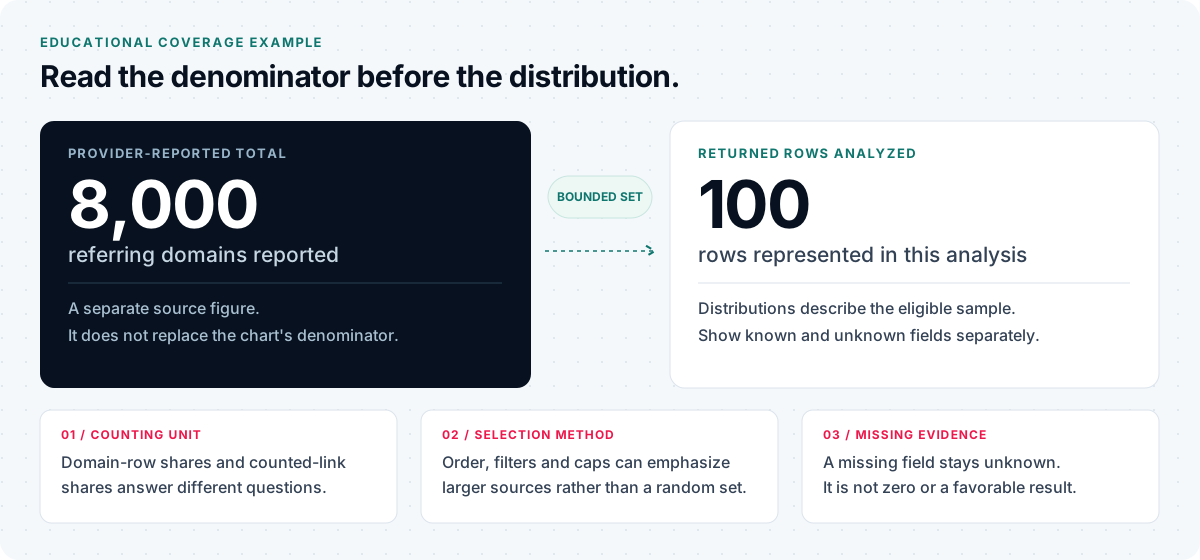
Keep the selected target, uploaded source, analysis scope, collection context and row limits with the findings. A provider-reported total, if supplied as context, stays separate from the records actually analyzed. Filters change the visible matching set; the original coverage remains part of the export.
If the provider reports 8,000 referring domains and the audit examines 100 returned rows, the distribution charts describe those 100 rows. They do not describe all 8,000 domains or every link on the web. A list ordered by authority or link volume may also emphasize larger sources rather than represent a random sample.
Unknown fields are identified separately. A missing country, IP address or link count does not become a zero or a favorable result. When a calculation lacks adequate inputs, the report explains why it is unavailable.
Coverage belongs beside the result
Source · Target scope · Collection context · Rows analyzed · Valid hostnames · Duplicates and rejected rows · Known and unknown counts · Provider-reported total, if supplied · Counting method
Interpret the available fields
What this import helps you review
Each view follows the supplied records and the stated counting method. Read missing-field and duplicate warnings before treating a pattern as a publishing decision.
Unique referring domains and grouping
The import normalizes supplied domains or HTTP(S) source URLs to exact hostnames, then removes duplicate identities. Letter case, internationalized hostname spelling and a trailing dot are normalized. Separate subdomains, www hosts and hosted-platform tenants remain separate.
Grouping matters. news.example.com and blog.example.com may be separate hosts under one registrable domain. Multi-part public suffixes and hosted publishing platforms also need an explicit rule. The report shows the grouping method rather than silently changing what “unique” means.
This import uses hostname identities and the final DNS label. It does not apply a Public Suffix List or combine hosts into registrable-domain groups. A counted hostname is not proof of a separate publisher or owner.
Links per domain and concentration
See each domain’s reported links to the target and its share of the total counted across eligible rows. Review the largest source and the leading source groups before deciding whether repeated links reflect useful references, sitewide navigation, syndication or something requiring further investigation.
When you map valid links-to-target counts and confirm their meaning, the import reports top-1, top-5 and top-10 shares, HHI on a 0–10,000 scale and effective source count. These are descriptive calculations across eligible supplied counts.
Duplicate hostname counts use the largest valid count, rather than adding repeated rows. Conflicting values are disclosed. A missing or invalid count stays unknown; a supplied zero is a known count. If no positive denominator is available, link-weighted calculations remain unavailable.
Calculation: HHI = sum of squared source shares × 10,000. Effective source count = 10,000 ÷ HHI. Neither measure is a Google score, health grade or recommended target.
Final-label TLD distribution
Review extensions such as .com, .org and .uk across the distinct valid hostnames. Each hostname receives equal weight in this distribution. For publisher.co.uk, the final-label group is uk, not co.uk.
Extensions are domain labels. They do not establish publisher location, audience geography, organizational quality or institutional endorsement. A profile dominated by one extension may reflect its market rather than a problem to correct.
Supplied hosting-country and IP observations
Optional country and IP columns are used only when the supplied values validate. Conflicting duplicate observations remain unknown. Country observations are separate from country-code extensions and from audience geography.
Shared hosting and content delivery networks can serve unrelated sites through the same addresses, and one domain can use several addresses. An IP group is a technical observation, not proof that publishers share an owner. The import does not fetch a hostname or look up missing hosting data.
Competitor overlap and missing sources
An apparent gap is a research lead. It does not prove that you have never received a link from that publisher, that the publisher accepts contributions or that a placement would improve rankings. Keep the provider, scope and collection period comparable before drawing conclusions.
Add one compatible competitor export and confirm that source, target scope and collection context are comparable. The comparison shows shared and not-found hostname records; it does not discover additional links.
If you already have separate exports, the Backlink Gap Tool provides a focused export-comparison workflow.
Filters, review notes and evidence exports
Filter the analyzed records, inspect the matching rows and add session notes. A filtered export includes every matching row, not just the page currently visible. Full-import concentration metrics remain unchanged when you filter the table.
Download row data as CSV, then use the matching JSON button to retain source and scope labels, counting rules, coverage, diagnostics and session notes. These are separate downloads. Notes exist only for the current browser session unless you save the JSON. The import does not upload your file or create a saved account project.
Anchor composition and provider-discovered changes answer different questions. For those workflows, read about the Backlink Anchor Profile Audit and Competitor Link Velocity Analyzer, checking their current source availability and coverage.
From supplied evidence to a review brief
How to audit referring domain diversity
Identify the target and scope
Record what the export represents: a root domain, hostname or exact target page. Root-domain, hostname and exact-page datasets should not be treated as equivalent.
Preview and map the supplied columns
Use a CSV or TSV up to 2 MiB and 5,000 data rows, or a plain newline-separated domain list. Check the header preview and map the domain column; links-to-target count, country and IP are optional. Confirm the meaning of any mapped count field.
An export with only domain names can support domain counts and extension distribution. It cannot supply link-weighted concentration, hosting locations or dates that are absent from the file.
Read coverage before concentration
Review accepted and rejected rows, duplicate identities, missing fields and the eligible count denominator. Then inspect the largest counted sources. Provider-reported totals, when recorded, stay separate from the analyzed sample.
Compare relevant evidence
Compare similar datasets and investigate whether sources fit your audience, subject and destination pages. Use Link Relevance Checker to review wording and link context in selected pages; its lexical comparison supports review rather than proving editorial relevance.
Use compatible competitor files for hostname overlap. An absent record means “not found in this dataset,” with the original collection limits still attached.
Export a review brief
Save the supported output or prepare a shortlist. Record the source, scope and collection date alongside questions about publisher fit, article context, audience evidence and placement terms. Decide what needs human review before expanding a campaign.
A fictional, fully labeled example
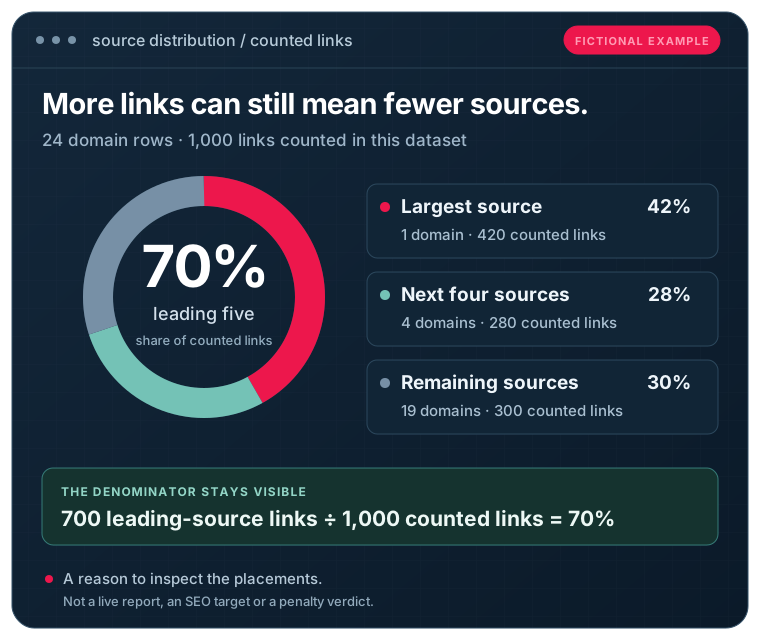
A simple concentration example
This fictional example illustrates the calculation. It is not a live result, an SEO target or a recommended profile.
The dataset contains 24 referring-domain rows with valid link counts. Those rows report 1,000 links to the target in total.
| Source group | Domains | Links counted | Share of the 1,000 counted links |
|---|---|---|---|
| Largest source | 1 | 420 | 42% |
| Next four sources | 4 | 280 | 28% |
| Remaining sources | 19 | 300 | 30% |
| Total | 24 | 1,000 | 100% |
The leading five domains account for 70% of the links counted across this dataset. That is a reason to inspect those placements and understand the source relationships. It is not evidence of a penalty, a link scheme or a requirement to acquire a particular number of new links.
Calculation: source share = links to the target from that source ÷ eligible links counted across the analyzed rows × 100.
If these 24 rows came from a capped provider response, the shares would remain sample shares. A provider-wide total would be displayed separately and would not replace the calculation’s denominator.
These aggregate groups do not supply individual counts for every domain, so they do not define a unique per-domain HHI or effective source count.
A better research brief
Turn findings into better publisher research
Use the audit to improve the questions in your next campaign brief.
For a local business, ask whether sources have a useful connection to its actual service area. For a specialist brand, prioritize subject expertise and relevant readers. For an agency, compare source repetition across campaigns and document the reason for each proposed publisher.
Investigate the largest sources before seeking a different distribution. They may be valuable partners, repeated navigation links or syndicated coverage. The next decision should follow the evidence and business objective, rather than a target percentage.
The Guest Post Site Finder can help narrow catalogue matches against a campaign brief. If you already have a candidate list, the Bulk Publisher Availability Checker can carry it into a reviewed request. A catalogue match does not guarantee current publisher acceptance.
Before you buy guest posts, compare publisher relevance, article quality, audience evidence, price and editorial terms. Hosting clues and provider metrics are supporting evidence, not substitutes for those decisions.
Need help researching additional publishers? Explore blogger outreach services for publisher research, pitching and placement coordination. Where audience evidence is central to your brief, review traffic verified guest posts.
Paid placements should be identified with appropriate link attributes, such as rel="sponsored" or nofollow. Publisher selection and delivery do not guarantee ranking credit, indexing or a particular search position.
Useful evidence, bounded conclusions
What the audit can and cannot tell you
| The import can help you review | It does not establish |
|---|---|
| Normalized hostnames and valid supplied links-to-target counts | Every backlink or referring domain on the web |
| Concentration within the analyzed dataset | A Google-approved diversity threshold |
| Final-label TLD distribution | Publisher nationality, audience location or quality |
| Valid supplied country and IP observations | Common ownership or a private blog network |
| Comparable competitor hostname sets | A guaranteed placement opportunity or whole-web absence |
| Sources you choose to annotate for review | A penalty diagnosis or an automatic disavow instruction |
Before interpreting the output
Frequently asked questions
What is a referring domain diversity audit?
It reviews how links and available source characteristics are distributed across referring domains in a defined dataset. The useful output combines domain counts, concentration, source coverage and context for further investigation.
How is this different from a backlink checker?
A backlink checker focuses on discovering or listing individual links and their details. This audit focuses on the distribution across domain identities and the sources on which your available dataset depends. Use the Backlink Checker when you need to inspect its supported link sample; free and connected modes have different coverage.
How many referring domains should a website have?
There is no universal target. Your subject, audience, competitors, editorial relationships and business goals affect which sources are useful. More domain identities do not by themselves establish better quality or higher rankings.
Is a high share from one domain bad?
Not automatically. It can reflect a meaningful publisher relationship, repeated navigation, syndication or other circumstances. Review actual placements and the dataset’s selection method before deciding whether a change is needed.
Does sharing an IP address mean publishers belong to the same network?
No. Shared hosting and CDNs can serve unrelated websites through common addresses. IP and address-prefix observations are leads for further review, not ownership evidence.
Do country-code extensions show where a website’s readers are?
No. An extension and a hosting-country observation describe different technical properties. Neither measures visitor location. Audience geography needs a separate source with its own method and collection period.
What is the difference between a TLD and a public suffix?
A TLD is the final domain label, such as .uk. A public suffix can contain several labels, such as .co.uk. Registrable-domain grouping requires an explicit suffix rule. The selected grouping method is shown in the report.
The import displays the final DNS label and keeps exact hostnames separate. It does not use public-suffix or registrable-domain grouping.
Can I compare competitors?
Yes. Add one compatible competitor export and confirm that the source, target scope and collection context are comparable. A record missing from one set means “not found in this dataset,” rather than proof that a link never existed.
Can I analyze a CSV without a connected provider?
Yes. The free import processes compatible CSV or TSV records in your browser, with a column preview and a mapping step. It also accepts a plain domain list. It analyzes the supplied records and does not discover additional live links. Domain-only data supports hostname counts and final-label TLD distribution; concentration requires valid supplied links-to-target counts.
Are the results complete?
The report is limited by the uploaded file or selected provider’s index, limits and collection method. Even a response with no more available rows does not establish whole-web completeness. Sample and provider-wide figures remain separate.
What happens to my data?
The import processes your supplied file in this browser without uploading it. Notes and results are held for the current session; save an export if you want to retain them. Provider lookup, when connected and authorized, sends the target and supported request parameters to the selected provider. Other site and provider handling remains subject to their policies. See the site’s privacy policy for applicable handling details.
Will this audit improve rankings or identify toxic backlinks automatically?
It provides evidence for a review. It does not improve rankings by itself, diagnose penalties or instruct you to remove links solely because a score or distribution looks unusual. Relevant content, technical accessibility, editorial context and business outcomes remain part of the wider SEO assessment.
Start with the dataset you have
Understand your sources before expanding your campaign
Review the dataset, investigate concentration and build a publisher brief around relevance and audience fit.
Independent educational resources
Understand the sources behind the counts
These third-party resources explain backlinks, referring domains and publisher relevance. They do not describe EduGuestPost’s tool or imply an affiliation.
Ahrefs video lesson: backlinks and SEO metrics
Review an independent video lesson about backlink data and its interpretation. It opens on Ahrefs Academy; no third-party player loads on this page.