
Structured Data Checker
Check JSON-LD from a page URL or pasted markup. Find syntax problems, inspect entities and review Schema.org type and property names.
Check what the page sends
Start with a published page when you want to inspect its current source. Use pasted HTML or JSON-LD when you are reviewing a draft, comparing plugin output or fixing one block. Adding the page location gives relative identifiers a base address; it does not make the checker visit that address in pasted-markup mode.
The report separates the source blocks from the entities inside them. One script may contain an article, its author and a publisher. Another script might describe the same publisher again. A count of scripts is therefore not a count of distinct real-world things, and a repeated @id is not automatically an error.
Fix syntax first
A missing comma or an extra closing bracket can stop a JSON-LD block from being read. Fix that before judging its properties. The checker preserves each extracted block and reports JSON parsing errors separately from vocabulary findings. Error locations from the JSON parser refer to the block, not to the full HTML document. Blocks are numbered in source order.
After syntax, inspect the terms. A property named headlien is still valid JSON, but it is not the Schema.org property headline. That distinction is easy to miss when a generic JSON formatter says the document is valid.
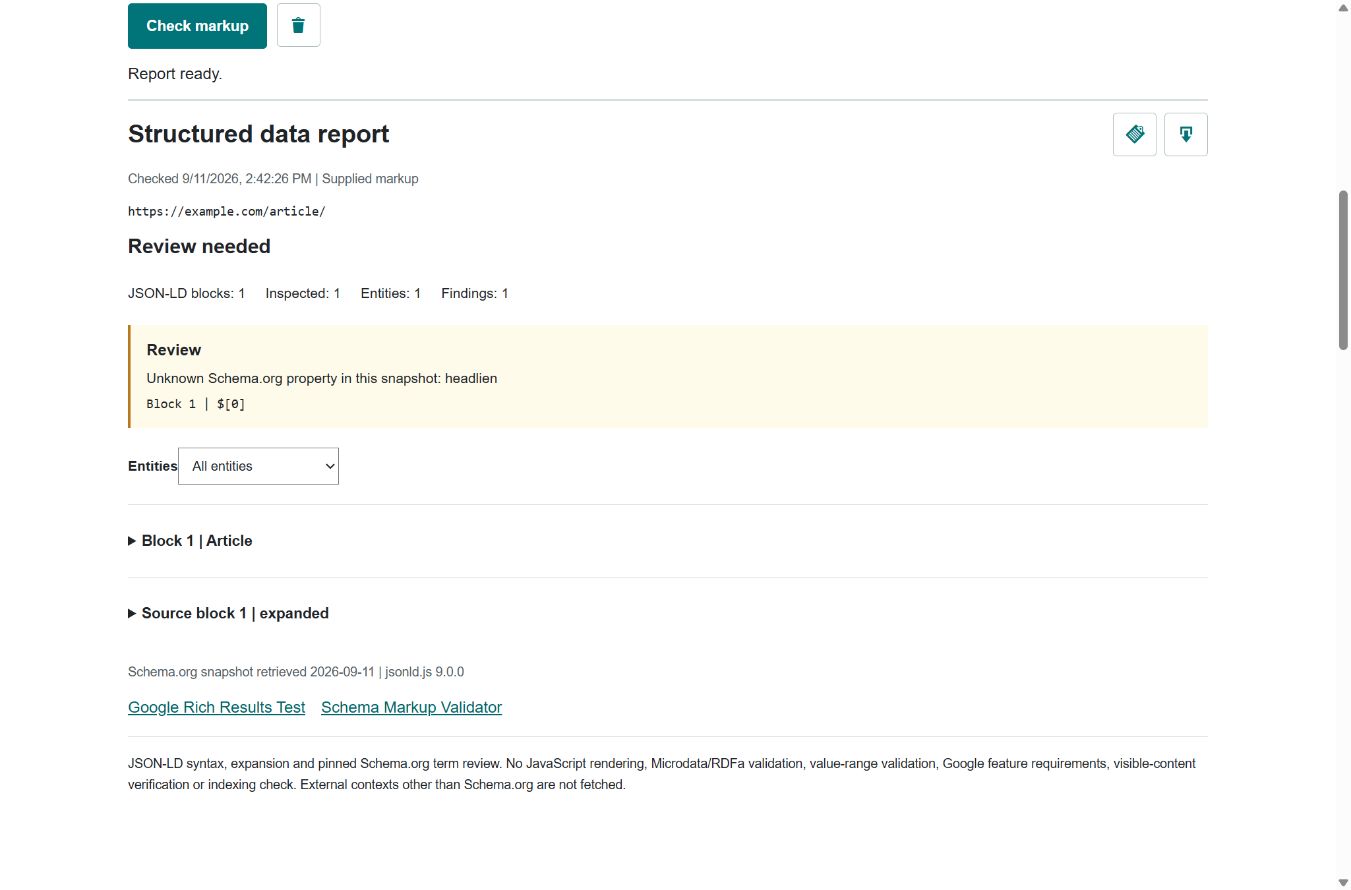
Read the entity
Check which object owns the flagged property. A cooking duration attached to a person is worth reviewing even when the duration itself looks reasonable. The checker compares a property’s usual domains with the entity’s types, including parent types. It treats this as advice, not an absolute prohibition: Schema.org’s data model is deliberately flexible.
Review the surrounding graph before editing. An author name belongs with the author entity; an article headline belongs with the article. A publisher reference can point to an organization defined elsewhere in the same page. Do not copy every warning into a new block or remove useful references merely to reduce the finding count.
Contexts matter
@context explains how short terms map to identifiers. This tool uses the jsonld.js processor to expand JSON-LD, including graphs, arrays and aliases. It does not assume every field that looks familiar belongs to Schema.org.
The bundled Schema.org context is available locally. Other remote contexts are deliberately not requested. If a document depends on one, the report is incomplete rather than a pass. An unfamiliar term may be a typo, another vocabulary or a term newer than the bundled snapshot. Verify it against the vocabulary you intended before changing it. The report shows the snapshot retrieval date.
Three different checks
This checker reviews JSON-LD syntax, expansion and selected Schema.org vocabulary relationships. Schema Markup Validator provides broader Schema.org checking, including Microdata and RDFa. Google Rich Results Test checks the Google search features it supports. These are related tasks, not interchangeable certificates.
Google’s required and recommended properties depend on the feature. A technically readable article object is not a promise of a particular search display. Markup must also match the page a visitor can see. Check names, prices, ratings and dates against the real content; do not add invented details to satisfy a test. Google’s structured data guidelines explain the content and quality requirements and why correct markup does not guarantee rich results.
Know the boundaries
URL mode reads the server response without rendering JavaScript. Markup added only after scripts run may be absent. Microdata and RDFa attributes are detected but not validated. Property value ranges, duplicate JSON keys, Google feature requirements, image access and visible-content accuracy are not checked. A clean report means no listed issue was found within this scope.
Input is limited to 256 KiB of UTF-8 text. URL checks follow up to three redirects; block, entity and processing caps keep a large document from holding the browser open indefinitely. A capped or unsupported inspection is marked incomplete. Neither submitted markup nor report bodies are cached or logged by this module. Downloads contain the supplied blocks, so review a report before sharing it.
Recheck the published version
After changing a template, inspect a representative live page again. Also compare another page using that template: a global organization block and a page-specific article block have different owners. Keep a copy of the report with the template change so you can compare the exact evidence later.
Use the Schema Markup Generator when you need a starting template. For crawl rules, noindex and canonical signals, use the Indexability Checker. Those signals concern access and indexing instructions; they do not replace structured-data review or confirm Google’s indexing decision.
Common questions
Does a clean report guarantee rich results?
No. It covers the listed technical checks, not Google feature requirements, content quality or search appearance. Continue with Google Rich Results Test for Google-supported features.
Does it validate Microdata and RDFa?
No. It detects their attributes in supplied HTML but does not validate those formats. Use Schema Markup Validator for that additional coverage.
Is my markup stored?
This module does not cache or log submitted markup or report bodies. It sends pasted input to the server for extraction and processes the returned JSON-LD in your browser. Do not submit private or sensitive data.
Planning outreach?
Share your target page and campaign requirements for a publisher outreach review.